Ever since iOS 17, Apple has required that you have "lock" capability on your phone in order to be able to share your location. In other words, you cannot use an iOS 17 iPhone to share location unless you have it locked with a passcode, touch ID, or facial ID. So the first thing to do to be able to share your location is to setup a passcode so you can lock your phone. Do this under settings-> Touch ID and Passcode.
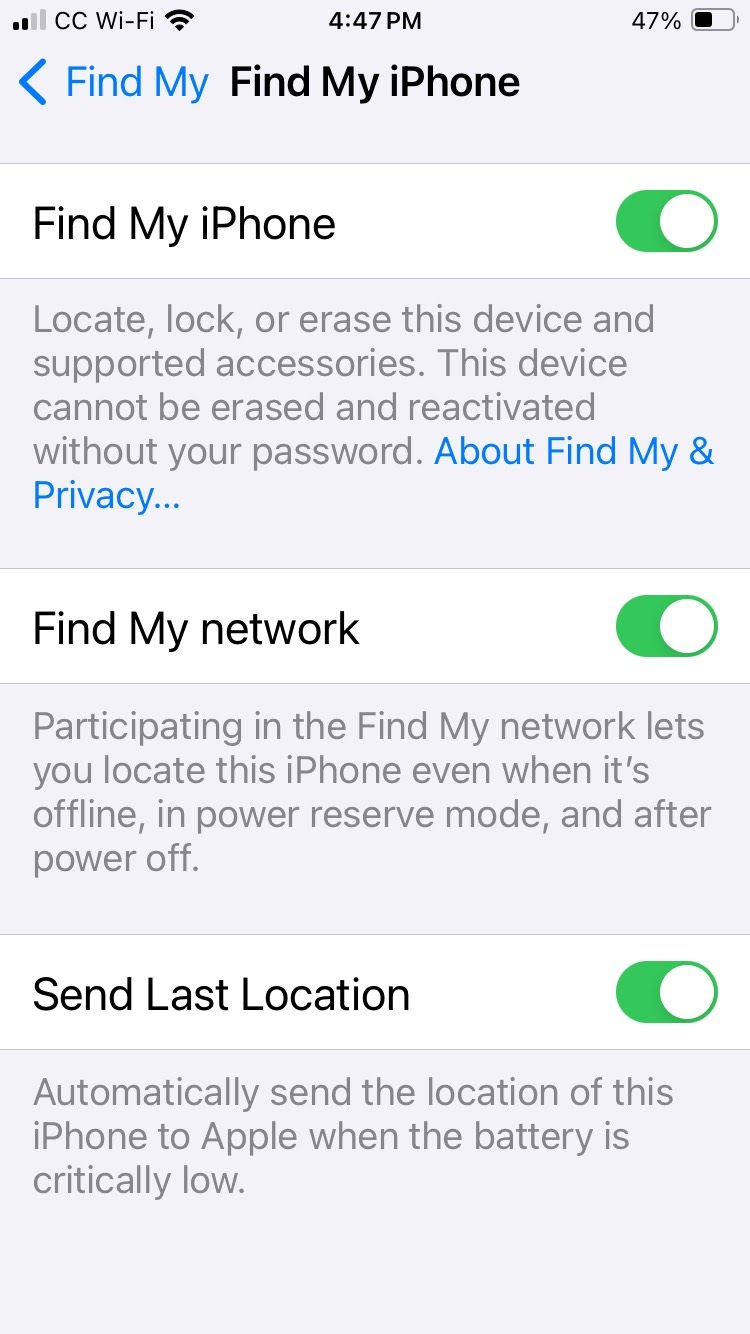
Then once this is enabled, you need to turn on "Find My network" under Settings. Tap on your Apple ID at the very top of settings. Then tap "Find MY", then tap "Find My iPhone". On that screen, you will see a setting for "Find My network." Make sure this is ON, as well as the other 2 settings on that screen.
Note: You cannot turn on the "Find My network" setting unless your phone requires passcode, facial ID, or touch ID on the lock screen.
If your iPhone is "unlocked", meaning that you never setup a passcode for your lock screen, then you will not be able to share your location using iOS 17.