I can't share my location to new people

Some people already have my location but im trying to share it with new people and it always says “Share location unavailable. Please try again later” It is not my connection because ive tried this in various locations and even with wifi. I have no restrictions on my

phone and my location services are turned on. The people who already have my location can see it just fine as well. What do i do to fix this?


[Re-titled by Moderator]

iPhone 14 Pro, iOS 17

Posted on Oct 22, 2023 9:40 AM

Reply
Question marked as Top-ranking reply

Posted on Jul 10, 2024 12:07 PM

Ever since iOS 17, Apple has required that you have "lock" capability on your phone in order to be able to share your location. In other words, you cannot use an iOS 17 iPhone to share location unless you have it locked with a passcode, touch ID, or facial ID. So the first thing to do to be able to share your location is to setup a passcode so you can lock your phone. Do this under settings-> Touch ID and Passcode.

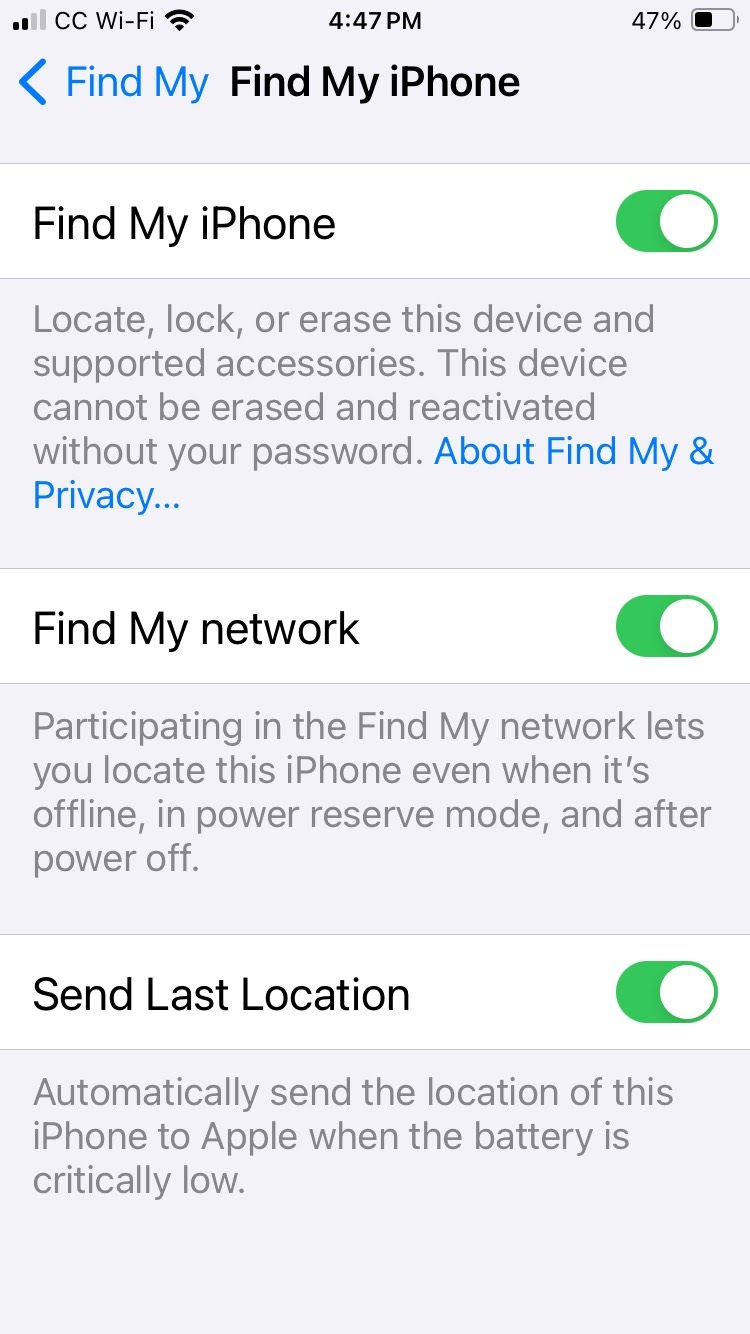
Then once this is enabled, you need to turn on "Find My network" under Settings. Tap on your Apple ID at the very top of settings. Then tap "Find MY", then tap "Find My iPhone". On that screen, you will see a setting for "Find My network." Make sure this is ON, as well as the other 2 settings on that screen.

Note: You cannot turn on the "Find My network" setting unless your phone requires passcode, facial ID, or touch ID on the lock screen.

If your iPhone is "unlocked", meaning that you never setup a passcode for your lock screen, then you will not be able to share your location using iOS 17.

65 replies
Question marked as Top-ranking reply

Jul 10, 2024 12:07 PM in response to saniya284

Ever since iOS 17, Apple has required that you have "lock" capability on your phone in order to be able to share your location. In other words, you cannot use an iOS 17 iPhone to share location unless you have it locked with a passcode, touch ID, or facial ID. So the first thing to do to be able to share your location is to setup a passcode so you can lock your phone. Do this under settings-> Touch ID and Passcode.

Then once this is enabled, you need to turn on "Find My network" under Settings. Tap on your Apple ID at the very top of settings. Then tap "Find MY", then tap "Find My iPhone". On that screen, you will see a setting for "Find My network." Make sure this is ON, as well as the other 2 settings on that screen.

Note: You cannot turn on the "Find My network" setting unless your phone requires passcode, facial ID, or touch ID on the lock screen.

If your iPhone is "unlocked", meaning that you never setup a passcode for your lock screen, then you will not be able to share your location using iOS 17.


Jun 30, 2024 7:12 AM in response to saniya284

I tied almost everything possible that everyone saying multiple times. Last thing I tried finally fixed it.

-Settings

-Privacy & Security

-Location Services

-Share My Location

-Find My iPhone

Turn on the "Find My network"

First It asked me to create passcode which I did not have previously. After I created one It let me turn it "ON"

I tried to send my location via Messages app to person I want to share and finally let me do it and did not received “Share location unavailable. Please try again later” error.

Seems like Apple introduced this option in iOS 17 (might be earlier) and also introduced this very very frustrating bug. All these frustrations and confusions started when iCloud started with Apple. They supposed to make things simple for everyone to operate and ease life but seems like it is going far away from that everyday.

This is all after 5 hours of trying.

Hope this will help someone and save a headache.

Oct 23, 2023 11:07 AM in response to saniya284

Hi saniya284,


If you are having trouble sharing your location, you can try some basic troubleshooting steps:


If it continues, as you've done what you can on your end, contact Apple for support as it is their app - Get Support.


Take care.


Mar 23, 2024 8:43 PM in response to saniya284

Of course this doesn't seem to be a network error, still: if you are on a cellular network, switch over to Wi-Fi and see if it works, but I still believe this won't be the culprit. Hmm.. can you try this: Go to Find My (it would already be toggled On ) here check if Find my Network is also toggled on. If still not solved, try to sign out Apple ID and sign in again, refreshing Data Sync. Hope this will work.


[Edited by Moderator]

This thread has been closed by the system or the community team. You may vote for any posts you find helpful, or search the Community for additional answers.

I can't share my location to new people

Welcome to Apple Support Community
A forum where Apple customers help each other with their products. Get started with your Apple Account.
