How to redownload the AppStore when it is gone from your library

I just realized that I deleted the App Store from my home screen and now I can’t find it in my library.

iPhone 11, iOS 17

Posted on Oct 23, 2023 4:15 PM

Reply
Question marked as Top-ranking reply

Posted on Oct 24, 2023 2:13 PM

Greetings Arianni32,


We'd like to provide you with a few steps that can help you to restore the App Store, on your iPhone:


Use Search on your iPhone

"Swipe to search

  1. Swipe down from the middle of the Home screen.
  2. Tap the Search field, then enter what you're looking for. As you type, Search updates results in real time.
  3. To see more results, tap Show More or search directly in an app by tapping Search in App.
  4. Tap a search result to open it.

In iOS 16 and later, you can also tap the Search field at the bottom of your Home Screen to start a search.
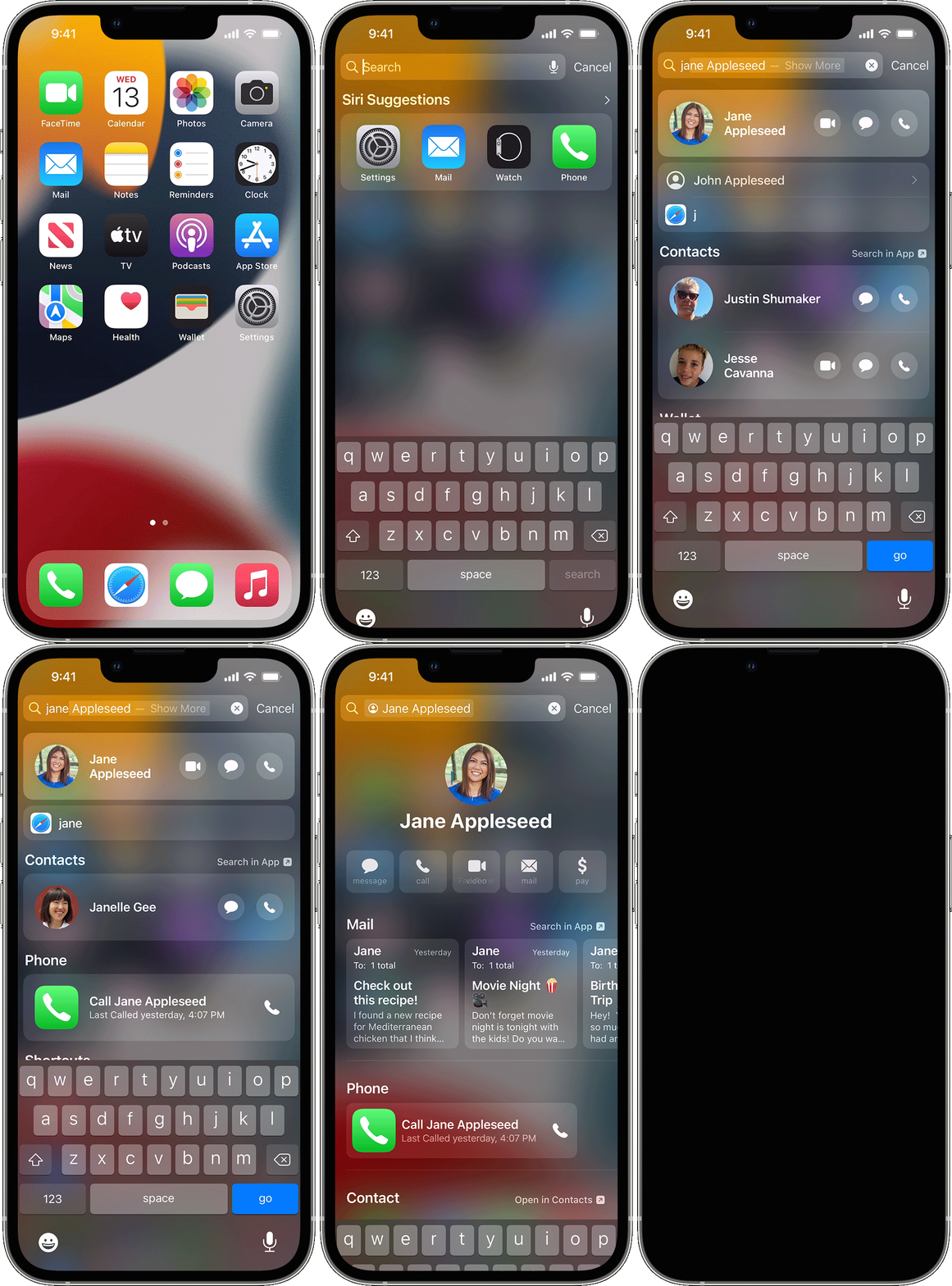
iPhone screen showing how to swipe to search

"


Restart your iPhone

  1. "Press and hold either volume button and the side button until the power-off slider appears.

The volume button is located on the left side of the device, and the side button is located on the right


  1. Drag the slider, then wait 30 seconds for your device to turn off. If your device is frozen or unresponsive, force restart your device.
  2. To turn your device back on, press and hold the side button (on the right side of your iPhone) until you see the Apple logo."


Update your iPhone or iPad (Secure your data with a backup before proceeding)


Reset the Home Screen and apps to their original layout

  1. "Go to Settings  > General > Transfer or Reset iPhone.
  2. Tap Reset, tap Reset Home Screen Layout, then tap Reset Home Screen.
  3. Any folders you’ve created are removed, and apps you’ve downloaded are arranged alphabetically after apps that came with your iPhone."


More details here: Move apps and widgets on the Home Screen on iPhone


Take care.


1 reply
Question marked as Top-ranking reply

Oct 24, 2023 2:13 PM in response to arianni32

Greetings Arianni32,


We'd like to provide you with a few steps that can help you to restore the App Store, on your iPhone:


Use Search on your iPhone

"Swipe to search

  1. Swipe down from the middle of the Home screen.
  2. Tap the Search field, then enter what you're looking for. As you type, Search updates results in real time.
  3. To see more results, tap Show More or search directly in an app by tapping Search in App.
  4. Tap a search result to open it.

In iOS 16 and later, you can also tap the Search field at the bottom of your Home Screen to start a search.

iPhone screen showing how to swipe to search

"


Restart your iPhone

  1. "Press and hold either volume button and the side button until the power-off slider appears.

The volume button is located on the left side of the device, and the side button is located on the right


  1. Drag the slider, then wait 30 seconds for your device to turn off. If your device is frozen or unresponsive, force restart your device.
  2. To turn your device back on, press and hold the side button (on the right side of your iPhone) until you see the Apple logo."


Update your iPhone or iPad (Secure your data with a backup before proceeding)


Reset the Home Screen and apps to their original layout

  1. "Go to Settings  > General > Transfer or Reset iPhone.
  2. Tap Reset, tap Reset Home Screen Layout, then tap Reset Home Screen.
  3. Any folders you’ve created are removed, and apps you’ve downloaded are arranged alphabetically after apps that came with your iPhone."


More details here: Move apps and widgets on the Home Screen on iPhone


Take care.


This thread has been closed by the system or the community team. You may vote for any posts you find helpful, or search the Community for additional answers.

How to redownload the AppStore when it is gone from your library

Welcome to Apple Support Community
A forum where Apple customers help each other with their products. Get started with your Apple Account.
