Family member deleted, but need to restore
I accidentally deleted a family member from my family sharing plan. They now do not have access to their music and photos. How do I restore this?
MacBook Pro 16″, macOS 13.0
I accidentally deleted a family member from my family sharing plan. They now do not have access to their music and photos. How do I restore this?
MacBook Pro 16″, macOS 13.0
Hello ErinWalter1,
Please check out this link, which will guide you through the process to add a family member to your Family Sharing group, which should help: Add family members to a Family Sharing group on Mac
Add family members to a Family Sharing group on Mac
The family organizer can add up to five family members to the Family Sharing group. Each family member joins with their own Apple ID, which allows everyone to share subscriptions, purchases, and locations while keeping their own account privacy protected. The family organizer can create an Apple ID for a child who doesn’t have one.
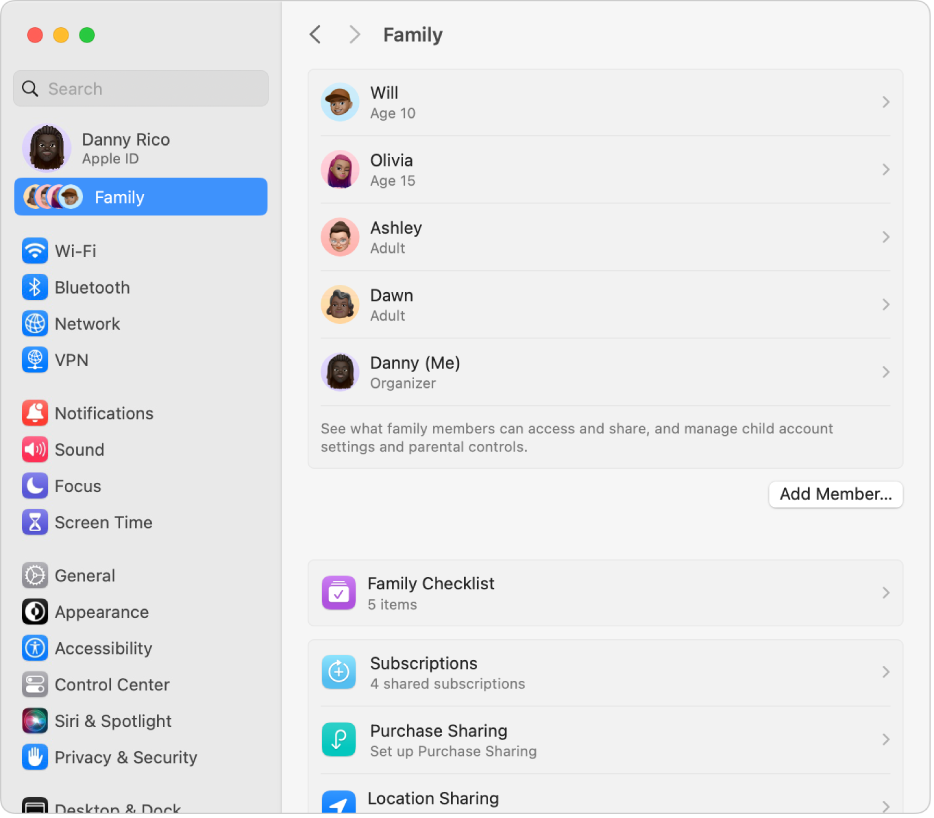
1. On your Mac, choose Apple menu> System Settings, then click Family in the sidebar.
2. If you don’t see Family, set up Family Sharing.
3. Click Add Member on the right, then do one of the following:
* Invite family members: Click Invite People, then follow the onscreen instructions.
If the person you’re inviting is nearby, you can choose Invite in Person and ask them to enter their Apple ID and password on your Mac. Otherwise, you can send the invitation using Mail, Messages, or AirDrop. If the person you’re inviting doesn’t have an Apple ID, they have to create one before they can accept your invitation.
* Create an Apple ID for a younger child: Click Create Child Account, then follow the onscreen instructions. See the Apple Support article Create an Apple ID for your child.
After your family members accept your invitation, Family Sharing is set up on everyone’s devices automatically.
Purchases made by new family members are available to the family group after the new members sign in with the Apple ID they want to use to share purchases. Each family member can do this in Family settings.
For information about combining your Apple subscriptions, see the Apple Support article Bundle Apple subscriptions with Apple One.
Thanks!
Hello ErinWalter1,
Please check out this link, which will guide you through the process to add a family member to your Family Sharing group, which should help: Add family members to a Family Sharing group on Mac
Add family members to a Family Sharing group on Mac
The family organizer can add up to five family members to the Family Sharing group. Each family member joins with their own Apple ID, which allows everyone to share subscriptions, purchases, and locations while keeping their own account privacy protected. The family organizer can create an Apple ID for a child who doesn’t have one.
1. On your Mac, choose Apple menu
2. If you don’t see Family, set up Family Sharing.
3. Click Add Member on the right, then do one of the following:
* Invite family members: Click Invite People, then follow the onscreen instructions.
If the person you’re inviting is nearby, you can choose Invite in Person and ask them to enter their Apple ID and password on your Mac. Otherwise, you can send the invitation using Mail, Messages, or AirDrop. If the person you’re inviting doesn’t have an Apple ID, they have to create one before they can accept your invitation.
* Create an Apple ID for a younger child: Click Create Child Account, then follow the onscreen instructions. See the Apple Support article Create an Apple ID for your child.
After your family members accept your invitation, Family Sharing is set up on everyone’s devices automatically.
Purchases made by new family members are available to the family group after the new members sign in with the Apple ID they want to use to share purchases. Each family member can do this in Family settings.
For information about combining your Apple subscriptions, see the Apple Support article Bundle Apple subscriptions with Apple One.
Thanks!
Family member deleted, but need to restore