Are Apple PDFs compliant with ISO standards - Big Sur macOS

My tax software says that some government agencies have trouble processing some printed forms and they recommend using Adobe Reader. I looked into Adobe Reader and found thatD they seem to want to produce ISO standard PDFs.


Hence my question, doesn't Apple create ISO-compliant PDFs already? As noted above, I have the Big Sur macOS.

MacBook Air 13″, macOS 11.7

Posted on Oct 27, 2023 11:52 AM

Reply
Question marked as Top-ranking reply

Posted on Oct 27, 2023 12:20 PM

No. Not even in Sonoma 14.1 because Apple would have to pay Adobe an enormous sum to upgrade its PDF frameworks and that would break every PDF-based application currently written for macOS. There are third-party applications for macOS that are independent of Apple's PDF frameworks and they use current commercial PDF libraries to generate the linked ISO standards in the following paragraph. Adobe Acrobat Pro, Adobe InDesign, or Affinity Publisher are among those that can generate ISO standard PDFs.


Apple PDF frameworks do not generate PDF/A which is an ISO standardized format for archival PDF, nor does it produce PDF/X, a subset of the PDF ISO standard for printing and graphics exchange. It does not generate PDF/UA which is an ISO standard for accessible PDF. Third-party applications that use their own commercial PDF libraries may do this though. This paragraph does not mean that PDFs generated by Apple applications or those applications that use Apple's PDF frameworks are not interchangeable with other platforms or PDF readers. It does mean they will not pass any formal verification process for these three PDF ISO standards.


It is one thing to generate the PDF XMP data that hints that a document is a PDF/A, PDF/X or PDF/UA document, but until that document is scrutinized by appropriate verification software, it is only a suggestion of that compatibility.


Adobe Acrobat Reader DC will read any of the linked specs from the first paragraph and will show a blue banner across the top of the document:
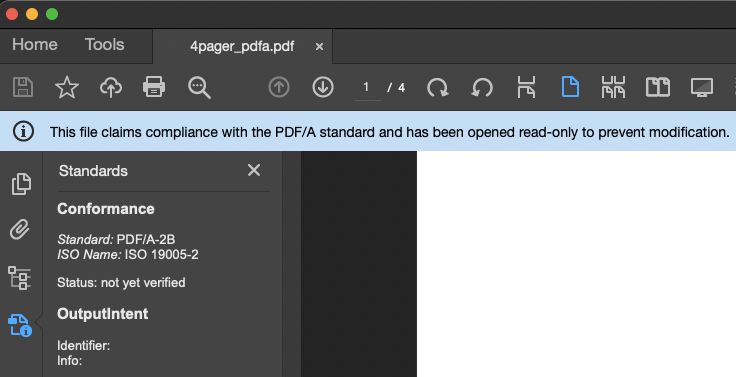


and if the PDF is a hinting that it is a PDF/X-3, there will be a fine green border around the document itself:


8 replies
Question marked as Top-ranking reply

Oct 27, 2023 12:20 PM in response to InkSW

No. Not even in Sonoma 14.1 because Apple would have to pay Adobe an enormous sum to upgrade its PDF frameworks and that would break every PDF-based application currently written for macOS. There are third-party applications for macOS that are independent of Apple's PDF frameworks and they use current commercial PDF libraries to generate the linked ISO standards in the following paragraph. Adobe Acrobat Pro, Adobe InDesign, or Affinity Publisher are among those that can generate ISO standard PDFs.


Apple PDF frameworks do not generate PDF/A which is an ISO standardized format for archival PDF, nor does it produce PDF/X, a subset of the PDF ISO standard for printing and graphics exchange. It does not generate PDF/UA which is an ISO standard for accessible PDF. Third-party applications that use their own commercial PDF libraries may do this though. This paragraph does not mean that PDFs generated by Apple applications or those applications that use Apple's PDF frameworks are not interchangeable with other platforms or PDF readers. It does mean they will not pass any formal verification process for these three PDF ISO standards.


It is one thing to generate the PDF XMP data that hints that a document is a PDF/A, PDF/X or PDF/UA document, but until that document is scrutinized by appropriate verification software, it is only a suggestion of that compatibility.


Adobe Acrobat Reader DC will read any of the linked specs from the first paragraph and will show a blue banner across the top of the document:


and if the PDF is a hinting that it is a PDF/X-3, there will be a fine green border around the document itself:


Oct 27, 2023 3:24 PM in response to InkSW

I don't know if it is part of the same issue – but Preview sometimes has trouble with fillable forms that work without a hitch in Adobe Acrobat Reader.


For instance, there was a state / local government form that did automatic totals of numbers in a column – like in a spreadsheet. Touching the form with Preview (at least in High Sierra) would break the automatic total feature.


Other people using more recent versions of macOS have complained on these forums about rectangles showing up where there was supposed to be text. Downloading Adobe Reader (and re-entering the data from scratch on .PDFs not touched by Preview) fixed the problem.


Most of the time, I have no problem using Preview, but these days, Adobe Acrobat Reader is my "go-to" application when dealing with any sort of fillable .PDF form (like Federal and State income tax forms).

This thread has been closed by the system or the community team. You may vote for any posts you find helpful, or search the Community for additional answers.

Are Apple PDFs compliant with ISO standards - Big Sur macOS

Welcome to Apple Support Community
A forum where Apple customers help each other with their products. Get started with your Apple Account.

