I can't buy anything on iTunes with the credit added to my account by Gift Card

I redeemed a gift card into my AppStore


When redeeming a gift card, the amount was credited to my Apple Account balance and set to purchase for something using my iTunes balance but it gets denied and says "YOUR PURCHASE COULD NOT BE COMPLETED"


I need help!!!

Posted on Nov 9, 2023 7:30 PM

Reply
Question marked as Top-ranking reply

Posted on Nov 10, 2023 2:09 AM

1.

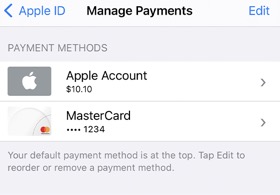
If you have enough money in your Apple Account balance, all you have to do is -> you need to set your Apple Account balance as your default payment.


See -> Add a payment method to your Apple ID

Add a payment method to your Apple ID – Apple Support (UK)


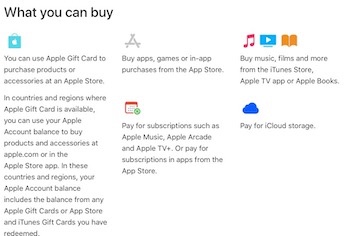
See -> What you can buy with your Apple Gift Card or Apple Account balance

What you can buy with your Apple Gift Card or Apple Account balance – Apple Support (UK)


and ⤵️

  • You can't use your Apple Account balance to send gifts or gift cards.
  • If you use Family Sharing, your family members can't spend your Apple Account balance. Funds that you add to your Apple Account balance are only available to you. Find out more about how purchases are billed to your Apple Account balance.
  • Some purchases might require you to have a credit card on file, even if you use your Apple Account balance to make the purchase.


2.

If you get a message -> Your purchase could not be completed, you need to Add a payment method to your Apple ID – Apple Support (UK)

  • If you want to change your card, add first the new card, then remove the old one.
  • or if you want to use your Apple ID balance, you need to set your Apple ID balance as your default payment.


See also ⤵️

Payment methods you can use with your Apple ID

Payment methods you can use with your Apple ID – Apple Support (UK)


FYI: Not all credit & debit cards seem to work with App Store / iTunes Store, try a different one, or preferably a credit card. If your card is not accepted as a paymenf method, you need to contact your bank.


Add money to your Apple Account balance -> Add money to your Apple Account balance - Apple Support

If you have set your Apple Account balance as your default payment method, your default payment method will be used first by Apple when you need to make a payment.

Some purchases might require you to have a credit card on file, even if you use your Apple Account balance to make the purchase.


Check also -> If your payment method is declined in the App Store or iTunes Store, see -> 

If your payment method is declined in the App Store or iTunes Store - Apple Support

⤵️

How to complete your purchase if a payment failed or was declined

  1. On your iPhone or iPad, open the Settings app.
  2. Tap your name.
  3. Tap Payment & Shipping.
  4. Add a different payment method and remove the old one
  5. Try to complete your purchase.


If you still can't make a purchase


If you have followed all the steps and instructions and if you still need help, get support from Apple directly -> Get Support or call Apple in your region see -> Contact Apple for support and service or check -> here for more support and assistance.


1 reply
Question marked as Top-ranking reply

Nov 10, 2023 2:09 AM in response to galla97

1.

If you have enough money in your Apple Account balance, all you have to do is -> you need to set your Apple Account balance as your default payment.


See -> Add a payment method to your Apple ID

Add a payment method to your Apple ID – Apple Support (UK)


See -> What you can buy with your Apple Gift Card or Apple Account balance

What you can buy with your Apple Gift Card or Apple Account balance – Apple Support (UK)


and ⤵️

  • You can't use your Apple Account balance to send gifts or gift cards.
  • If you use Family Sharing, your family members can't spend your Apple Account balance. Funds that you add to your Apple Account balance are only available to you. Find out more about how purchases are billed to your Apple Account balance.
  • Some purchases might require you to have a credit card on file, even if you use your Apple Account balance to make the purchase.


2.

If you get a message -> Your purchase could not be completed, you need to Add a payment method to your Apple ID – Apple Support (UK)

  • If you want to change your card, add first the new card, then remove the old one.
  • or if you want to use your Apple ID balance, you need to set your Apple ID balance as your default payment.


See also ⤵️

Payment methods you can use with your Apple ID

Payment methods you can use with your Apple ID – Apple Support (UK)


FYI: Not all credit & debit cards seem to work with App Store / iTunes Store, try a different one, or preferably a credit card. If your card is not accepted as a paymenf method, you need to contact your bank.


Add money to your Apple Account balance -> Add money to your Apple Account balance - Apple Support

If you have set your Apple Account balance as your default payment method, your default payment method will be used first by Apple when you need to make a payment.

Some purchases might require you to have a credit card on file, even if you use your Apple Account balance to make the purchase.


Check also -> If your payment method is declined in the App Store or iTunes Store, see -> 

If your payment method is declined in the App Store or iTunes Store - Apple Support

⤵️

How to complete your purchase if a payment failed or was declined

  1. On your iPhone or iPad, open the Settings app.
  2. Tap your name.
  3. Tap Payment & Shipping.
  4. Add a different payment method and remove the old one
  5. Try to complete your purchase.


If you still can't make a purchase


If you have followed all the steps and instructions and if you still need help, get support from Apple directly -> Get Support or call Apple in your region see -> Contact Apple for support and service or check -> here for more support and assistance.



This thread has been closed by the system or the community team. You may vote for any posts you find helpful, or search the Community for additional answers.

I can't buy anything on iTunes with the credit added to my account by Gift Card

Welcome to Apple Support Community
A forum where Apple customers help each other with their products. Get started with your Apple Account.