Can your stolen iPhone be backed up?

The iPhone 8+ was stolen and I need the contents in the phone back on another iPhone how do I get them back

iPhone 8 Plus, iOS 16

Posted on Nov 13, 2023 1:40 AM

Reply
Question marked as Top-ranking reply

Posted on Nov 13, 2023 1:45 AM

Regarding your data…

  1. If you have an iCloud or iTunes latest backup, then there is nothing to worry about. Just restore from it, else...
  2. If You have synced your data to iCloud, then what you will get back is what you have synced to iCloud and uploaded to iCloud Drive;
    1. The information that is synced and stored in iCloud, like Contacts, Calendars, Bookmarks, Mail*, Notes, Voice MemosMessages*, shared photosiCloud Photos*, Health data*, call history*, and files* you store in iCloud Drive.
    2. *-If you had turned on Messages in iCloudiCloud Photos, Mail, Health data, call history under iCloud, and files you store in iCloud Drive your content is automatically stored in iCloud and is available on all devices that use the same Apple ID
  3. You have imported your Photos & Videos to Mac/PC then they are safely residing there on Mac/PC
  4. You have uploaded some of it to Cloud Drives using the Files app (iCloud Drive, Google Drive, OneDrive, DropBox, Flickr, box, AmazonDrive, Adobe Creative Cloud etc). The data remains there.
  5. If you have not backed up or do not have the latest backup, nor imported nor you have synced or uploaded your data to cloud drives prior to the situation that you are in, then I am sorry, all your data is lost.


4 replies
Question marked as Top-ranking reply

Nov 13, 2023 1:45 AM in response to ugochi36

Regarding your data…

  1. If you have an iCloud or iTunes latest backup, then there is nothing to worry about. Just restore from it, else...
  2. If You have synced your data to iCloud, then what you will get back is what you have synced to iCloud and uploaded to iCloud Drive;
    1. The information that is synced and stored in iCloud, like Contacts, Calendars, Bookmarks, Mail*, Notes, Voice MemosMessages*, shared photosiCloud Photos*, Health data*, call history*, and files* you store in iCloud Drive.
    2. *-If you had turned on Messages in iCloudiCloud Photos, Mail, Health data, call history under iCloud, and files you store in iCloud Drive your content is automatically stored in iCloud and is available on all devices that use the same Apple ID
  3. You have imported your Photos & Videos to Mac/PC then they are safely residing there on Mac/PC
  4. You have uploaded some of it to Cloud Drives using the Files app (iCloud Drive, Google Drive, OneDrive, DropBox, Flickr, box, AmazonDrive, Adobe Creative Cloud etc). The data remains there.
  5. If you have not backed up or do not have the latest backup, nor imported nor you have synced or uploaded your data to cloud drives prior to the situation that you are in, then I am sorry, all your data is lost.


Nov 13, 2023 1:45 AM in response to ugochi36

If you have a backup either on iCloud or iTunes then you can get almost everything depending on when the backup was taken.

If you had turned on Messages in iCloudiCloud Photos, Mail, Health data, call history under iCloud, and files you store in iCloud Drive your content is automatically stored in iCloud and is available on all devices that use the same Apple ID.


If nothing of the above is true then I am sorry to say you have lost the data along with the device.


Nov 13, 2023 1:43 AM in response to ugochi36

Don'ts

If the device is removed from an account after it is erased, Activation Lock will be turned off. This allows another person to turn on and use the device.


An example of my iPhone 5 is given in the GIF below. There is no "Undo" after you remove it from your account.



iPhones are designed with strong security measures to protect the privacy and data of their owners. One of the key features that ensure this is the requirement of an Apple ID and password or a passcode to access the device's contents. This means that without the owner's authorization, it is nearly impossible for anyone else to open an iPhone and gain access to its data.


  • The Apple ID and password serve as a unique identifier for each user and are used to link the device to the owner's iCloud account.
  • In the event that the owner has chosen to set up a passcode, an additional layer of protection is added.
  • Additionally, enabling two-factor authentication for the Apple ID further enhances the security of the device by requiring a secondary verification step, typically through a trusted device or phone number, to access the account.


With these security measures in place, iPhones offer a high level of protection against unauthorized access. Even if someone physically possesses the device, they will find it extremely challenging to access its contents without the owner's Apple ID and password or the passcode. This helps safeguard sensitive information, personal data, and ensures the privacy of the iPhone's owner.


It is worth noting that while these security measures provide strong protection against unauthorized access, it is essential for iPhone owners to choose strong and unique passcodes or passwords. This minimizes the risk of brute-force attacks or password-guessing attempts.


Nov 13, 2023 1:43 AM in response to ugochi36

Find IMEI & Serial No. of the Lost Device


  1. If an iPhone, iPad, or iPod touch is lost or stolen - Apple ...
  2. Find the serial number or IMEI on an iPhone, iPad, or iPod ...

You may use a web browser to get the Serial Number and the IMEI Number. You cannot track using the IMEI number. but you may need it so keep it handy

Log in to https://appleid.apple.com with your Apple ID credentials. All your devices will be listed there. Click on any to get the details.


Do's, If you had enabled "Find My" before it was lost


Beware of Phishing!


Be careful and be smart to --> Recognize and avoid phishing messages, phoney support calls ...

Note: Apple will never send you any info on Lost/Found iPhones. It (Phishing) may appear as the image given below.


Switched Off? Still traceable


Even if the iPhone is switched off it is findable, see the pic below.


Device Offline?


I see my device in Find My, but it's offline
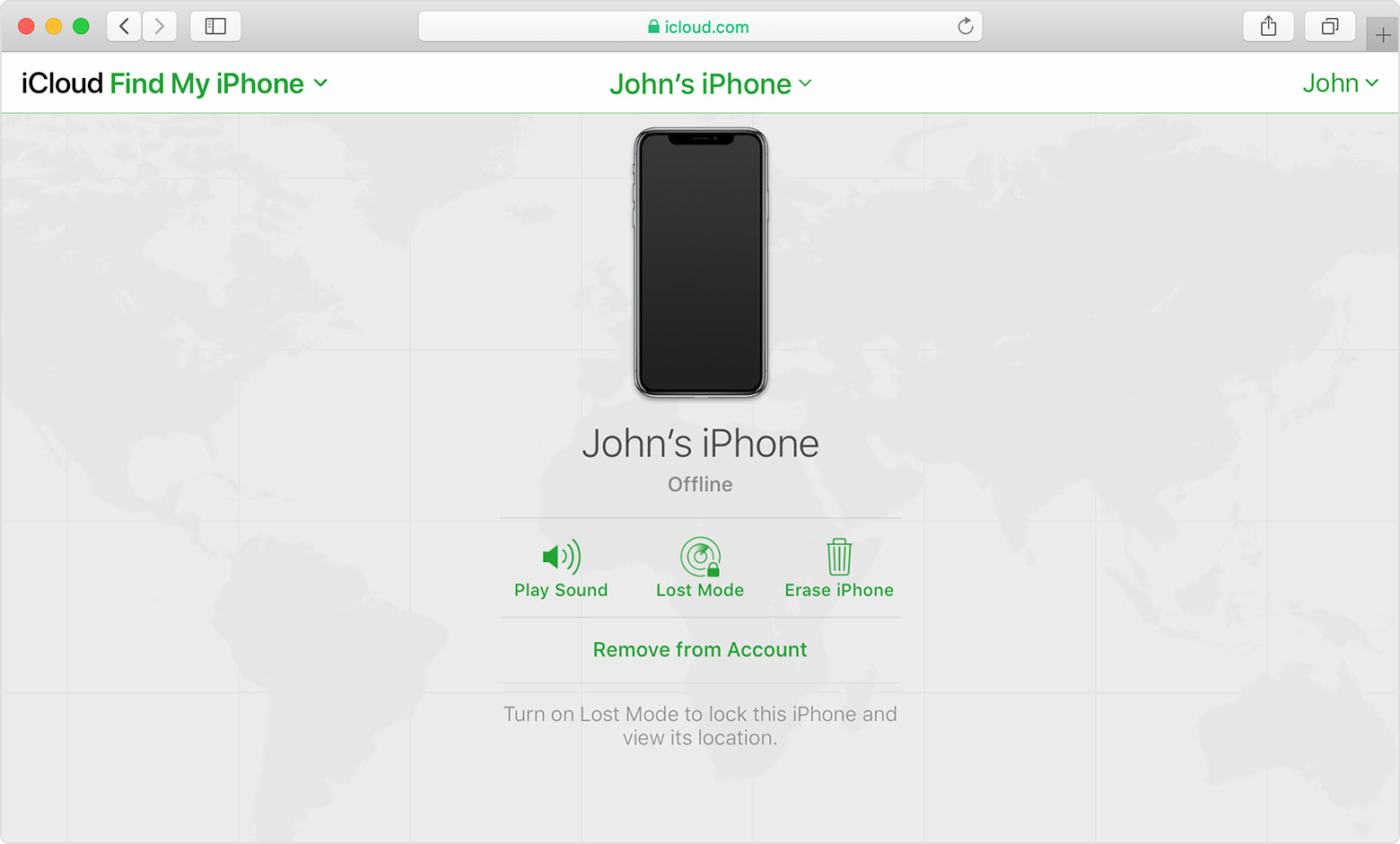

If you see "Offline," "No location available," or "Location Services Off," your device might be offline for one of these reasons:


Don't see your device?

  • You might not have Find My turned on.
  • If you're using the Find My app, you can't see your device's location if more than 7 days have passed since its last location was sent to Apple.
  • If you're using iCloud.com/find, you can't see your device's location if it's powered off, the battery has run out, or more than 24 hours has passed since its last location was sent to Apple.
  • Learn how you can still protect your information.


This thread has been closed by the system or the community team. You may vote for any posts you find helpful, or search the Community for additional answers.

Can your stolen iPhone be backed up?

Welcome to Apple Support Community
A forum where Apple customers help each other with their products. Get started with your Apple Account.
