Orientation not working properly

Just changed my iPad from 7 year old iPad Air to Generation ten. I’ve found that some of my original apps will only display in portrait mode. Can’t get them into Landscape. They were fine on my previous device. I don’t have orientation lock activated.


Posted on Nov 16, 2023 10:06 AM

Reply
Question marked as Top-ranking reply

Posted on Nov 16, 2023 10:32 AM

To switch between Portrait and Landscape view, you generally only need to rotate the iPad to the desired screen orientation.


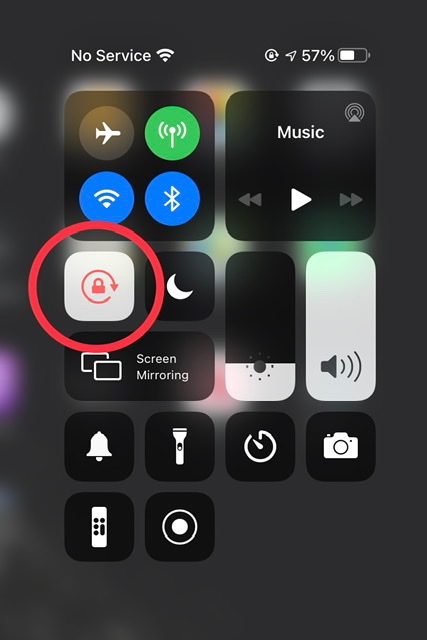
For newer models of iPad without a side-switch, you may need to disable your Screen Rotation Lock. To do so, you need to access the Control Centre; swipe downwards from the top-right corner of the screen - then tap the Screen Rotation lock icon:


If screen rotation proves to be problem with some Apps - and not others - you need to be aware that not all Apps are coded to operate in both Portrait and Landscape screen modes. Apps that have a fixed screen orientation will always* appear in the orientation determined by the App Developer.


(*) For compatible Apps that are intended for iPhone, iPadOS15/16/17 will now automatically rotate the App to display in Landscape screen orientation. There is no manual configuration or setting to enable this feature.


However, Apps designed for iPad that are expressly coded to force Portrait screen orientation, iPadOS15/16/17 will honour the intended Portrait mode - and will not override the App coding.




4 replies
Question marked as Top-ranking reply

Nov 16, 2023 10:32 AM in response to the2ems

To switch between Portrait and Landscape view, you generally only need to rotate the iPad to the desired screen orientation.


For newer models of iPad without a side-switch, you may need to disable your Screen Rotation Lock. To do so, you need to access the Control Centre; swipe downwards from the top-right corner of the screen - then tap the Screen Rotation lock icon:


If screen rotation proves to be problem with some Apps - and not others - you need to be aware that not all Apps are coded to operate in both Portrait and Landscape screen modes. Apps that have a fixed screen orientation will always* appear in the orientation determined by the App Developer.


(*) For compatible Apps that are intended for iPhone, iPadOS15/16/17 will now automatically rotate the App to display in Landscape screen orientation. There is no manual configuration or setting to enable this feature.


However, Apps designed for iPad that are expressly coded to force Portrait screen orientation, iPadOS15/16/17 will honour the intended Portrait mode - and will not override the App coding.


This thread has been closed by the system or the community team. You may vote for any posts you find helpful, or search the Community for additional answers.

Orientation not working properly

Welcome to Apple Support Community
A forum where Apple customers help each other with their products. Get started with your Apple Account.