You may check for it under the App Library. Next to the last page of the Home Screen. If it is in the App Library Touch, Hold and Drag the icon to Home Screen. That's it.

Probably some pages may be hidden
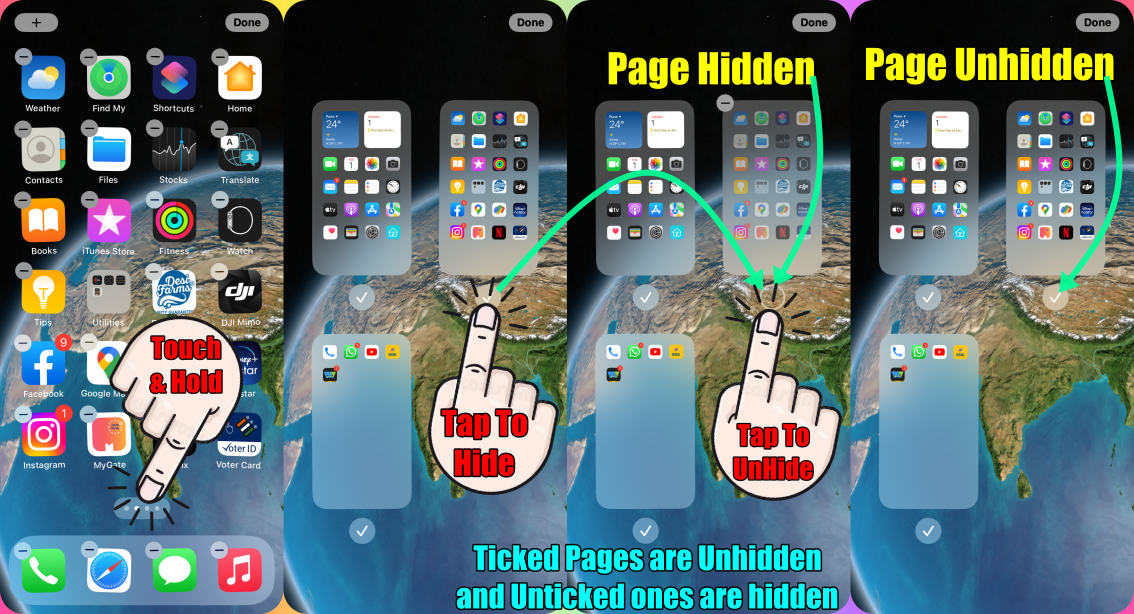
Here's how to hide/unhide a page:
- Touch and hold an empty area on your Home Screen.
- Tap the dots near the bottom of your screen.
- Tap and Tick the circle under the page that you want to unhide.
- Tap Done.
Please see the pic below which is self-explanatory
You may --> Organize the Home Screen and App Library on your iPhone

