Songs purchased from Apple Store won't convert to MP3 - Error 42017

I have all the settings in my import in iTunes to convert to MP3. If my purchase doesn't convert I've wasted the money in purchasing the song. I get error 42017. Not happy. Defeats the purpose of purchase,

Windows, Windows 10

Posted on Dec 25, 2023 1:01 PM

Reply
Question marked as Top-ranking reply

Posted on Dec 27, 2023 3:06 AM

Okay, so it sounds as though you do need the music in MP3 format. But as I stated, I've converted a song from AAC to MP3 yesterday, using iTunes (in order to check that what I am saying is correct), so I stand by what I said previously - the conversion process does work.


So now is the time to work out exactly what the issue is. Perhaps your files are protected (when did you purchase them?). Or - here's a thing, perhaps they have been converted but you just haven't found the conversions. Let's see what we can do:

    • Error message: error message 42017 may indicate that the file is corrupted and I suppose that even if it plays correctly in iTunes (have you checked?), it's possible that it won't convert. The solution is to delete the song and download it again from your account purchases (I'd make a backup of the existing file first though)


    • Protected Files; up until mid-2009 music sold by the iTunes Store was protected from copying by something called DRM. To check whether your songs are subject to DRM:
      1. consider when you purchased them. If they're recent then they're are unlikely to be protected
      2. examine the file's properties (in your iTunes Library). Select a problem song and click on Edit/Song Info/File>kind. Is it a Purchased AAC audio file or a Protected AAC audio file? Note the difference. Study the two songs pictured below, which I purchased from the iTunes Store (well, in fact they were free gifts, but the principal is the same):


    • note that the purchase dates, in 2009, are only two months apart (UK date format - DDMMYYYY), which suggests that by May 2009, Apple was no longer subjecting music to DRM
    • the expected error message if a file cannot be converted is as shown in the following screenshot:


If you saw no error message, that suggests that the conversion was completed, which leads onto the next stage.

    • Converted but not found: a conversion creates a new file, in addition to the existing one (yes, this means that you now have two copies of the specific song - the original and the conversion). But dependant upon how you look at your Library, you may not see the newly converted files. Target one of your failed conversions: look under the Artist name or Album title. Can you see two copies of the converted file? Study the screenshot below:
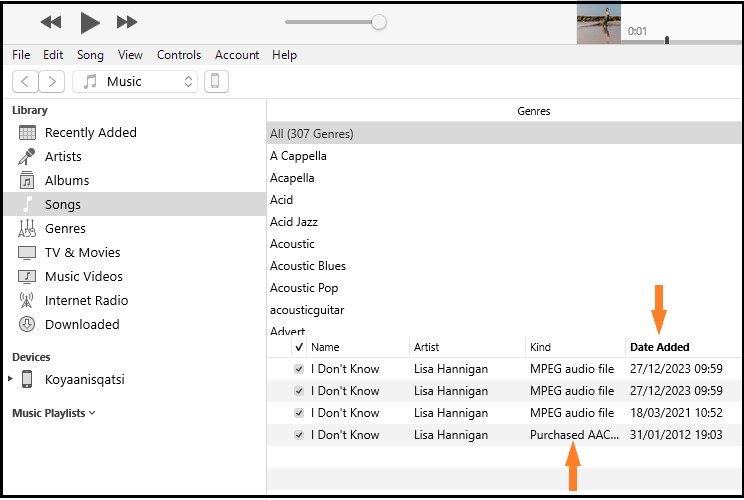


  • notice that I have four copies of the Lisa Hannigan song and that the top two were added today - as conversions (27/12/2023 is 27th December 2023). The third one is a conversion made in 2021, possibly for the same reason as today, while the bottom one is the original


Ethelrude wrote:

Rebuying the songs elsewhere means I wasted my money and that’s on Apple.

I'm not sure the law would agree with you, since the songs play as advertised (providing you have confirmed that they play, as mentioned above) and do what they are intended to do.


But if you are left with no other option (which I doubt), then chalk it up to experience and part of life's ups and downs. Certainly in the future, buy MP3s from somewhere else.



8 replies
Question marked as Top-ranking reply

Dec 27, 2023 3:06 AM in response to Ethelrude

Okay, so it sounds as though you do need the music in MP3 format. But as I stated, I've converted a song from AAC to MP3 yesterday, using iTunes (in order to check that what I am saying is correct), so I stand by what I said previously - the conversion process does work.


So now is the time to work out exactly what the issue is. Perhaps your files are protected (when did you purchase them?). Or - here's a thing, perhaps they have been converted but you just haven't found the conversions. Let's see what we can do:

    • Error message: error message 42017 may indicate that the file is corrupted and I suppose that even if it plays correctly in iTunes (have you checked?), it's possible that it won't convert. The solution is to delete the song and download it again from your account purchases (I'd make a backup of the existing file first though)


    • Protected Files; up until mid-2009 music sold by the iTunes Store was protected from copying by something called DRM. To check whether your songs are subject to DRM:
      1. consider when you purchased them. If they're recent then they're are unlikely to be protected
      2. examine the file's properties (in your iTunes Library). Select a problem song and click on Edit/Song Info/File>kind. Is it a Purchased AAC audio file or a Protected AAC audio file? Note the difference. Study the two songs pictured below, which I purchased from the iTunes Store (well, in fact they were free gifts, but the principal is the same):


    • note that the purchase dates, in 2009, are only two months apart (UK date format - DDMMYYYY), which suggests that by May 2009, Apple was no longer subjecting music to DRM
    • the expected error message if a file cannot be converted is as shown in the following screenshot:


If you saw no error message, that suggests that the conversion was completed, which leads onto the next stage.

    • Converted but not found: a conversion creates a new file, in addition to the existing one (yes, this means that you now have two copies of the specific song - the original and the conversion). But dependant upon how you look at your Library, you may not see the newly converted files. Target one of your failed conversions: look under the Artist name or Album title. Can you see two copies of the converted file? Study the screenshot below:


  • notice that I have four copies of the Lisa Hannigan song and that the top two were added today - as conversions (27/12/2023 is 27th December 2023). The third one is a conversion made in 2021, possibly for the same reason as today, while the bottom one is the original


Ethelrude wrote:

Rebuying the songs elsewhere means I wasted my money and that’s on Apple.

I'm not sure the law would agree with you, since the songs play as advertised (providing you have confirmed that they play, as mentioned above) and do what they are intended to do.


But if you are left with no other option (which I doubt), then chalk it up to experience and part of life's ups and downs. Certainly in the future, buy MP3s from somewhere else.


Dec 27, 2023 7:56 AM in response to Ethelrude

There is an occasional issue where freshly downloaded songs from the iTunes Store appear to arrive with DRM. This will typically show with iTunes prompting you to authorize a computer that is already authorized, but perhaps the inability to burn the tracks is an alternate symptom. Removing the downloads that you have and redownloading usually works around this issue.


Another potential issue when you have an Apple Music account is that it can provide lossless versions of your tracks, although I'm not certain if the current version of iTunes for Windows does this. These lossless versions contain DRM. Changing your setting so that you don't get lossless downloads, then removing and redownloading should resolve that issue. Such files typically have a .movpkg extension.


If you're still not able to resolve this you should use the https://reportaproblem.apple.com/ site to raise the issue with iTunes Store Support. They should be able to help you download tracks that you can burn as you please, or if not provide a refund so that you can buy them again elsewhere. Amazon sell music in MP3 format.


tt2

Dec 26, 2023 4:17 AM in response to Ethelrude

The songs need to be locally stored on your computer, so once purchased you need to download them from the store. You cannot convert them until their are downloaded. Note that music obtained through an Apple Music subscription is not purchased and cannot be converted.


I have just this minute successfully used my iTunes to convert an AAC file to MP3, so the procedure does work.


Most modern audio players can play AAC files, so why do you think you need to convert the songs to MP3? If you simply cannot get the conversion to work and you do need the songs in MP3 format, perhaps you should buy an MP3 version from another outlet.

Dec 27, 2023 7:03 AM in response to Ethelrude

Okay. Not here to argue. And, no, I’m not an idiot.

I checked security settings in Windows and also the 3rd party software indicated files had a CODEC protection .So the files I purchased have a protection from being converted. I have used Apple products for years and I do have a right to voice displeasure if expectations don’t live up to previous experiences.

I spent several hours trying to figure out the problem for $2.60 of purchases. I did due diligence.

I don’t want to make that mistake again.

Thank you again for your input.

Dec 27, 2023 5:06 AM in response to the fiend

So I have been using iTunes for at least 15 years. I have bought music from Apple and converted to MP3. Just to set that I am not inexperienced.

The songs I was trying to convert were purchased Dec. 23, 2023. One of the songs is by Sonny Boy Williamson and is more than 70 years old.

The option in iTunes to convert to MP3 is there, but the conversion fails.

Apple obviously slapped DRM on my two purchased songs unbeknownst to me. I wouldn’t have purchased had I known.

I attempted with a 3rd party converter and also got an error.

So, yes, lesson learned and Apple has lost a customer for digital music purchases. As I said, I’ve purchased before and had no issues and converted files. But obviously something has changed. Thank you for taking the time to help troubleshoot the issue.

Dec 27, 2023 5:52 AM in response to Ethelrude

Ethelrude wrote:

The songs I was trying to convert were purchased Dec. 23, 2023.

Then as stated, those songs should not be protected. It's irrelevant when the songs were recorded.


Apple obviously slapped DRM on my two purchased songs unbeknownst to me.

On what do you base that claim, you've stated that they are recent purchases?


But obviously something has changed.

Such as what? Although I recommended that you examined the proprieties of the files, you have not confirmed that you have done so. In fact, you've not actually acknowledged any of the points I raised, in particular the fact that perhaps the files for these songs are corrupted.


It's time to stop trying to blame Apple because whether Apple is to blame or not, if you want to fix the issue rather than buy those songs again somewhere else, then you need to find the cause. And here's an even more important point; if you fail to identify the cause then how do you know that any music you buy elsewhere won't be subjected to the same issue?

This thread has been closed by the system or the community team. You may vote for any posts you find helpful, or search the Community for additional answers.

Songs purchased from Apple Store won't convert to MP3 - Error 42017

Welcome to Apple Support Community
A forum where Apple customers help each other with their products. Get started with your Apple Account.