All different Bluetooth devices have low sound on Iphone

Hello,

Ive tried AirPods, plug in headphones, and multiple Bluetooth headphones but through all, the sound is still extremely low, I’ve tried going into my settings and all settings are normal, and all Bluetooth headphones are working perfectly fine on different iPhones, and iPad. I’ve tried updating my iOS and everything

iPhone 11

Posted on Dec 25, 2023 10:48 PM

Reply
Question marked as Top-ranking reply

Posted on Dec 25, 2023 10:53 PM

Headphone notifications on your iPhone, iPod touch, or Apple Watch

  1. Open the Settings app on your iPhone or iPod touch.
  2. Tap Sounds & Haptics, then tap Headphone Safety.
  3. Turn Headphone Notifications on or off.

Headphone notifications on your iPhone, iPod touch, or Apple ...



About headphone notifications and volume

Listening to audio on your headphones too loud for too long can damage your hearing. Headphone Notifications let you know if your audio exposure has been loud enough for long enough to affect your hearing—for example, over 80 decibels (dB) for 40 hours total within the last 7 days.

Your iPhone, iPod touch, or Apple Watch can now alert you when you’ve exceeded 100% of the 7-day exposure limit while wearing headphones.* These notifications give you more awareness of your listening habits to help you protect your hearing. When you receive a notification, you’ll hear a chime, and your volume will turn down automatically. You can dismiss the notification and turn your volume back up if you choose.

*The 7-day exposure limit applies only to media audio. Phone calls do not count towards your headphone audio exposure.


Check the Screen Time Restrictions, first, Settings > Screen Time > Content & Privacy Restrictions > Reduce Loud Sounds


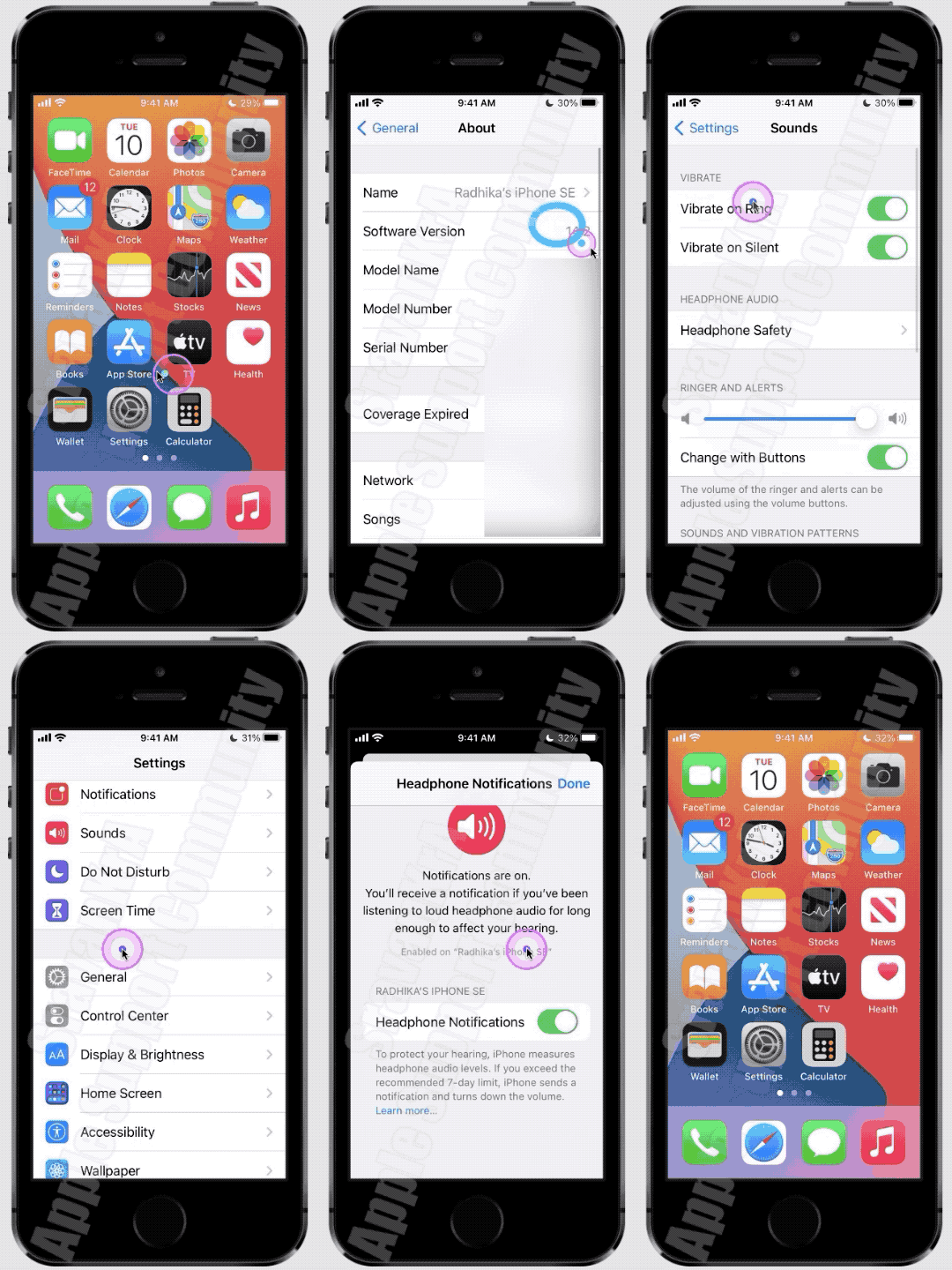
Then watch this GIF made on iPhone SE (1st Gen) iOS 14.2. Watch till the end.

Similar questions

1 reply
Question marked as Top-ranking reply

Dec 25, 2023 10:53 PM in response to Alwaysdestiny365

Headphone notifications on your iPhone, iPod touch, or Apple Watch

  1. Open the Settings app on your iPhone or iPod touch.
  2. Tap Sounds & Haptics, then tap Headphone Safety.
  3. Turn Headphone Notifications on or off.

Headphone notifications on your iPhone, iPod touch, or Apple ...


About headphone notifications and volume

Listening to audio on your headphones too loud for too long can damage your hearing. Headphone Notifications let you know if your audio exposure has been loud enough for long enough to affect your hearing—for example, over 80 decibels (dB) for 40 hours total within the last 7 days.

Your iPhone, iPod touch, or Apple Watch can now alert you when you’ve exceeded 100% of the 7-day exposure limit while wearing headphones.* These notifications give you more awareness of your listening habits to help you protect your hearing. When you receive a notification, you’ll hear a chime, and your volume will turn down automatically. You can dismiss the notification and turn your volume back up if you choose.

*The 7-day exposure limit applies only to media audio. Phone calls do not count towards your headphone audio exposure.


Check the Screen Time Restrictions, first, Settings > Screen Time > Content & Privacy Restrictions > Reduce Loud Sounds


Then watch this GIF made on iPhone SE (1st Gen) iOS 14.2. Watch till the end.


This thread has been closed by the system or the community team. You may vote for any posts you find helpful, or search the Community for additional answers.

All different Bluetooth devices have low sound on Iphone

Welcome to Apple Support Community
A forum where Apple customers help each other with their products. Get started with your Apple Account.
