How can I cancel a subscription on App Store?

One month ago I download the app pedometer but I dnt use this app n a lot of money was deduct from my account with the reference of thiz app. I want to refund my money bcz I dnt want this subscription yet


[Re-Titled by Moderator]

iPhone 11 Pro Max, iOS 13

Posted on Jan 4, 2024 4:46 AM

Reply
Question marked as Top-ranking reply

Posted on Jan 4, 2024 1:51 PM

First confirm you have canceled any subscription automatic renewal (if you simply delete an app this does not cancel subscriptions):


Review the information in this support article by clicking on the link to learn how to cancel a subscription from Apple. ➔ If you want to cancel a subscription from Apple - Apple Support

• "If you signed up for a free or discounted trial subscription and you don't want to renew it, cancel it at least 24 hours before the trial ends."

• An existing subscription will normally continue until the end of its term and may then renew automatically. Stopping automatic renewal is effectively canceling it. "If you don’t see Cancel Subscription, then the subscription is already canceled and won't renew." The "Expires" date means the current subscription will just run until then.

• Read the article to see what to do about subscriptions that do not appear in your list. If you still can't find a subscription, contact Apple Support using the link at the end of the support article.

• Canceling a subscription does not automatically start a refund.


Finally, follow the directions in this support article about how to request a refund for apps or content that you bought from Apple ➔ Request a refund for apps or content that you bought from Apple - Apple Support


3 replies
Question marked as Top-ranking reply

Jan 4, 2024 1:51 PM in response to momi65

First confirm you have canceled any subscription automatic renewal (if you simply delete an app this does not cancel subscriptions):


Review the information in this support article by clicking on the link to learn how to cancel a subscription from Apple. ➔ If you want to cancel a subscription from Apple - Apple Support

• "If you signed up for a free or discounted trial subscription and you don't want to renew it, cancel it at least 24 hours before the trial ends."

• An existing subscription will normally continue until the end of its term and may then renew automatically. Stopping automatic renewal is effectively canceling it. "If you don’t see Cancel Subscription, then the subscription is already canceled and won't renew." The "Expires" date means the current subscription will just run until then.

• Read the article to see what to do about subscriptions that do not appear in your list. If you still can't find a subscription, contact Apple Support using the link at the end of the support article.

• Canceling a subscription does not automatically start a refund.


Finally, follow the directions in this support article about how to request a refund for apps or content that you bought from Apple ➔ Request a refund for apps or content that you bought from Apple - Apple Support


Jan 4, 2024 5:03 AM in response to momi65

Cancelling a subscription or deleting an App does not reverse the transaction made.


Unknown Charge?

  1. App Purchase
    1. Curious about a Charge? --> If you see an 'itunes.com/bill' or an unfamiliar charge on your statement
    2. If you have an issue with an app on App Store or billing --> Request a refund for an App Store or iTunes Store
  2. Subscriptions
    1. You may view a subscription to an app --> See or cancel your subscriptions - Apple Support
    2. You can also request a refund for a recent renewal of an in-app subscription purchase 


Avoid accidental purchases

  1. If it is your device then, please --> Use Guided Access with iPhone, iPad, and iPod touch - Apple ... before handing over a device to a child.
  2. If it is your child's device then in the future, enable the Ask to Buy feature --> Request and make purchases with Ask to Buy - Apple Support


It could be Phishing


Jan 4, 2024 5:02 AM in response to momi65

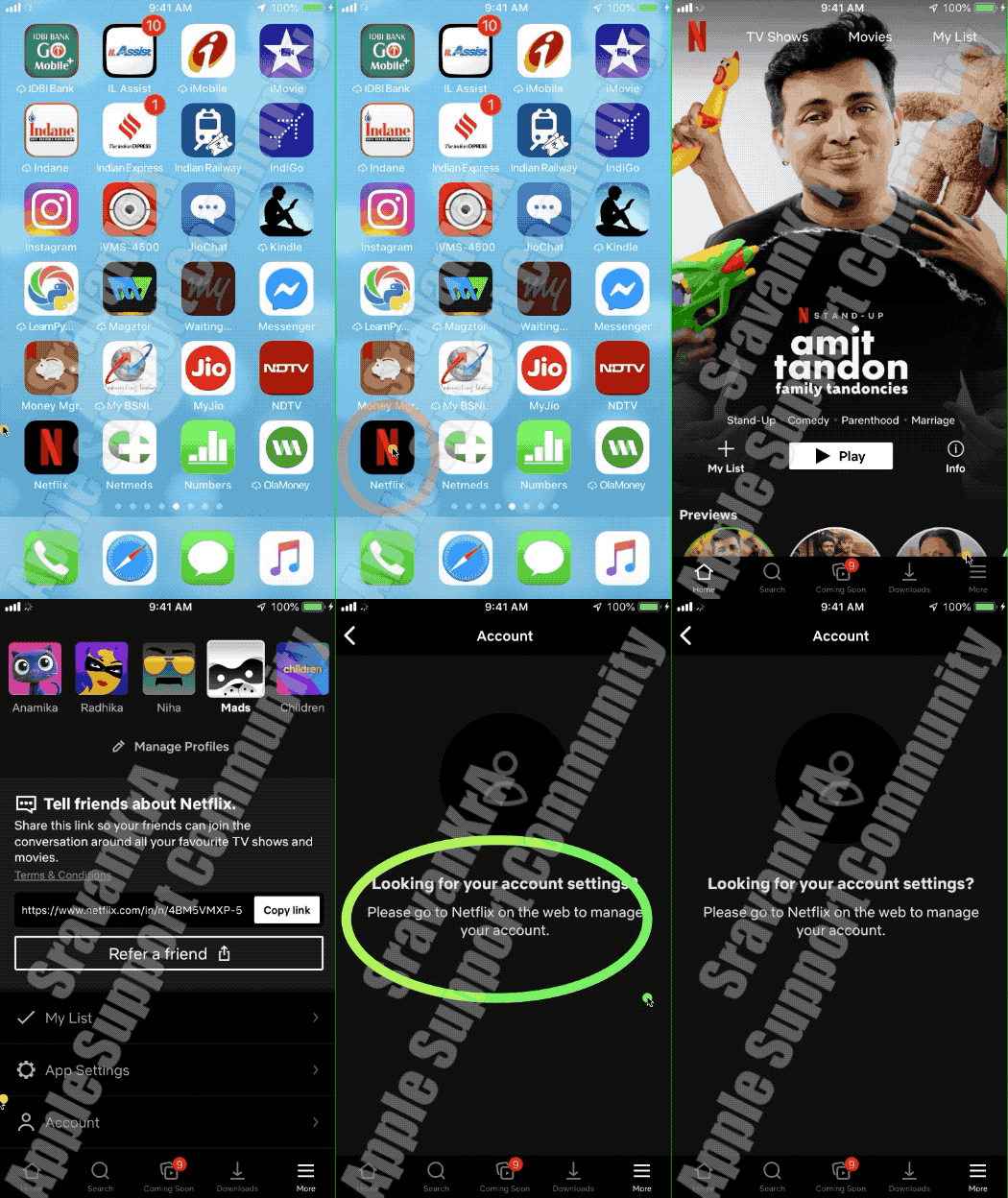
There are two type of subscription

  1. Purchased through App Store (Watch the 1st GIF)
  2. Purchased directly from Third Party App developer (Watch the 2nd GIF)


1st GIF



2nd GIF

If you don't see the subscription that you're looking for

If you tried to see or cancel a subscription and you can't find the subscription that you're looking for, check the following things. Or contact Apple Support.


Is the subscription billed through another company?

On your bank statement, find the charge for the subscription. If it does not say iTunes, Apple, or something similar, the subscription might not be billed through Apple.

Get help with subscriptions that aren't billed through Apple.


Did a family member sign up for the subscription?

A Family Sharing organizer can’t manage subscriptions for other family members. Ask your family members to change or cancel their subscriptions from their own devices or when they're signed in with their own Apple ID. You can also use Ask to Buy to control what kids buy.

Turn on Ask to Buy.

Did you subscribe with a different Apple ID?

To see subscriptions for a different Apple ID, sign in with that Apple ID, then follow the steps in this article.

Forgot your Apple ID?


Do you need to manage iCloud storage or AppleCare plans?

Downgrade your iCloud storage plan.

Manage an AppleCare+ plan or AppleCare Protection Plan.



This thread has been closed by the system or the community team. You may vote for any posts you find helpful, or search the Community for additional answers.

How can I cancel a subscription on App Store?

Welcome to Apple Support Community
A forum where Apple customers help each other with their products. Get started with your Apple Account.

