Either you are pressing the Digital Crown (the round, rotating sticks out from the case button).
Or you are still on watchOS 9, and not watchOS 10 where they made the change.
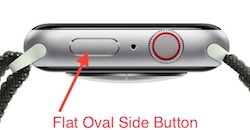
To be clear, it is this button for watchOS 10 (see picture), and it is swipe up for watchOS 9 (the previous method)
Use Control Center on Apple Watch - Apple Support
And you DO NOT hold the button, as that brings up Emergency services and the power off icon.
Getting the press and release timing just right can be an issue. You can make it more reliable by changing:
Settings -> Accessibility -> Side Button Click Speed
“Side Button Click Speed” can adjust the press and release timing, so you get the Control Center display every time. Adjusting The "Side Button Click Speed" is also useful for Apple Pay’s double press and release. There is “Default” (sub second timing of needed), “Slow” (up to a second between press and release), and “Slowest” (up to 2 seconds between press and release). I like the “Slow” setting.
NOTE: Slow and Slowest settings do not mean you have to wait a full second or 2 seconds between press and release. It just means you do not need to be super fast.




