Auto Reply Text Message Driving Mode NEVER sends

Hi


No mater which iPhone I try I can never get auto reply with text message to work. I have searched for 1 month trying everything thats out there even spoke to Apple support and they were useless. Any help or advice would be very gratefully received. 


I have tried an iPhone 15 pro, 14 pro and 13 pro 17.2.1 no joy


iPhone X 16.7.4 no joy. 


Many thanks


Danny Kirk


iPhone 14 Pro, iOS 17

Posted on Jan 11, 2024 10:35 PM

Reply
3 replies

Jan 11, 2024 10:41 PM in response to DannyType2

Auto Reply will work only when you Driving Focus is turned ON (Manually or Autmatically)


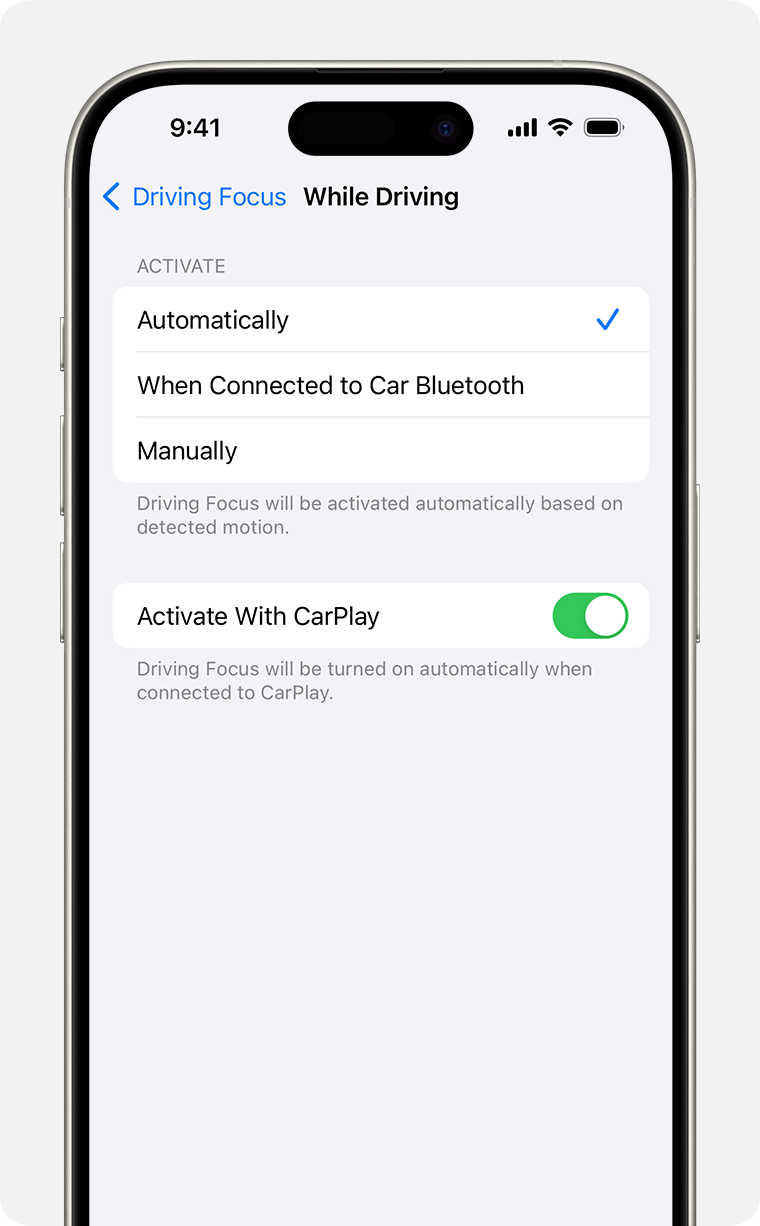
Turn on Driving Focus automatically 

  1. Go to Settings > Focus, then tap Driving.
  2. Tap While Driving under Turn on Automatically, then select one of these options: 
    • Automatically: Driving will be activated based on detected motion.
    • When Connected to Car Bluetooth: Driving will be activated when your iPhone is connected to a car's Bluetooth systems.
    • Manually: Driving can be activated manually from Control Centre.
    • Activate With CarPlay: Driving will be activated automatically when your iPhone is connected to CarPlay.


This thread has been closed by the system or the community team. You may vote for any posts you find helpful, or search the Community for additional answers.

Auto Reply Text Message Driving Mode NEVER sends

Welcome to Apple Support Community
A forum where Apple customers help each other with their products. Get started with your Apple Account.