Finding File Extension Amounts on macOS Sonoma

Is there any Apple or third-party software that can scan an external drive and summarize how much space each file extension is taking up on the drive or at least the top 3 extensions?


[Re-Titled by Moderator]


Mac mini (M2 Pro, 2023)

Posted on Jan 20, 2024 10:42 AM

Reply
Question marked as Top-ranking reply

Posted on Jan 20, 2024 3:01 PM

The script uses Zsh Associative arrays to dynamically add file extensions and the accumlating storage for those file extensions. It then loops through the associative array by key and finally sorts the values descending. It does not limit the number of extensions printed.


Code:


#!/bin/zsh

: <<"COMMENT"
List file extensions sorted descending by aggregate storage used

Usage: tally_ext.zsh [ folder | path/to/external drive ]
Reference: https://discussions.apple.com/thread/255426165?sortBy=oldest_first
Tested: macOS Sonoma 14.2.1, Zsh 5.9
VikingOSX, 2024-01-20, Apple Support Communities, no {warranty, indemnity}
COMMENT

# declare an associative array
typeset -A extKind=()

# make absolute path
STARTDIR="${1:a:s/\~\//}"
# check if msdos or exfat type filesystem
if [[ "$STARTDIR" =~ "(/Volumes/)" && \
     $(diskutil info "$STARTDIR" | awk '/Bundle/ {print $3}') =~ "(msdos|exfat)" ]]; then
    have_msdos=1
fi

# case insensitive files
setopt nocaseglob
# only look for regular, non-dot files in the folder hierarchy
for f in "${STARTDIR}"/**/*(.N);
do
    # exclude the .dat file in in exFAT System Volume Information folder
    [[ ${have_msdos}" && ${f:e}" =~ "(dat)" ]] && continue
    # automatically add extension (:e) and file size to the associative array
    extKind[${f:e}]=$(( $(stat -f '%z' ${f}) + $((${(v)extKind[${f:e}]})) ))
done

# now print out the extension and summary file sizes for each extension
# and reverse sort the 2nd column of printed key/value pairs.
printf '%14s\t%s\n' "Extension" "Size in Bytes"
for key in ${(@k)extKind};
do
    printf "%14s:\t%'d\n" ${key} ${extKind[$key]}
done | sort -rn -k2
# release the associative array
unset extKind
exit 0


You would copy/paste this into script into a plain text editor (not Script Editor, but rather BBEdit, etc.) and save as tally_ext.zsh to your Desktop. Then launch the Terminal:


cd ~/Desktop
chmod +x ./tally_ext.zsh
./tally_ext.zsh /Volumes/STUFF
10 replies
Question marked as Top-ranking reply

Jan 20, 2024 3:01 PM in response to worx25

The script uses Zsh Associative arrays to dynamically add file extensions and the accumlating storage for those file extensions. It then loops through the associative array by key and finally sorts the values descending. It does not limit the number of extensions printed.


Code:


#!/bin/zsh

: <<"COMMENT"
List file extensions sorted descending by aggregate storage used

Usage: tally_ext.zsh [ folder | path/to/external drive ]
Reference: https://discussions.apple.com/thread/255426165?sortBy=oldest_first
Tested: macOS Sonoma 14.2.1, Zsh 5.9
VikingOSX, 2024-01-20, Apple Support Communities, no {warranty, indemnity}
COMMENT

# declare an associative array
typeset -A extKind=()

# make absolute path
STARTDIR="${1:a:s/\~\//}"
# check if msdos or exfat type filesystem
if [[ "$STARTDIR" =~ "(/Volumes/)" && \
     $(diskutil info "$STARTDIR" | awk '/Bundle/ {print $3}') =~ "(msdos|exfat)" ]]; then
    have_msdos=1
fi

# case insensitive files
setopt nocaseglob
# only look for regular, non-dot files in the folder hierarchy
for f in "${STARTDIR}"/**/*(.N);
do
    # exclude the .dat file in in exFAT System Volume Information folder
    [[ ${have_msdos}" && ${f:e}" =~ "(dat)" ]] && continue
    # automatically add extension (:e) and file size to the associative array
    extKind[${f:e}]=$(( $(stat -f '%z' ${f}) + $((${(v)extKind[${f:e}]})) ))
done

# now print out the extension and summary file sizes for each extension
# and reverse sort the 2nd column of printed key/value pairs.
printf '%14s\t%s\n' "Extension" "Size in Bytes"
for key in ${(@k)extKind};
do
    printf "%14s:\t%'d\n" ${key} ${extKind[$key]}
done | sort -rn -k2
# release the associative array
unset extKind
exit 0


You would copy/paste this into script into a plain text editor (not Script Editor, but rather BBEdit, etc.) and save as tally_ext.zsh to your Desktop. Then launch the Terminal:


cd ~/Desktop
chmod +x ./tally_ext.zsh
./tally_ext.zsh /Volumes/STUFF

Jan 20, 2024 11:04 AM in response to worx25

worx25 wrote:

Is there any Apple or third-party software that can scan an external drive and summarize how much space each file extension is taking up on the drive or at least the top 3 extensions?


You can easily sort by "Kind" and do some quick math...


Organize your files in the Finder on Mac


Press Command + F to filter by Kind. use list View.


ref: I want to sort file types in finder - Apple Community


Jan 24, 2024 8:16 AM in response to worx25

One of the shortcomings of the Zsh shell, even if using extended globbing, is that it will recursively drill into every subfolder, even when those subfolders are package folders of applications, libraries, and other package bundles. This encroachment will add false extensions and sums to your results depending upon what the script encounters on its pursuit of folder contents.


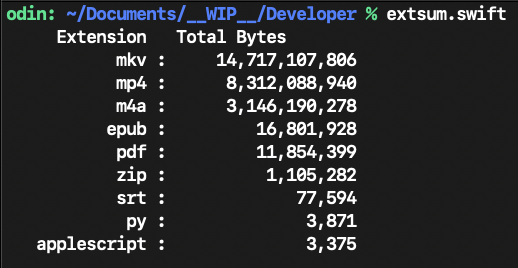
As a mental exercise, I wrote a Swift language replacement for the Zsh script that obeys restrictions on entering package folders, and its recursion extension summary is shorter and more accurate for this reason. The Swift solution isn't quite done because it needs to present its results in a scrollable window, and needs to be able to accept a command-line path to the searchable folder location — in addition to its current launching a file chooser when no arguments are offered.


I probably could have written this in AppleScript/Objective-C with no small interference from AppleScript in the process. Since Apple does not bundle a Swift compiler and libraries with the operating system, one would need to install the current command-line tools for Xcode (~3.5 GB) in order to compile the Swift source.


If you want the Swift source code when I am done, ask for it here, and I will post it with instructions.

Jan 20, 2024 3:41 PM in response to VikingOSX

An errata in the previously posted script. It works fine even with the syntax error, but:


Change:

# exclude the .dat file in in exFAT System Volume Information folder
[[ ${have_msdos}" && ${f:e}" =~ "(dat)" ]] && continue


To:

# exclude the .dat file in in exFAT System Volume Information folder
[[ ${have_msdos} && "${f:e}" =~ "(dat)" ]] && continue

This thread has been closed by the system or the community team. You may vote for any posts you find helpful, or search the Community for additional answers.

Finding File Extension Amounts on macOS Sonoma

Welcome to Apple Support Community
A forum where Apple customers help each other with their products. Get started with your Apple Account.
