I am trying to add a Longos and Canada post card to my wallet. When I click on the there is no option to add a card manually and there is no QR code on either cardt

When I click on the plus / add button on upper right only credit debit or transit passe are offered. Neither Longos or Canad Post has QR code. No option to add card manually or use camera to identify.

iPhone 12, iOS 17

Posted on Jan 21, 2024 6:58 AM

Reply
1 reply

Jan 21, 2024 7:03 AM in response to fixthis4me2

The card issuer must enable the "Add to Apple Wallet" feature.


You will find this in the Card Issue Document

Tap Add to Apple Wallet.



You may add a ticket/card/pass from the mail or the document that you received when you bought the ticket/card/pass.

  • The ticket/card/pass cannot be added directly from the Wallet app.
  • Instead, you can add it to the Wallet app by using the ticket/card/pass document or the email that you may have received.



However, you may add any of the following passes/tickets

Adding Boarding Passes, Bookmyshow Tickets, IRCTC (Railway) tickets, Airline Tickets, Game Tickets and Hotel Bookings are only possible if the issuer has enabled the "Add to Apple Wallet" feature for the tickets/passes issued by them. See some examples below.

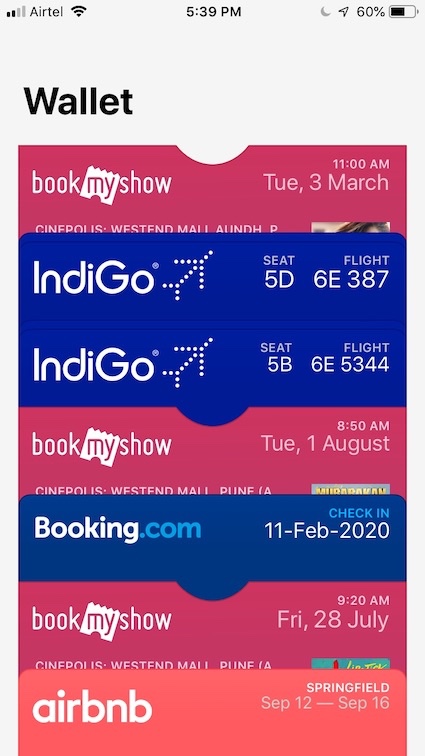


The card issuer must enable the "Add to Apple Wallet" feature.


You will find this in the Card Issue Document

  1. Tap Add to Apple Wallet.


This thread has been closed by the system or the community team. You may vote for any posts you find helpful, or search the Community for additional answers.

I am trying to add a Longos and Canada post card to my wallet. When I click on the there is no option to add a card manually and there is no QR code on either cardt

Welcome to Apple Support Community
A forum where Apple customers help each other with their products. Get started with your Apple Account.
