Why does my iPhone 13 Pro say "Unknown Camera Part"?

I have very well cared for 13 Pro that I purchased/traded up new from a T-Mobile store about 18 months ago. Everything has always worked fine. It has never been repaired. I went to take a picture 3 days ago and it was blurred out. I thought the lense was covered with something so I turned it around and nothing. I restarted my phone and the camera worked again but I had the “Unknown Part” message. I’ve rebooted a few times but nothing will make the message go away or restore the .5x to my camera function. Based on what I’ve read on this forum, this looks like an Apple problem, NOT a consumer problem.


[Edited by Moderator]

Posted on Feb 3, 2024 5:38 PM

Reply
Question marked as Top-ranking reply

Posted on Feb 4, 2024 5:34 AM

Kindly reach out to the Store/Individual/Agency from whom you acquired your iPhone. They would be best equipped to confirm whether the device has undergone servicing by an unauthorized service provider.


In case you recall not encountering this message at the time of purchase and it surfaced after an update, it's important to note that this message is visible specifically on iOS 15.2 and subsequent versions. It might be beneficial to inquire about any recent updates or changes made to the device's software configuration that could have triggered this notification.


Understanding the circumstances surrounding the appearance of this message could provide insights into any alterations in the device's service history or software updates that have brought about this notice.



Camera and service history

With iPhone 12 models and later using iOS 15.2 and later you can go to Settings > General > About to see the parts and service history of your iPhone and you can see if the camera has been replaced. If the repair was done using genuine Apple parts and processes, you will see "Genuine Apple Part" next to the Camera.

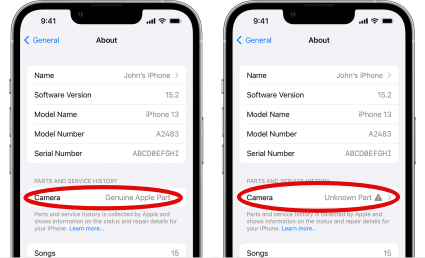


  • You will see an Unknown Part  message if the camera installation is incomplete or if the camera:
  • Was replaced with a nongenuine camera
  • Was already used or installed in another iPhone
  • Isn't functioning as expected

This message doesn't affect your ability to use your iPhone or access your camera.

Learn more about iPhone parts and service history.


Battery and Display and service history

With iPhone 11 models and later, excluding iPhone SE (2nd and 3rd generation), using iOS 15.2 and later, you can go to Settings > General > About for the parts and service history of your iPhone. You can also find out if the display has been replaced. If the repair was done using genuine Apple parts and processes, "Genuine Apple Part" will appear next to Display.
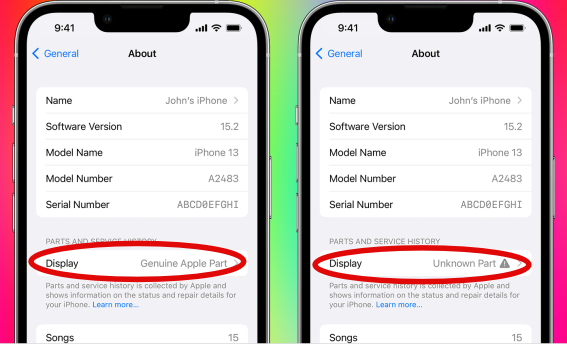


  • An Unknown Part  message will appear if the display installation is incomplete or if the display:
  • Was replaced with a nongenuine display
  • Was already used or installed in another iPhone
  • Isn't functioning as expected


An additional message might appear that says "Apple has updated the device information for this iPhone." This means that Apple has updated the device information maintained for this iPhone for service needs, safety analysis, and to improve future products. 


If your iPhone's parts have been previously replaced, repaired, or serviced by an unauthorized service provider, it's worth noting that Apple may decline to provide service for your device. The decision to refuse service will depend on the specific components that were affected by the unauthorized service.


Get a Genius Bar Reservation and Apple Support Options - Apple


Contact Genius Bar.

Manage Reservations - My Reservations - Apple


9 replies
Question marked as Top-ranking reply

Feb 4, 2024 5:34 AM in response to CintheaJ

Kindly reach out to the Store/Individual/Agency from whom you acquired your iPhone. They would be best equipped to confirm whether the device has undergone servicing by an unauthorized service provider.


In case you recall not encountering this message at the time of purchase and it surfaced after an update, it's important to note that this message is visible specifically on iOS 15.2 and subsequent versions. It might be beneficial to inquire about any recent updates or changes made to the device's software configuration that could have triggered this notification.


Understanding the circumstances surrounding the appearance of this message could provide insights into any alterations in the device's service history or software updates that have brought about this notice.


Camera and service history

With iPhone 12 models and later using iOS 15.2 and later you can go to Settings > General > About to see the parts and service history of your iPhone and you can see if the camera has been replaced. If the repair was done using genuine Apple parts and processes, you will see "Genuine Apple Part" next to the Camera.


  • You will see an Unknown Part  message if the camera installation is incomplete or if the camera:
  • Was replaced with a nongenuine camera
  • Was already used or installed in another iPhone
  • Isn't functioning as expected

This message doesn't affect your ability to use your iPhone or access your camera.

Learn more about iPhone parts and service history.


Battery and Display and service history

With iPhone 11 models and later, excluding iPhone SE (2nd and 3rd generation), using iOS 15.2 and later, you can go to Settings > General > About for the parts and service history of your iPhone. You can also find out if the display has been replaced. If the repair was done using genuine Apple parts and processes, "Genuine Apple Part" will appear next to Display.


  • An Unknown Part  message will appear if the display installation is incomplete or if the display:
  • Was replaced with a nongenuine display
  • Was already used or installed in another iPhone
  • Isn't functioning as expected


An additional message might appear that says "Apple has updated the device information for this iPhone." This means that Apple has updated the device information maintained for this iPhone for service needs, safety analysis, and to improve future products. 


If your iPhone's parts have been previously replaced, repaired, or serviced by an unauthorized service provider, it's worth noting that Apple may decline to provide service for your device. The decision to refuse service will depend on the specific components that were affected by the unauthorized service.


Get a Genius Bar Reservation and Apple Support Options - Apple


Contact Genius Bar.

Manage Reservations - My Reservations - Apple



Feb 3, 2024 6:09 PM in response to CintheaJ

This is a user to user only forum. We can't offer any useful help if your phone is reporting an unknown camera part. Parts on anything from any manufacturer can fail. Perhaps the phone fell, with no apparent exterior damage, but could have caused internal damage. We can't diagnose, nor fix the issue for you. You need to schedule an appointment at your Apple Store Genius Bar for evaluation and options.

Feb 3, 2024 6:13 PM in response to CintheaJ

CintheaJ wrote:

I clearly stated that my phone camera has never been repaired. My phone has never been out of my possession. As many people have already stated on this site, the phone is fine one moment and then it’s not. And for you to edit my words is not right. I’ve been a loyal Apple user since the first iPhone came out and this experience could likely change my mind depending how it plays out.


Apple edited your message. Whatever was there was somehow deemed problematic. What the issue and the edit was, I don’t know. I didn’t see your original post.


This is a user-to-user forum. Apple typically doesn’t reply around here. Folks replying here are other users. Volunteers. Not Apple.


Now as for the hardware, and as was stated earlier, good parts can report bad, bad parts can report good, updates can get snarled, and whatever actually happened here nobody here knows, or even can know.


Again, good parts can sometimes mis-report as non-genuine.


The next step here is a discussion with Apple Support, and scheduling a look at this iPhone and its camera.

Feb 4, 2024 9:27 AM in response to CintheaJ

CintheaJ wrote:

I clearly stated that my phone has “never” been serviced. I’ve already read everything you put in your reply and I came to this site looking for people who have had the same experience and what APPLE did to fix it because this was due to nothing that I did. I have all updates set to “Automatic” on my phone so that has always been done. I do have one question for you…you said “reach out to the store/individual/agency” -
I got my phone from T-Mobile almost 2 years ago and it was a brand new phone. I’m not the only person who has experienced this message/problem so I do not understand how this could be a problem for T-Mobile to fix. Isn’t this exclusively an APPLE problem to fix?


In the absence of a previous camera repair, Apple will usually fix this, yes.


That is however not the question you likely intended to ask.


You likely intended to ask about the repair cost to you.


The repair will probably be covered under AppleCare+ coverage.


Without AppleCare+ coverage, you will probably be paying for this repair.


If the camera is still working, you can also ignore the message.


If you want the official answer, contact Apple Support, and schedule a look.

Feb 3, 2024 5:57 PM in response to MrHoffman

I clearly stated that my phone camera has never been repaired. My phone has never been out of my possession. As many people have already stated on this site, the phone is fine one moment and then it’s not. And for you to edit my words is not right. I’ve been a loyal Apple user since the first iPhone came out and this experience could likely change my mind depending how it plays out.

Feb 4, 2024 8:59 AM in response to SravanKrA

I clearly stated that my phone has “never” been serviced. I’ve already read everything you put in your reply and I came to this site looking for people who have had the same experience and what APPLE did to fix it because this was due to nothing that I did. I have all updates set to “Automatic” on my phone so that has always been done. I do have one question for you…you said “reach out to the store/individual/agency” -

I got my phone from T-Mobile almost 2 years ago and it was a brand new phone. I’m not the only person who has experienced this message/problem so I do not understand how this could be a problem for T-Mobile to fix. Isn’t this exclusively an APPLE problem to fix?


This thread has been closed by the system or the community team. You may vote for any posts you find helpful, or search the Community for additional answers.

Why does my iPhone 13 Pro say "Unknown Camera Part"?

Welcome to Apple Support Community
A forum where Apple customers help each other with their products. Get started with your Apple Account.

