why is the usb connector bigger than any standard usb plug I own?

Have a "newer" Monterey MacBook Pro. It won't talk to the old Pro (in High Sierra) because it's too "snotty" to talk to the old machine, and everything is backed up on Seagate externals. the issue is, not ONE of any of my usb connectors is LARGE ENOUGH to fit into the usb slot of the APPLE usb to usb-c adapter. Does anyone else have that problem, and how do I solve it. It appears to be that the adapter USB connector is about 1/16" larger than a standard USB plug.


manufacturing error? Maybe?


HELP!

MacBook Pro 15″

Posted on Feb 17, 2024 12:48 PM

Reply
Question marked as Top-ranking reply

Posted on Feb 17, 2024 4:38 PM

janielaurel wrote:

Have a "newer" Monterey MacBook Pro.

What is the exact model? Monterey is a version of macOS which can run on lots of different laptops with different ports. You can get the exact model by clicking the Apple menu & selecting "About This Mac". Since the ports are different than your old High Sierra MBPro, it tells me your "Monterey" laptop has USB-C ports.


It appears to be that the adapter USB connector is about 1/16" larger than a standard USB plug.

Sounds like you are looking at a USB type B connector of some sort. If so, that type of connector is not typcially connected to a computer since most computers have either USB-A ports like your old High Sierra laptop, or USB-C ports like your newer Mac (2016+). It may help to know what cable you are using for the external drive(s) & see a picture of the end you are trying to connect.


Some USB drives may utilize either a USB-C port or a micro-USB-B port on the back of the drive. You will need the appropriate cable to connect to the back of the USB drive. The other end of that USB cable should either have a USB-A connector or a USB-C connector. If it is a USB-A connector, then you need to use a USB-C to USB-A adapter to connect the drive to the new Mac.


Here is a picture of the various USB connectors:


The only connectors which get connected to a computer are the Type-A or Type-C ones. All of the other USB connectors shown Mini/Micro A/B are usually only found as ports on external devices such as drives and cameras.



Similar questions

12 replies
Question marked as Top-ranking reply

Feb 17, 2024 4:38 PM in response to janielaurel

janielaurel wrote:

Have a "newer" Monterey MacBook Pro.

What is the exact model? Monterey is a version of macOS which can run on lots of different laptops with different ports. You can get the exact model by clicking the Apple menu & selecting "About This Mac". Since the ports are different than your old High Sierra MBPro, it tells me your "Monterey" laptop has USB-C ports.


It appears to be that the adapter USB connector is about 1/16" larger than a standard USB plug.

Sounds like you are looking at a USB type B connector of some sort. If so, that type of connector is not typcially connected to a computer since most computers have either USB-A ports like your old High Sierra laptop, or USB-C ports like your newer Mac (2016+). It may help to know what cable you are using for the external drive(s) & see a picture of the end you are trying to connect.


Some USB drives may utilize either a USB-C port or a micro-USB-B port on the back of the drive. You will need the appropriate cable to connect to the back of the USB drive. The other end of that USB cable should either have a USB-A connector or a USB-C connector. If it is a USB-A connector, then you need to use a USB-C to USB-A adapter to connect the drive to the new Mac.


Here is a picture of the various USB connectors:


The only connectors which get connected to a computer are the Type-A or Type-C ones. All of the other USB connectors shown Mini/Micro A/B are usually only found as ports on external devices such as drives and cameras.


Feb 26, 2024 7:52 PM in response to HWTech

I figured I'd best post a response to all of this. I solved my problem by buying a cheap usb to usb-c adapter on amazon (https://www.amazon.com/dp/B0BMVHHT47?ref=ppx_yo2ov_dt_b_product_details&th=1) ... worked like a charm. Apple's adaptor is now in my box of "weird and unusual Mac supplies", destined to be trashed eventually ... better, these new dongles fit every usb cable in our house and we have a ton of them.


thanks for all your thoughts and concerns, folks.

Feb 18, 2024 9:22 AM in response to janielaurel

Please take a picture of this connector with your phone and

post the picture with the Image Insertion tool in the reply footer.


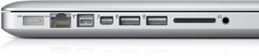
for you to compare, these are the ports on your MacBook Pro 2011 model


Magsafe, Ethernet, FireWire-800, Thunderbolt-2, USB-A, USB-A, SD card, Sound


could your cables on hand be ThunderBolt-2 or Firewire-800 and not USB ??

Feb 17, 2024 1:47 PM in response to janielaurel

what model-year MacBook Pro running High Sierra?


<< too snotty >>


Macs from previous years communicate freely with modern Macs. But file privacy is important, and the correct physical connection methods are important as well.


USB-A is used on older Macs for USB connections.


USB type C is used for USB-C and ThunderBolt connection on recent Macs

Mini DisplayPort/ThunderBolt-2 may be found on some Macs before 2016 models


Feb 17, 2024 2:13 PM in response to Grant Bennet-Alder

Sort of responded to the first question below, and I've now ordered several off-brand adapters to see if one will work .... as for what year the older Mac is, it's a beloved 2011 MacBook Pro, one of several rebuilds I've bought over the years. Can't upgrade the OS, so apparently that seems to be the "migration" issue. Meanwhile, I'm downloading what software I can from source websites and moving forward. "working files" are my issue of the moment. I'll get through it. It's 2024, what could go wrong, right? thanks for your help.

Feb 17, 2024 5:03 PM in response to janielaurel

<< Can't upgrade the OS, so apparently that seems to be the "migration" issue. >>


There is No migration issue. Upgrading the MacOS to TODAY's MacOS is not a requirement.


That 2011 model is perfectly capable of Migrating to a later model directly. But the setup, cables, and procedure may be a bit obscure. and direct migration is remarkably SLOW. Migrating from a Time machine backup is faster.


Does you backup drive enclosure have one of the "OTHER" USB connectors HWTech posted?

Feb 17, 2024 5:44 PM in response to Grant Bennet-Alder

yep - I agree on the migration issue. I'll try again tomorrow. I'm on a stupid DSL connection here at the moment, so I opted for using the iPhone hotspot as a safer faster connect. Didn't work, so tomorrow I'll launch into the DSL connection and see if the magic can happen. It's time for a glass of wine and some supper for us here. "enough already". :D - thanks for mentally backing up what I already know because I live in a Mac world. Tomorrow I'll figure out what's going wrong.

This thread has been closed by the system or the community team. You may vote for any posts you find helpful, or search the Community for additional answers.

why is the usb connector bigger than any standard usb plug I own?

Welcome to Apple Support Community
A forum where Apple customers help each other with their products. Get started with your Apple Account.