Problem loading my new ipad 10th generation and cannot get out of iCloud sign in

Setting up for the first time and my ipad is stuck on iCloud sign in, It ask for iCloud sign in with iCloud Apple ID which I entered but now is just churning away and I cannot turn it off or move anything Help

iPad, iOS 9

Posted on Feb 27, 2024 5:11 AM

Reply
Question marked as Top-ranking reply

Posted on Feb 27, 2024 5:58 AM

If the sign-in process has stalled - it will be necessary to restart the iPad.


Force restart iPad (models with Face ID or with Touch ID in the top button)

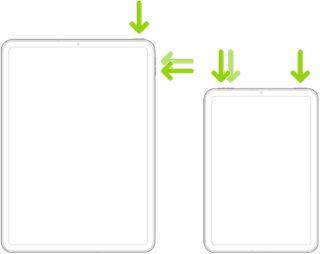
If your iPad doesn’t have the Home button, do the following:

  1. Press and quickly release the volume button nearest to the top button.
  2. Press and quickly release the volume button farthest from the top button.
  3. Press and hold the top button.
  4. When the Apple logo appears, release the top button.


Force restart iPad (models with the Home button)

Press and hold the top button and the Home button at the same time. When the Apple logo appears, release both buttons.



If you continue to experience difficulties, you may need to seek assistance directly from Apple Support.


You can contact the Support Team using the Support link at top-right or bottom-left of this page. Alternatively, if you have access to another Apple device, you can initiate and manage your support cases using the excellent Apple Support App. If not already installed, the App can be downloaded from the App Store:

https://apps.apple.com/gb/app/apple-support/id1130498044


1 reply
Question marked as Top-ranking reply

Feb 27, 2024 5:58 AM in response to davibubb

If the sign-in process has stalled - it will be necessary to restart the iPad.


Force restart iPad (models with Face ID or with Touch ID in the top button)

If your iPad doesn’t have the Home button, do the following:

  1. Press and quickly release the volume button nearest to the top button.
  2. Press and quickly release the volume button farthest from the top button.
  3. Press and hold the top button.
  4. When the Apple logo appears, release the top button.


Force restart iPad (models with the Home button)

Press and hold the top button and the Home button at the same time. When the Apple logo appears, release both buttons.


If you continue to experience difficulties, you may need to seek assistance directly from Apple Support.


You can contact the Support Team using the Support link at top-right or bottom-left of this page. Alternatively, if you have access to another Apple device, you can initiate and manage your support cases using the excellent Apple Support App. If not already installed, the App can be downloaded from the App Store:

https://apps.apple.com/gb/app/apple-support/id1130498044



This thread has been closed by the system or the community team. You may vote for any posts you find helpful, or search the Community for additional answers.

Problem loading my new ipad 10th generation and cannot get out of iCloud sign in

Welcome to Apple Support Community
A forum where Apple customers help each other with their products. Get started with your Apple Account.