Setting time zone manually on my MacBook with macOS Sonoma

1 марта в Казахстане, был изменен часовой пояс с +6 на +5. После перезагрузки, системное время на компьютере изменилось, все хорошо. Но когда я устанавливаю приложения, например Notion и ввожу задачи, время сохранения указывает неверное, на +1 час позже, как будто остался старый часовой пояс +6. Также неверно показывается время в часах на заставке


[Re-Titled by Moderator]

MacBook Pro 14″, macOS 14.3

Posted on Mar 6, 2024 11:47 PM

Reply
Question marked as Top-ranking reply

Posted on Mar 10, 2024 7:51 AM

WillForce_kz wrote:

Time zone has not changed

On March 1, in Kazakhstan, the time zone was changed from +6 to +5. After the reboot, the system time on the computer changed, everything is fine. But when I install applications such as Notion and enter tasks, the saving time is incorrect, +1 hour later, as if the old +6 time zone was left. The time in hours on the screensaver is also shown incorrectly.


You can turn off "Automatically" this gives you the option to set manually.
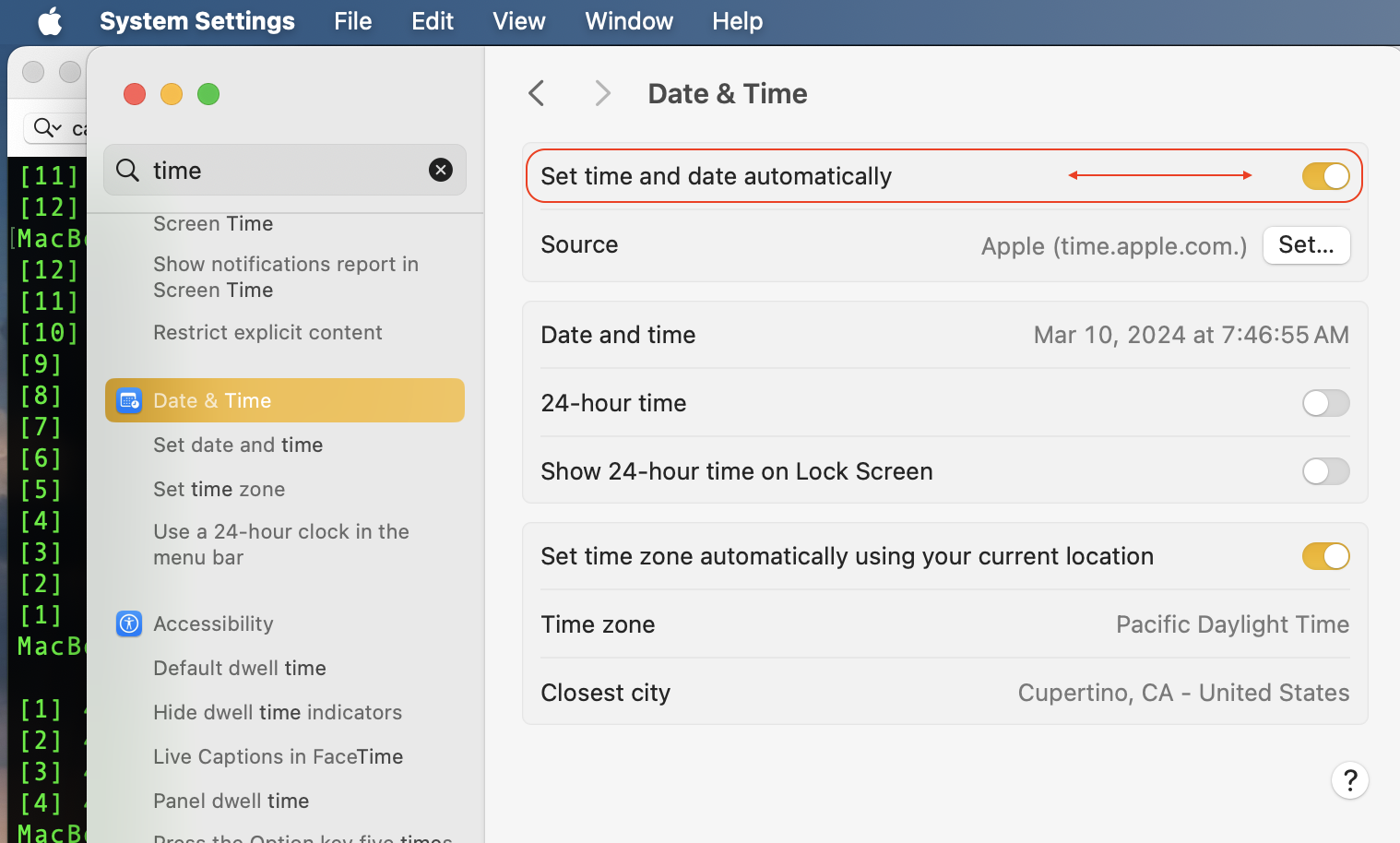


Please note—The current stable release of Sonoma including bug fixes, security updates is macOS 14.4

Keep your Mac up to date - Apple Support

Keep your Mac up to date - Apple Support


If no resolve for your issue from the Terminal.app copy & paste:

sudo rm /var/db/timed/com.apple.timed.plist


this will remove the plist if corrupt . reboot and compare your results


(note—your psswd will not echo on screen, type it in any way use the enter\return key to proceed.)




1 reply
Question marked as Top-ranking reply

Mar 10, 2024 7:51 AM in response to WillForce_kz

WillForce_kz wrote:

Time zone has not changed

On March 1, in Kazakhstan, the time zone was changed from +6 to +5. After the reboot, the system time on the computer changed, everything is fine. But when I install applications such as Notion and enter tasks, the saving time is incorrect, +1 hour later, as if the old +6 time zone was left. The time in hours on the screensaver is also shown incorrectly.


You can turn off "Automatically" this gives you the option to set manually.


Please note—The current stable release of Sonoma including bug fixes, security updates is macOS 14.4

Keep your Mac up to date - Apple Support

Keep your Mac up to date - Apple Support


If no resolve for your issue from the Terminal.app copy & paste:

sudo rm /var/db/timed/com.apple.timed.plist


this will remove the plist if corrupt . reboot and compare your results


(note—your psswd will not echo on screen, type it in any way use the enter\return key to proceed.)


This thread has been closed by the system or the community team. You may vote for any posts you find helpful, or search the Community for additional answers.

Setting time zone manually on my MacBook with macOS Sonoma

Welcome to Apple Support Community
A forum where Apple customers help each other with their products. Get started with your Apple Account.