No internal audio input device

Can't see any internal input device.

Speakers are OK, but no mic, how to fix it?

Yes, I tried to restart system many times.

If I connect external Audio device both input and output are recognised but still no internal mic.

Sestem up to date.

Mac Studio, macOS 14.3

Posted on Mar 10, 2024 1:14 AM

Reply
Question marked as Top-ranking reply

Posted on Mar 10, 2024 1:34 AM

Malbik wrote:

Can't see any internal input device.
Speakers are OK, but no mic, how to fix it?
Yes, I tried to restart system many times.
If I connect external Audio device both input and output are recognised but still no internal mic.
Sestem up to date.

Predicated on the user by-line " Mac Studio, macOS 14.3 " as the computer with this Sound Issue


The Mac Studio is a Headless computer


Depending on the exact model, it can use various External Displays using several types of connections.


According to the Technical Specifications of this computer it does have


Audio

  • Built-in speaker
  • 3.5 mm headphone jack with advanced support for high-impedance headphones
  • HDMI port supports multichannel audio output


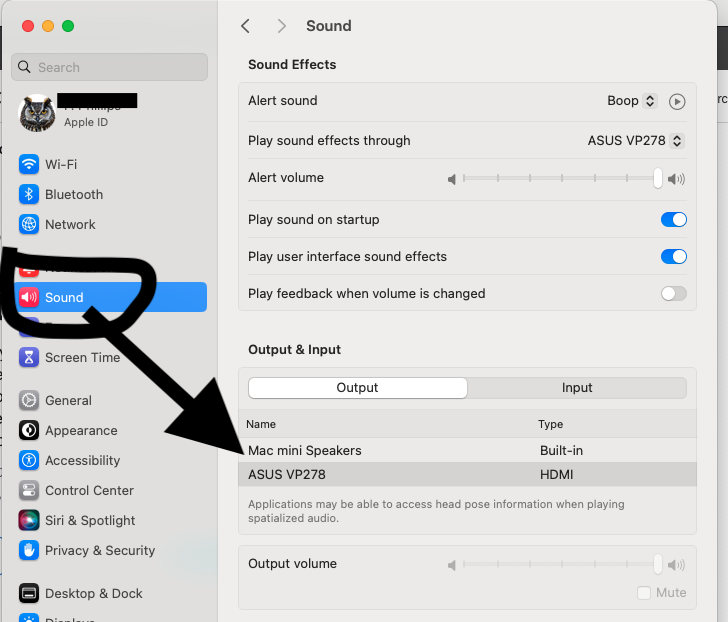
It is suggested System Setting >>> Sidebar >> Sound


The check if you have the Mac Studio Speaker is missing or just Not chosen for should output


Also, mach sure the " Play Sound effects through " matches " Output & Input " setting


Further - this computer does not have a Builtin Microphone


1 reply
Question marked as Top-ranking reply

Mar 10, 2024 1:34 AM in response to Malbik

Malbik wrote:

Can't see any internal input device.
Speakers are OK, but no mic, how to fix it?
Yes, I tried to restart system many times.
If I connect external Audio device both input and output are recognised but still no internal mic.
Sestem up to date.

Predicated on the user by-line " Mac Studio, macOS 14.3 " as the computer with this Sound Issue


The Mac Studio is a Headless computer


Depending on the exact model, it can use various External Displays using several types of connections.


According to the Technical Specifications of this computer it does have


Audio

  • Built-in speaker
  • 3.5 mm headphone jack with advanced support for high-impedance headphones
  • HDMI port supports multichannel audio output


It is suggested System Setting >>> Sidebar >> Sound


The check if you have the Mac Studio Speaker is missing or just Not chosen for should output


Also, mach sure the " Play Sound effects through " matches " Output & Input " setting


Further - this computer does not have a Builtin Microphone


This thread has been closed by the system or the community team. You may vote for any posts you find helpful, or search the Community for additional answers.

No internal audio input device

Welcome to Apple Support Community
A forum where Apple customers help each other with their products. Get started with your Apple Account.
