How to retrieve desktop folders from MacBook Pro's backup on High Sierra

Hi everybody, -


I can´t seem to see the desktop folders on the backup from my old mac (Macbook Pro 2012, running with High Sierra). Anybody who knows how to do this?

thanks ...


[Re-Titled by Moderator]

MacBook Pro 16″, macOS 14.3

Posted on Mar 18, 2024 3:30 AM

Reply
5 replies

Mar 18, 2024 7:50 AM in response to Birikit

Birikit wrote:

Hi everybody, -

I can´t seem to see the desktop folders on the backup from my old mac (Macbook Pro 2012, running with High Sierra). Anybody who knows how to do this?
thanks ...


Your Desktop folder lives in your User/home folder you can see it in Finder>Go>Go to Folder

~/


The content from the Finder>Go>Go to Folder copy and paste:

~/Desktop


ref: Restore items backed up with Time Machine on Mac - Apple Support


Mar 21, 2024 12:36 AM in response to leroydouglas

In the end, it was the data path through the finder that go it. I couldn´t retrieve it in a "Find folder" command, but I did discover a package callled "Desktop package" via my user. After having downloaded it (this is a retrieval from the ** of my old mac, which I don´t have anymore in my new mac), again I couldn´t open it, but throught data path of that folder, I finally got the subfolders I needed.


Thanks for your replies and your help!


Birgit

Mar 18, 2024 7:48 AM in response to Birikit

Time machine backups store the files saved on a particular date together in a folder of that date. Other files present on that backup date are represented only as links, to files stored elsewhere in the backup set. Searching through the sets of what was saved on a particular day for a particular file is an exercise in futility.


TimeMachine.app (not to be confused with Time machine preferences) is the included Application that allows you to see into the Time Machine Database, and shows you re-constructed versions of folder as of any given date still on the backup drive. once you find a folder with a given file of set of files, you can ask Time machine to retire that set of files to a location of your choosing.
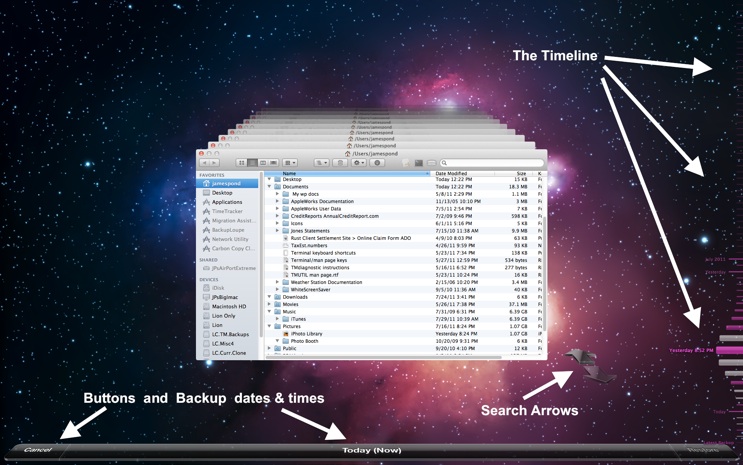


This would be MUCH easier using the computer and its backup together, rather than trying to get into backups for one computer from a different computer.


This thread has been closed by the system or the community team. You may vote for any posts you find helpful, or search the Community for additional answers.

How to retrieve desktop folders from MacBook Pro's backup on High Sierra

Welcome to Apple Support Community
A forum where Apple customers help each other with their products. Get started with your Apple Account.