
How to set up an automatic text reply on my iPhone 8?
with iPhone 8 and iOS 16.7.6
[Re-Titled by Moderator]
iPhone 6, iOS 12
with iPhone 8 and iOS 16.7.6
[Re-Titled by Moderator]
iPhone 6, iOS 12
That is available only when you are on the Driving Focus. Turn on Driving Focus automatically · Go to Settings > Focus, then tap Driving. · Tap While Driving under Turn on Automatically, then select one ...
Use Driving Focus on your iPhone to concentrate on the ...

Turn on Auto-Reply
With Auto-Reply, favourites and those you allow notifications from will receive an auto-reply when you have the Driving Focus turned on. They can choose to notify you anyway by sending "urgent" as an additional message.
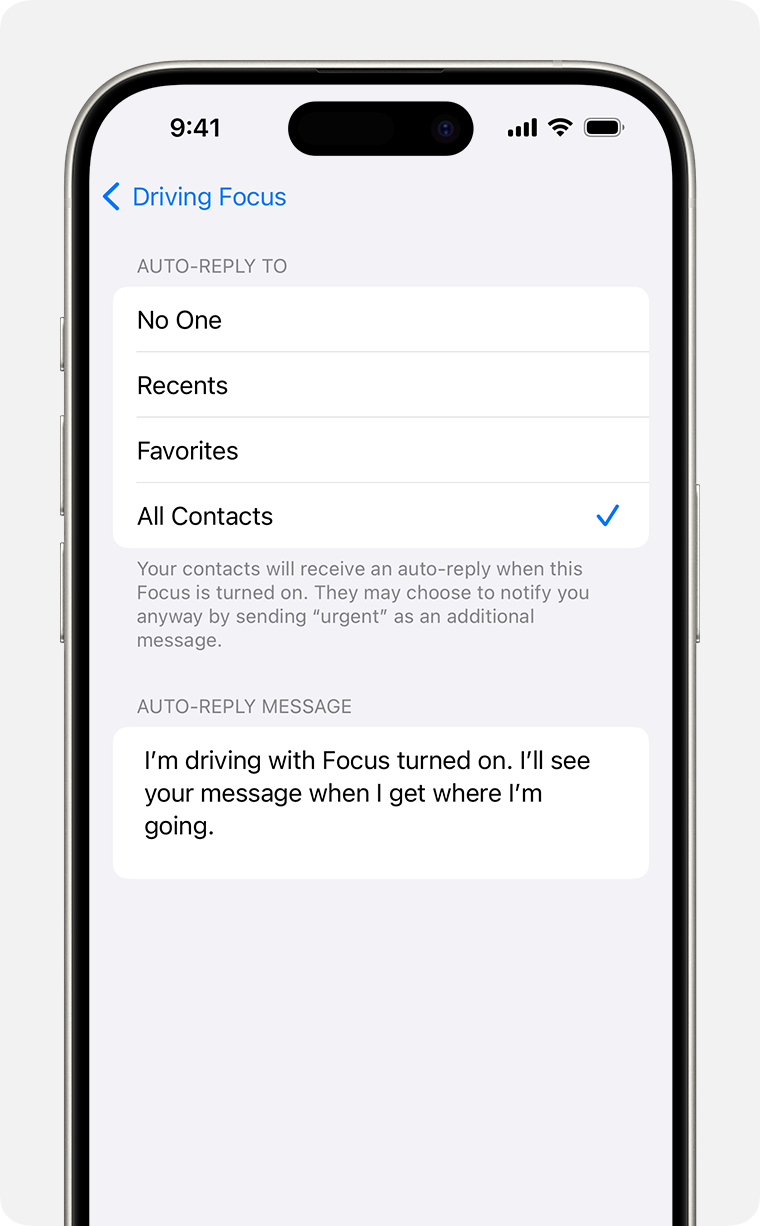
From here, you can customise the auto-reply message that people will receive when they message you while a Driving Focus is turned on.
That is available only when you are on the Driving Focus. Turn on Driving Focus automatically · Go to Settings > Focus, then tap Driving. · Tap While Driving under Turn on Automatically, then select one ...
Use Driving Focus on your iPhone to concentrate on the ...
Turn on Auto-Reply
With Auto-Reply, favourites and those you allow notifications from will receive an auto-reply when you have the Driving Focus turned on. They can choose to notify you anyway by sending "urgent" as an additional message.
From here, you can customise the auto-reply message that people will receive when they message you while a Driving Focus is turned on.
How to set up an automatic text reply on my iPhone 8?
