Hollywood_3zx wrote:
So wtf is this phenomena?
Remove your email account and set it up again
Make sure that all of your emails are there or make sure that your email is saved somewhere other than your device. On your device, go to Settings > Mail, then tap Accounts. Tap the email account that you want to remove. Tap Delete Account.
If you can't receive email on your iPhone, iPad, or iPod touch ...

If you can't send an email on your iPhone, iPad or iPod touch
- When you make an iOS or iPadOS backup in iCloud or iTunes, it backs up your mail settings, but not your email. ...
- Make sure your device is connected to the Internet.
- Check with your email service provider to find out if there's a service outage.
More items...•
If you can't send an email on your iPhone, iPad or iPod touch ...
Which email account are you referring to? Google, iCloud, AOL, Exchange, Outlook, Yahoo or any Other (Refer to the pic )below
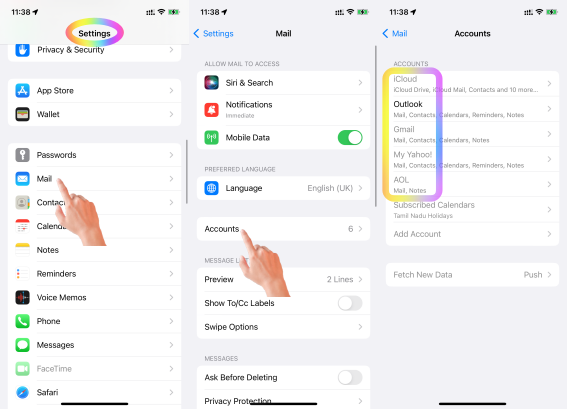
- Is this your corporate iPhone? Then please contact the system administrator of your corporate
- If it is your personal device, in that case, do you have any profile installed by your corporate/organisation/enterprise/School Management?
- Erase the profile added by you If you have installed a profile on your own --> Install or remove configuration profiles on iPhone - Apple ...
- Or please contact the system administrator of the organisation who provided the profile to you
It's crucial to emphasize that when you enable 2-step verification for your Outlook (Hotmail) account, you need to utilize a specially generated app password from Microsoft to access the same account through the iOS mail app. --> Manage app passwords for two-step verification
Using an app password is essential if you enabled two-step verification for your Outlook (Hotmail) account. Two-step verification adds an extra layer of security by requiring a code from your phone or authenticator app in addition to your password when signing in. Regular passwords won't work with apps that don't support two-step verification, which is why Microsoft created app passwords. Just generate an app password for your iPhone's mail app and you'll be good to go!
Here are some additional points you might find helpful:
- You can generate app passwords through your Microsoft account security settings.
- App passwords are unique and only work for the specific app they're created for.
- Consider creating strong and unique passwords for your Microsoft account and other online accounts.
This applies to Google, Yahoo and Aol too.
You may have enabled two step verification on Google --> Sign in with App Passwords - Google Account Help
You may have enabled Authenticator for Yahoo --> Generate and manage third-party app passwords | Yahoo Help
You may have activate 2-step verification for Aol --> Create and manage third-party app passwords - AOL Help

