It is highly unlikely that skilled hackers would choose to invest their time and resources into monitoring an unknown person's device and tapping or clicking randomly. Firstly, hacking requires a certain level of expertise, knowledge, and tools, which can be quite valuable assets. A proficient hacker typically has a specific agenda, such as gaining unauthorized access to sensitive information, financial gain, or advancing their own personal or political interests.
Monitoring your iPhone would not yield any substantial benefits for a hacker. It would be a trivial and unproductive pursuit that lacks any significant value or purpose. Additionally, hacking activities are often motivated by tangible gains, such as financial rewards, access to valuable data, or the ability to manipulate systems for personal or ideological motives. Monitoring someone's device or tapping or clicking randomly would not offer any meaningful advantage or serve a legitimate purpose but pranks would.
Moreover, hacking is an inherently risky activity that can have serious legal consequences. Engaging in unauthorized access, surveillance, or invasion of privacy is illegal in most jurisdictions. Skilled hackers typically operate with more calculated precision, targeting high-value entities or systems that present greater opportunities for achieving their objectives. The risks associated with hacking a device would far outweigh any potential benefits, making it an illogical and unprofitable endeavor.
In summary, hackers typically focus their efforts on more lucrative targets that align with their motives and offer substantial rewards. Investing time and resources into monitoring a device and tapping or clicking randomly would be an inefficient and unproductive use of their skills, knowledge, and tools.
To protect your devices and personal information, it is crucial to follow good security practices such as using strong and unique passwords, keeping your software up to date, being cautious with email attachments and links, and ensuring that your devices have appropriate security measures in place.

On your iPhone, iPad, or iPod touch: Go to Settings > your name > Password & Security.Tap Turn On Two-Factor Authentication. Then tap Continue and follow the onscreen instructions.
Two-factor authentication for Apple ID - Apple Support (IN)
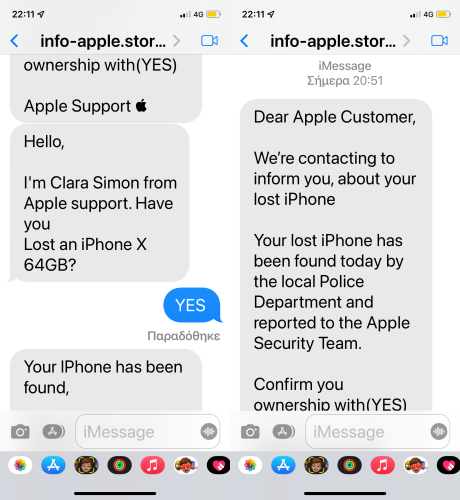
Beware of Phishing!: Be careful and be smart to --> Recognize and avoid phishing messages, phony support calls ...
It (Phishing) may appear as the image given below.
Gain control of your Apple ID
If your Apple ID password has been changed by someone else, reset your password. Go to appleid.apple.com to update any personal or security information that isn't correct or that you don't recognize.27-Mar-2023
If you think your Apple ID has been compromised



