Screen time app limit

I was setting up App screen limit for Instagram then once I clicked Instagram from the app list I’ve set the time limit for 30 minutes but the option for add limit was still working then I added one more limit of 1 hr then there are 2 screen time limits for the same app I.e Instagram one for 30 minutes and one 1hr but after the 30 minutes the Instagram app blocked. Then what is the point of 2 limits? Pls can anobody explain 🙏

iPhone 15 Plus

Posted on Apr 8, 2024 10:38 PM

Reply
Question marked as Top-ranking reply

Posted on Apr 9, 2024 1:28 AM

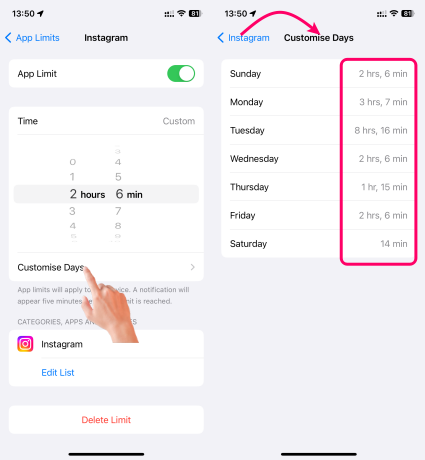
You can set app limits for individual days of the week and vary the time allowed for an app, as demonstrated in the image below.

You're right, there's no point in having two limits set for the same app in Screen Time if the shorter limit takes effect first. Here's what's happening:

  • Screen Time applies the strictest time limit you've set for an app.
  • In your case, even though you set a 1-hour limit later, the 30-minute limit you set first is the one that's enforced.


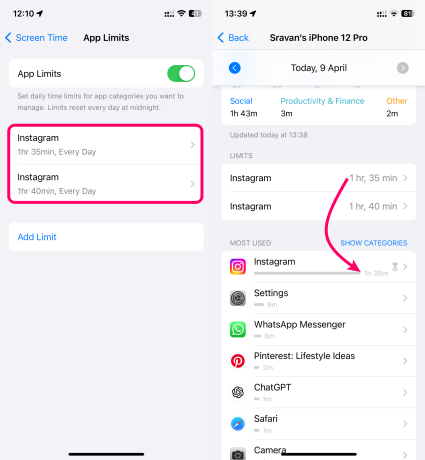
See the pic below (1 Hour 35 Mins and 1 Hour 40 Mins) The App limit exceeded after 1 hour and 35 Mins

There are two ways to address this:

  1. Remove the extra limit: Go back to Screen Time settings and remove the 1-hour limit you set for Instagram. This ensures only the 30-minute limit is active.
  2. Set the desired limit: If you want a 1-hour limit, remove the 30-minute limit and set a new one-hour limit for 1 hour.


Following these steps ensures that only the desired time limit applies to your Instagram usage.

1 reply
Question marked as Top-ranking reply

Apr 9, 2024 1:28 AM in response to Amanchahal_006

You can set app limits for individual days of the week and vary the time allowed for an app, as demonstrated in the image below.


You're right, there's no point in having two limits set for the same app in Screen Time if the shorter limit takes effect first. Here's what's happening:

  • Screen Time applies the strictest time limit you've set for an app.
  • In your case, even though you set a 1-hour limit later, the 30-minute limit you set first is the one that's enforced.


See the pic below (1 Hour 35 Mins and 1 Hour 40 Mins) The App limit exceeded after 1 hour and 35 Mins


There are two ways to address this:

  1. Remove the extra limit: Go back to Screen Time settings and remove the 1-hour limit you set for Instagram. This ensures only the 30-minute limit is active.
  2. Set the desired limit: If you want a 1-hour limit, remove the 30-minute limit and set a new one-hour limit for 1 hour.


Following these steps ensures that only the desired time limit applies to your Instagram usage.

This thread has been closed by the system or the community team. You may vote for any posts you find helpful, or search the Community for additional answers.

Screen time app limit

Welcome to Apple Support Community
A forum where Apple customers help each other with their products. Get started with your Apple Account.