iCloud contacts are glitchy

Icloud contacts are so glitchy random words next to phone numbers contacts duplicating and deleting contacts on mac dosnt include phone feild causing glitches and pfp photos not syncing and when i click on the profiles messages just crashes


[Re-Titled by Moderator]

Posted on Apr 12, 2024 5:57 PM

Reply
2 replies

Apr 13, 2024 12:11 AM in response to Athannk

If you are unable to find your contacts which were stored on iCloud, then try this --> Restore contacts, calendars, bookmarks, and more using ...


Check if the email account has been removed from the iOS mail app.

Add the email account that stores your contacts in the IOS mail app and enable Contacts.



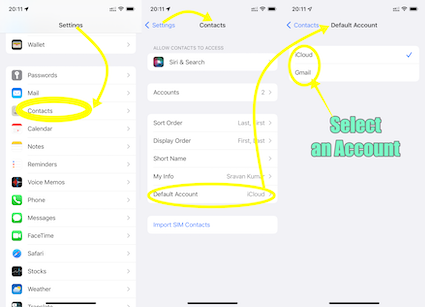
What is your default Contacts account? If none, please add an email account and enable contacts.


See the pic below


Unlike some Android devices, contacts are neither stored locally on an iPhone nor in SIM. They are synced to an email account that you had Google, iCloud, AOL, Exchange, Outlook, Yahoo or any Other


If you have a corporate email account added through a profile on your device, please check with your organization's system administrator.


Apr 13, 2024 12:11 AM in response to Athannk

You may have stored the same contacts in multiple email accounts.

Either remove the contacts from the rarely used email account or disable contacts from the rarely used mail account in the iOS Mail app.


Unlike some Android devices, contacts are neither stored locally on an iPhone nor in SIM. They are synced to an email account that you had Google, iCloud, AOL, Exchange, Outlook, Yahoo or any Other


This thread has been closed by the system or the community team. You may vote for any posts you find helpful, or search the Community for additional answers.

iCloud contacts are glitchy

Welcome to Apple Support Community
A forum where Apple customers help each other with their products. Get started with your Apple Account.