Please look at your settings...
Repeated Calls: If someone calls you twice within three minutes, the second call isn't silenced.
Please see the pic below which is self-explanatory
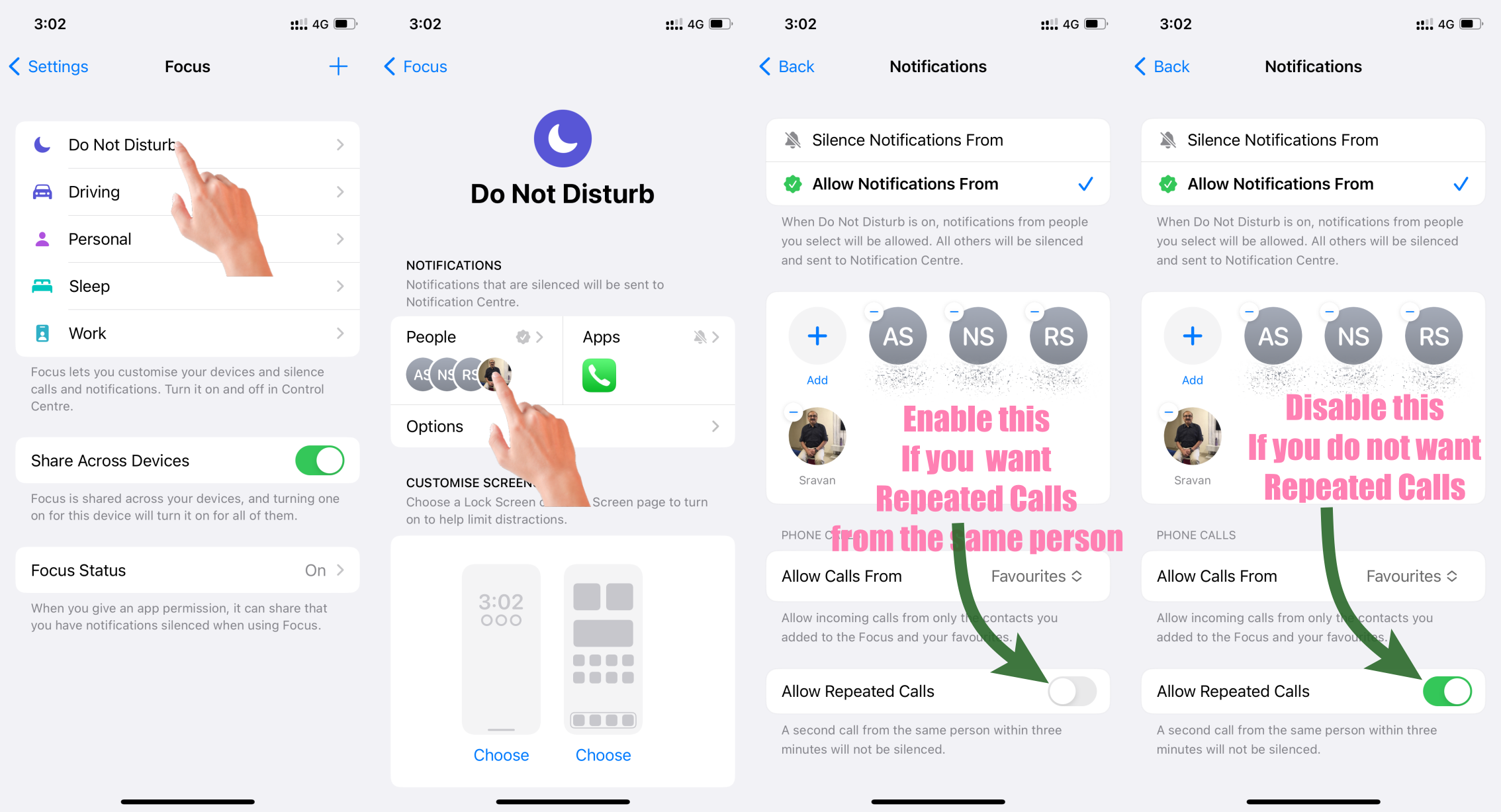
- You have allowed certain notifications to bypass Do Not Disturb. By default, phone calls, text messages, and FaceTime calls will still ring or vibrate when Do Not Disturb is on. However, you can also allow other notifications to bypass Do Not Disturb by going to Settings > Focus> Do Not Disturb > Allow Notifications and selecting the apps and contacts that you want to be able to notify you even when Do Not Disturb is turned on.
- You have enabled System Haptics. System Haptics provides haptic feedback for certain actions, such as when you touch and hold an app icon or scroll through a list. Even if Do Not Disturb is on, your iPhone will still vibrate for System Haptics if you have enabled it. To disable System Haptics, go to Settings > Sounds & Haptics and turn off System Haptics.

