Non secure websites

Hi, I have been a target of blackmail via email, as I have visited a website that was not secure. I used to check for the https before accessing, but didn’t on a couple of occasions. I noticed that Safari did not warn me when I accessed a non secure website from my iPhone. How do I correct this please.


Thank you

Marilyn

Windows

Posted on Apr 14, 2024 3:18 PM

Reply
Question marked as Top-ranking reply

Posted on Apr 14, 2024 7:49 PM

There is no harm in merely loading a nonsecure website, but you should not use it to divulge any personal information such as an email address.


Similarly, the mere disclosure of an email address is not in itself harmful. If you should receive a harassing email dispose of it as you would any piece of junk mail.


If that communication were to breach the threshold of criminal activity such as blackmail, then treat it as such. You might want to consult an attorney / law enforcement etc. That goes beyond any technological solution.


Apple provides the following information: If you see a 'Not Secure'' warning while browsing with Safari - Apple Support


Excerpt:


  • The website is unencrypted and asking you to enter password or credit card information.


Example of an unencrypted website:
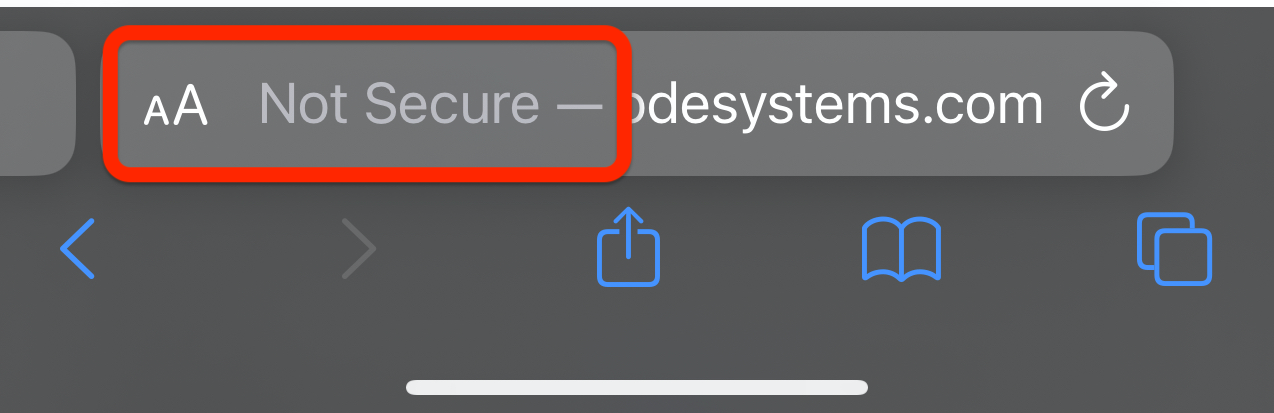


If you attempt to tap or click an element in that page to "sign in" or otherwise provide some information, that warning becomes more prominent. But you can just as easily provide personal information to a website that is completely secure, and it won't show any warning. The information you provide could still be used in an attempt to harass or defraud you in the exact same manner.


7 replies
Question marked as Top-ranking reply

Apr 14, 2024 7:49 PM in response to MissyE25

There is no harm in merely loading a nonsecure website, but you should not use it to divulge any personal information such as an email address.


Similarly, the mere disclosure of an email address is not in itself harmful. If you should receive a harassing email dispose of it as you would any piece of junk mail.


If that communication were to breach the threshold of criminal activity such as blackmail, then treat it as such. You might want to consult an attorney / law enforcement etc. That goes beyond any technological solution.


Apple provides the following information: If you see a 'Not Secure'' warning while browsing with Safari - Apple Support


Excerpt:


  • The website is unencrypted and asking you to enter password or credit card information.


Example of an unencrypted website:


If you attempt to tap or click an element in that page to "sign in" or otherwise provide some information, that warning becomes more prominent. But you can just as easily provide personal information to a website that is completely secure, and it won't show any warning. The information you provide could still be used in an attempt to harass or defraud you in the exact same manner.

This thread has been closed by the system or the community team. You may vote for any posts you find helpful, or search the Community for additional answers.

Non secure websites

Welcome to Apple Support Community
A forum where Apple customers help each other with their products. Get started with your Apple Account.