Where do I locate the Recently Deleted Notes App folder to try to recover an important note?

Hi, I deleted an important page in notes today, I want to retrieve it, but can’t find Trash or Recently Deleted buttons; my cell is XS Max! Thnx


Can’t find deleted notes in my IPhone X S Max. Thanks


[Re-Titled by Moderator]

Posted on Apr 21, 2024 10:02 AM

Reply
Question marked as Top-ranking reply

Posted on Apr 21, 2024 10:09 AM

Check your Recently Deleted folder

If you store your notes on iCloud, check your Recently Deleted folder:

  1. Open Notes, then tap the back icon until you see your Folders list.
  2. Tap Recently Deleted and search for your note.
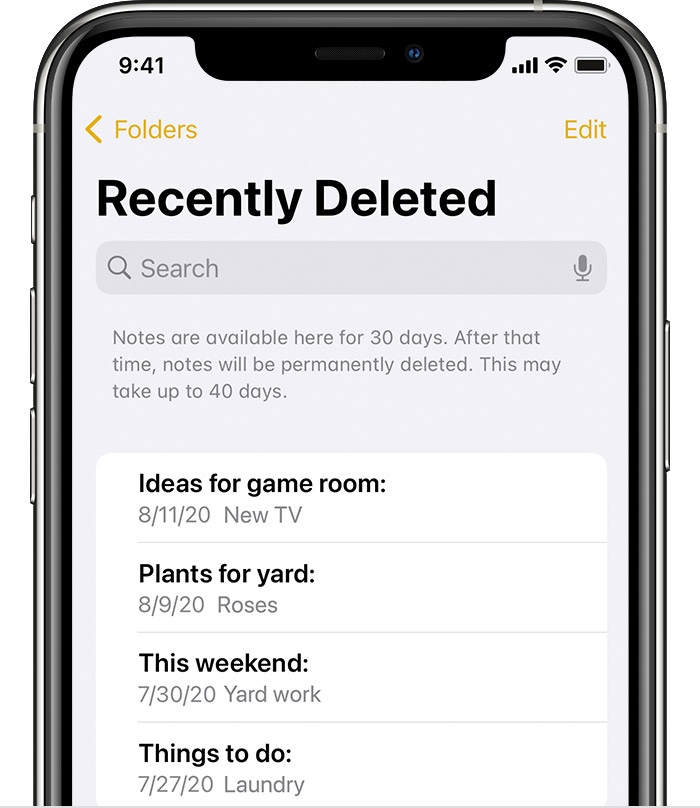
If you find your note in Recently Deleted or in another folder, you can move it:

  1. In the Notes list, tap Edit.
  2. Select the note that you want to move.
  3. Tap Move, then select the folder you want to move it to.

If you use notes with another service, like Gmail or Yahoo, check the Trash folder of that account in the Mail app. If you delete a note from the Notes app, your third-party account will usually keep it in the Trash folder. To recover a note from the Trash folder, you need to copy and paste the note to a new note in the Notes app.


1 reply
Question marked as Top-ranking reply

Apr 21, 2024 10:09 AM in response to samir186

Check your Recently Deleted folder

If you store your notes on iCloud, check your Recently Deleted folder:

  1. Open Notes, then tap the back icon until you see your Folders list.
  2. Tap Recently Deleted and search for your note.

If you find your note in Recently Deleted or in another folder, you can move it:

  1. In the Notes list, tap Edit.
  2. Select the note that you want to move.
  3. Tap Move, then select the folder you want to move it to.

If you use notes with another service, like Gmail or Yahoo, check the Trash folder of that account in the Mail app. If you delete a note from the Notes app, your third-party account will usually keep it in the Trash folder. To recover a note from the Trash folder, you need to copy and paste the note to a new note in the Notes app.


This thread has been closed by the system or the community team. You may vote for any posts you find helpful, or search the Community for additional answers.

Where do I locate the Recently Deleted Notes App folder to try to recover an important note?

Welcome to Apple Support Community
A forum where Apple customers help each other with their products. Get started with your Apple Account.