Is there really no way to alphabetize a selection in Pages?

Is there really no way to alphabetize a selection in Pages? I have a small list of things compiled over time as part of a larger document, and I want to alphabetize just the selection like you can in Word


[Re-Titled by Moderator]

Posted on May 6, 2024 12:43 PM

Reply
Question marked as Top-ranking reply

Posted on May 6, 2024 1:45 PM

Pages is not a clone of MS Word and has no inherent sorting capability outside of table columns.


I wrote an Apple Shortcut named List Processing. You select your text to sort and then right-click on it to access the Services menu > List Processing. The Shortcut presents a dialog providing three different options:
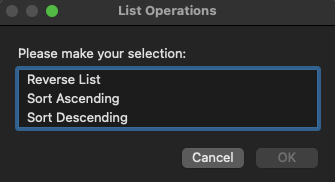


Based on your selection above, the current text list in Pages (or any other text-based application) will immediately apply the sort in place. You can immediately undo the sort operation with a cmd+Z keystroke.


This shortcut should work on Monterey, Ventura, and Sonoma.


Tested: Pages v14, Word v16.84 on macOS Sonoma 14.4.1.


Installation


You can click on this link to the List Processing Shortcut and you will be prompted for permission to install the Shortcut. Do that. You can then use it immediately as outlined above.


This is a lightweight alternative to installing the free WordService collection of services from the Mac App Store which also features a sort ascending/descending service.

2 replies
Question marked as Top-ranking reply

May 6, 2024 1:45 PM in response to Wizardofvoz

Pages is not a clone of MS Word and has no inherent sorting capability outside of table columns.


I wrote an Apple Shortcut named List Processing. You select your text to sort and then right-click on it to access the Services menu > List Processing. The Shortcut presents a dialog providing three different options:


Based on your selection above, the current text list in Pages (or any other text-based application) will immediately apply the sort in place. You can immediately undo the sort operation with a cmd+Z keystroke.


This shortcut should work on Monterey, Ventura, and Sonoma.


Tested: Pages v14, Word v16.84 on macOS Sonoma 14.4.1.


Installation


You can click on this link to the List Processing Shortcut and you will be prompted for permission to install the Shortcut. Do that. You can then use it immediately as outlined above.


This is a lightweight alternative to installing the free WordService collection of services from the Mac App Store which also features a sort ascending/descending service.

This thread has been closed by the system or the community team. You may vote for any posts you find helpful, or search the Community for additional answers.

Is there really no way to alphabetize a selection in Pages?

Welcome to Apple Support Community
A forum where Apple customers help each other with their products. Get started with your Apple Account.