Recovery mode loop

So everything started when my Iphone 12 was flashing after I previously fixed the screen a month ago (I do have the bill) afterwards for an hour until it started to act normal again while the phone was flashing it was automatically turning off by itself and showing itself to the home screen.


After everything went away my power button stopped working and then I decided to restart it using the AssistiveTouch accessibility afterwards my phone went into Recovery mode by itself whilst I tried to get it out of recovery mood I tried Itunes restore, force restart, delete all data also usage of 3rd party apps from Computer/Mac to get through it and it never worked.

What should I do ?

iPhone 12, iOS 17

Posted on May 12, 2024 10:07 PM

Reply
Question marked as Top-ranking reply

Posted on May 13, 2024 1:16 AM

Return to the Apple Authorised Service Center where you got the repair done.


Kindly reach out to the Store/Individual/Agency from whom you serviced your iPhone. They would be best equipped to answer the cause of the flasjing as described by you.



Battery and Display and service history

With iPhone 11 models and later, excluding iPhone SE (2nd and 3rd generation), using iOS 15.2 and later, you can go to Settings > General > About for the parts and service history of your iPhone. You can also find out if the display has been replaced. If the repair was done using genuine Apple parts and processes, "Genuine Apple Part" will appear next to Display.



  • An Unknown Part  message will appear if the display installation is incomplete or if the display:
  • Was replaced with a nongenuine display
  • Was already used or installed in another iPhone
  • Isn't functioning as expected


An additional message might appear that says "Apple has updated the device information for this iPhone." This means that Apple has updated the device information maintained for this iPhone for service needs, safety analysis, and to improve future products. 


If your iPhone's parts have been previously replaced, repaired, or serviced by an unauthorized service provider, it's worth noting that Apple may decline to provide service for your device. The decision to refuse service will depend on the specific components that were affected by the unauthorized service.


Get a Genius Bar Reservation and Apple Support Options - Apple


Contact Genius Bar.

Manage Reservations - My Reservations - Apple


1 reply
Question marked as Top-ranking reply

May 13, 2024 1:16 AM in response to darhyo

Return to the Apple Authorised Service Center where you got the repair done.


Kindly reach out to the Store/Individual/Agency from whom you serviced your iPhone. They would be best equipped to answer the cause of the flasjing as described by you.


Battery and Display and service history

With iPhone 11 models and later, excluding iPhone SE (2nd and 3rd generation), using iOS 15.2 and later, you can go to Settings > General > About for the parts and service history of your iPhone. You can also find out if the display has been replaced. If the repair was done using genuine Apple parts and processes, "Genuine Apple Part" will appear next to Display.
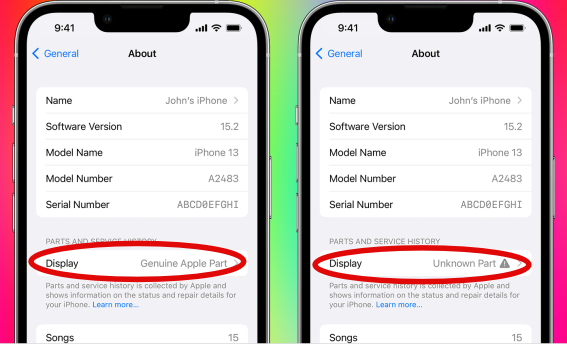


  • An Unknown Part  message will appear if the display installation is incomplete or if the display:
  • Was replaced with a nongenuine display
  • Was already used or installed in another iPhone
  • Isn't functioning as expected


An additional message might appear that says "Apple has updated the device information for this iPhone." This means that Apple has updated the device information maintained for this iPhone for service needs, safety analysis, and to improve future products. 


If your iPhone's parts have been previously replaced, repaired, or serviced by an unauthorized service provider, it's worth noting that Apple may decline to provide service for your device. The decision to refuse service will depend on the specific components that were affected by the unauthorized service.


Get a Genius Bar Reservation and Apple Support Options - Apple


Contact Genius Bar.

Manage Reservations - My Reservations - Apple


This thread has been closed by the system or the community team. You may vote for any posts you find helpful, or search the Community for additional answers.

Recovery mode loop

Welcome to Apple Support Community
A forum where Apple customers help each other with their products. Get started with your Apple Account.