I cannot add cards to Apple Pay

I have iPhone SE and iOS is up to date (17.5.1). I've been trying to add my Fidelity credit card and debit card to Apple Pay but no success. Error message says 'contact my bank.' So I called Fidelity and they told me they could not see the request. So I'm stuck. I updated Payment and Shipping info, but no help either. Any other ideas?

iPhone SE (2nd generation)

Posted on May 24, 2024 7:40 PM

Reply
Question marked as Top-ranking reply

Posted on May 25, 2024 10:05 AM

Ok, you have passed the initial identification process. That happens before the terms and conditions are available from the bank.


>>If a terms and conditions ID is returned with the Check Card process, Apple downloads and displays the terms and conditions of the card issuer to the user. If the user accepts the terms and conditions, Apple sends the ID of the terms that were accepted as well as the CVV to the Link and Provision process. Additionally, as part of the Link and Provision process, Apple shares information from the device with the card issuer or network. This includes information about (a) the user’s iTunes and App Store account activity (for example, whether the user has a long history of transactions within iTunes), (b) the user’s device (for example, the phone number, name and model of the user’s device plus any companion Apple device necessary to set up Apple Pay), and (c) the user’s approximate location at the time the user adds their card (if the user has Location Services enabled). Using this information, the card issuer determines whether to approve adding the card to Apple Pay.<<


Adding credit or debit cards to Apple Pay - Apple Support


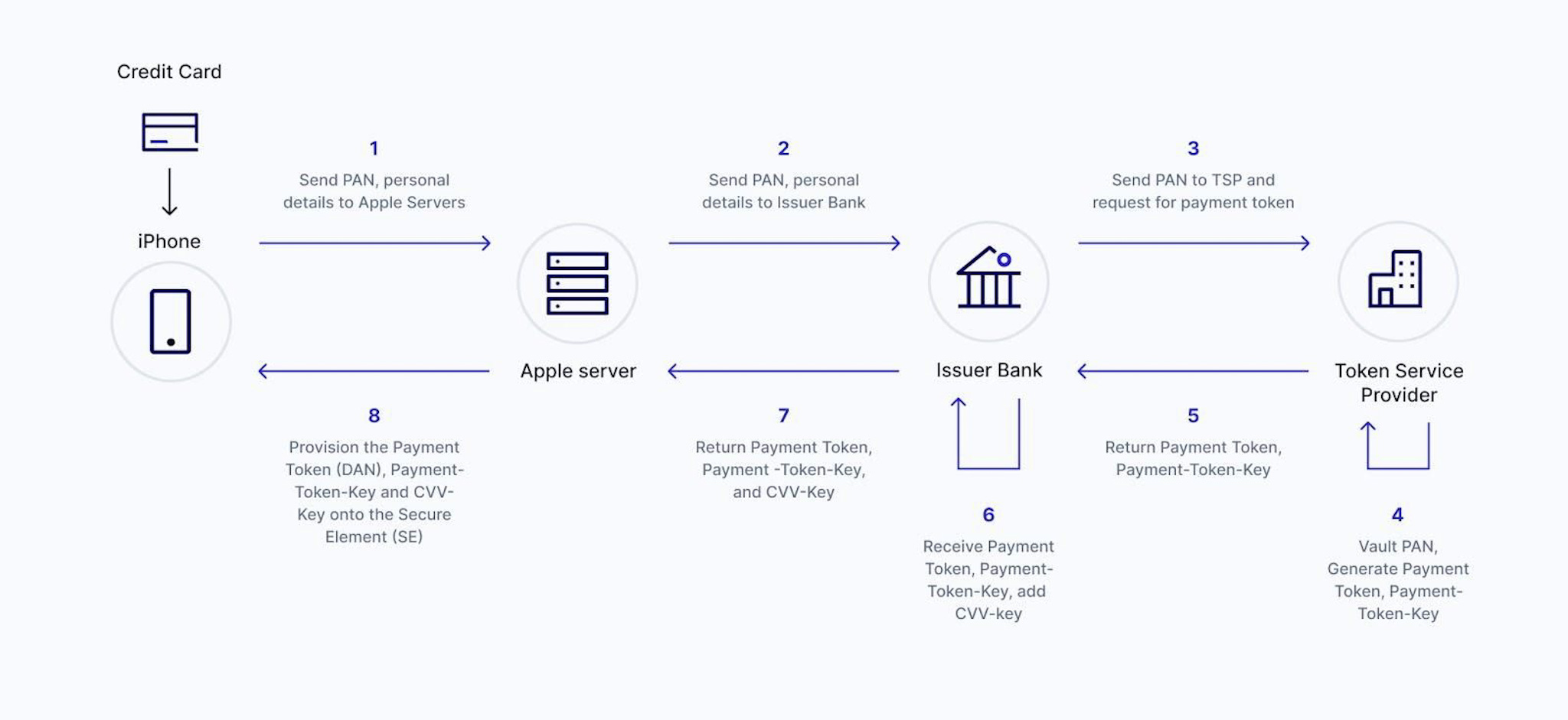
If you bank hasn’t seen the request, it’s because they are using a Token Service Provide (TSP). The TSP is typically the Payment Network Operator (PNO — MasterCard, Visa etc.). The card issuer would likely see the request so, the TSP may be blocking the card from being added. Your bank will need to contact the TSP.


You can try bypassing some of the process if the banks app or website allows you to add the card directly to the Wallet. Some banks, as a service to their customers, can <push> the card to the Wallet, but only after additional verification steps.


9 replies
Question marked as Top-ranking reply

May 25, 2024 10:05 AM in response to breezycoolday

Ok, you have passed the initial identification process. That happens before the terms and conditions are available from the bank.


>>If a terms and conditions ID is returned with the Check Card process, Apple downloads and displays the terms and conditions of the card issuer to the user. If the user accepts the terms and conditions, Apple sends the ID of the terms that were accepted as well as the CVV to the Link and Provision process. Additionally, as part of the Link and Provision process, Apple shares information from the device with the card issuer or network. This includes information about (a) the user’s iTunes and App Store account activity (for example, whether the user has a long history of transactions within iTunes), (b) the user’s device (for example, the phone number, name and model of the user’s device plus any companion Apple device necessary to set up Apple Pay), and (c) the user’s approximate location at the time the user adds their card (if the user has Location Services enabled). Using this information, the card issuer determines whether to approve adding the card to Apple Pay.<<


Adding credit or debit cards to Apple Pay - Apple Support


If you bank hasn’t seen the request, it’s because they are using a Token Service Provide (TSP). The TSP is typically the Payment Network Operator (PNO — MasterCard, Visa etc.). The card issuer would likely see the request so, the TSP may be blocking the card from being added. Your bank will need to contact the TSP.


You can try bypassing some of the process if the banks app or website allows you to add the card directly to the Wallet. Some banks, as a service to their customers, can <push> the card to the Wallet, but only after additional verification steps.


This thread has been closed by the system or the community team. You may vote for any posts you find helpful, or search the Community for additional answers.

I cannot add cards to Apple Pay

Welcome to Apple Support Community
A forum where Apple customers help each other with their products. Get started with your Apple Account.