iPad streaming says “unable to connect to Samsung 65. Why?
When I try to stream to my Samsung tv with my iPad Pro I get a ‘cannot connect’ message. However my iPhone streams same content perfectly!
What to do?
When I try to stream to my Samsung tv with my iPad Pro I get a ‘cannot connect’ message. However my iPhone streams same content perfectly!
What to do?
While it may appear counterintuitive, your WiFi Router may be unexpectedly blocking AirPlay for some devices - while successfully passing traffic for others.
A restart of your WiFi Router may clear the issue.
To restart you home router, disconnect power - then wait at least 30 seconds before restarting. When you router has rebooted (which may take several minutes), force-restart your iPad:
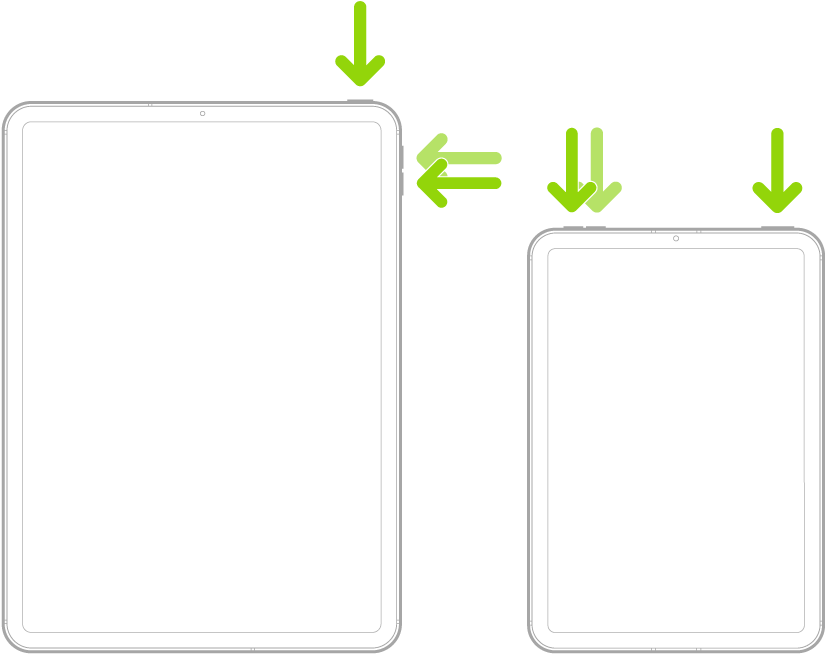
Force restart iPad (models with Face ID or with Touch ID in the top button)
If your iPad doesn’t have the Home button, do the following:
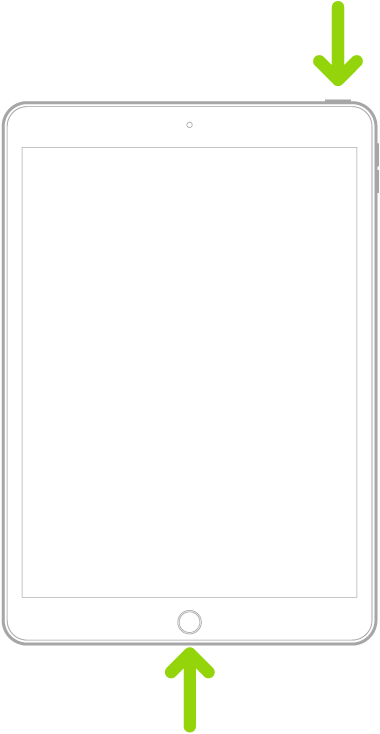
Force restart iPad (models with the Home button)
Press and hold the top button and the Home button at the same time. When the Apple logo appears, release both buttons.
While it may appear counterintuitive, your WiFi Router may be unexpectedly blocking AirPlay for some devices - while successfully passing traffic for others.
A restart of your WiFi Router may clear the issue.
To restart you home router, disconnect power - then wait at least 30 seconds before restarting. When you router has rebooted (which may take several minutes), force-restart your iPad:
Force restart iPad (models with Face ID or with Touch ID in the top button)
If your iPad doesn’t have the Home button, do the following:
Force restart iPad (models with the Home button)
Press and hold the top button and the Home button at the same time. When the Apple logo appears, release both buttons.
iPad streaming says “unable to connect to Samsung 65. Why?