Email attachments should not open automatically - ipad

It surely would be nice if Apple would have a feature where the attachments do not automatically open, when the previous email is deleted and the next one moves up.

I had some pdf open and an hour later my credit card was compromised.

I have since tried unsuccessfully to disable this…

iPad Pro, iPadOS 17

Posted on Jun 13, 2024 12:07 PM

Reply
Question marked as Top-ranking reply

Posted on Jun 13, 2024 4:39 PM

Apple’s default Mail settings should initially block download of embedded content. Check your settings:

Settings > Mail > [Messages] Privacy Protection > Block All Remote Content - set to ON


This security measure is intended to inhibit loading of potentially unsafe content - until such time as the recipient has had opportunity to review the email and determine whether or not the received email is from a trusted or expected source. Where images and other content have not been dowloaded, you may see a message at the top of the received email. For example…:



This behaviour has a secondary benefit. When accessing your email over a slow internet connection, the majority of your email messages can be quickly downloaded - without having to wait for bandwidth-hogging download of images and large attachments. This material can be selectively downloaded, if required, after reviewing the body text of the associated email message.


This screenshot shows the relevant setting in its more secure state:
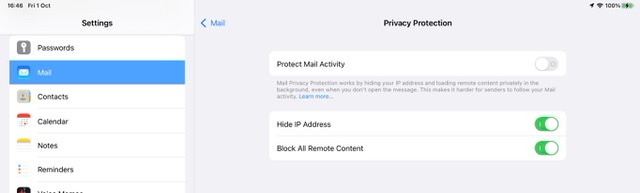


If settings are left is their more secure state, embedded content can be simply loaded if appropriate using the Load All Iimages button:



it is perhaps worthwhile to understand the reasoning for the default behaviour - whereby embedded images and otjer content are not initially loaded…


By delaying loading of embedded content until the body text is verified by the recipient, potentially malicious content and trackers are not loaded before the recipient has had opportunity to verify that the email is from an expected source or sender - or, for unsolicited email, taken the positive decision to download all content. Most legitimate email has adequate “body” to establish whether of not the email is (a) legitimate and (b) of interest to the sender.


If instead all content is loaded by default, malicious content is given opportunity to run malicious code or attempt a malware exploit. Similarly, images that contain (or are themselves) trackers will notify the actor that the email has been opened. At the very least, the sender of a broadcast phishing email is notified of a “live” mail account and recipient.



1 reply
Question marked as Top-ranking reply

Jun 13, 2024 4:39 PM in response to D-ent

Apple’s default Mail settings should initially block download of embedded content. Check your settings:

Settings > Mail > [Messages] Privacy Protection > Block All Remote Content - set to ON


This security measure is intended to inhibit loading of potentially unsafe content - until such time as the recipient has had opportunity to review the email and determine whether or not the received email is from a trusted or expected source. Where images and other content have not been dowloaded, you may see a message at the top of the received email. For example…:


This behaviour has a secondary benefit. When accessing your email over a slow internet connection, the majority of your email messages can be quickly downloaded - without having to wait for bandwidth-hogging download of images and large attachments. This material can be selectively downloaded, if required, after reviewing the body text of the associated email message.


This screenshot shows the relevant setting in its more secure state:


If settings are left is their more secure state, embedded content can be simply loaded if appropriate using the Load All Iimages button:


it is perhaps worthwhile to understand the reasoning for the default behaviour - whereby embedded images and otjer content are not initially loaded…


By delaying loading of embedded content until the body text is verified by the recipient, potentially malicious content and trackers are not loaded before the recipient has had opportunity to verify that the email is from an expected source or sender - or, for unsolicited email, taken the positive decision to download all content. Most legitimate email has adequate “body” to establish whether of not the email is (a) legitimate and (b) of interest to the sender.


If instead all content is loaded by default, malicious content is given opportunity to run malicious code or attempt a malware exploit. Similarly, images that contain (or are themselves) trackers will notify the actor that the email has been opened. At the very least, the sender of a broadcast phishing email is notified of a “live” mail account and recipient.


This thread has been closed by the system or the community team. You may vote for any posts you find helpful, or search the Community for additional answers.

Email attachments should not open automatically - ipad

Welcome to Apple Support Community
A forum where Apple customers help each other with their products. Get started with your Apple Account.