Ipad Pro 2nd Gen Wont Charge After Update

My ipad did an automatic update and afterwards it wont charge. Here is the kicker. It wont charge via USB C or Via the Official Apple Magic Keyboard which charges via a different method than USB C. This almost undoubtedly proves that Apples update has bricked my Ipad pro. Anyone had any luck with getting apple to help with this? I notice tons of posts where others have the same issue and they seem to just be out of luck.

iPad mini, iOS 10

Posted on Jul 9, 2024 6:14 PM

Reply
Question marked as Top-ranking reply

Posted on Jul 10, 2024 11:47 AM

If you can, try charging your iPad from a USB Type-A power source instead of USB-C - noting that the power source must be able to source at least 12W (i.e., 2.4A @5V). This may kick-start the charging process.


Otherwise, try a forced-restart of your iPad - as this will often clear an isolated software issue:


Force restart iPad (models with Face ID or with Touch ID in the top button)

If your iPad doesn’t have the Home button, do the following:

  1. Press and quickly release the volume button nearest to the top button.
  2. Press and quickly release the volume button farthest from the top button.
  3. Press and hold the top button.
  4. When the Apple logo appears, release the top button.



Force restart iPad (models with the Home button)

Press and hold the top button and the Home button at the same time. When the Apple logo appears, release both buttons.
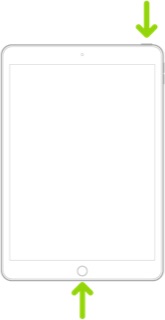


If the problem persists after performing the restart, it may be necessary to reset your iPad. Before proceeding, ensure that you have a current iCloud or iTunes backup before performing the reset:

How to back up your iPhone, iPad, and iPod touch - Apple Support


When you are happy to proceed, you can reset the iPad to factory settings:

Restore your iPhone, iPad, or iPod to factory settings - Apple Support


Otherwise, you would be best advised to seek assistance directly from Apple Support. You can contact the Support Team using the Support link at top-right or bottom-left of this page. Alternatively and perhaps easier, you can initiate and manage your support cases using the excellent Apple Support App. If not already installed on your iPad, the App can be downloaded from the App Store:

https://apps.apple.com/app/apple-support/id1130498044


You might also visit the Genius Bar at your local Apple Store or Apple Authorised Service Provider (AASP) - where the technicians will be able to test and assess your iPad - and you can explore your available options:

Genius Bar Reservation and Apple Support Options - Apple

1 reply
Question marked as Top-ranking reply

Jul 10, 2024 11:47 AM in response to GiantNoiseBlast

If you can, try charging your iPad from a USB Type-A power source instead of USB-C - noting that the power source must be able to source at least 12W (i.e., 2.4A @5V). This may kick-start the charging process.


Otherwise, try a forced-restart of your iPad - as this will often clear an isolated software issue:


Force restart iPad (models with Face ID or with Touch ID in the top button)

If your iPad doesn’t have the Home button, do the following:

  1. Press and quickly release the volume button nearest to the top button.
  2. Press and quickly release the volume button farthest from the top button.
  3. Press and hold the top button.
  4. When the Apple logo appears, release the top button.


Force restart iPad (models with the Home button)

Press and hold the top button and the Home button at the same time. When the Apple logo appears, release both buttons.


If the problem persists after performing the restart, it may be necessary to reset your iPad. Before proceeding, ensure that you have a current iCloud or iTunes backup before performing the reset:

How to back up your iPhone, iPad, and iPod touch - Apple Support


When you are happy to proceed, you can reset the iPad to factory settings:

Restore your iPhone, iPad, or iPod to factory settings - Apple Support


Otherwise, you would be best advised to seek assistance directly from Apple Support. You can contact the Support Team using the Support link at top-right or bottom-left of this page. Alternatively and perhaps easier, you can initiate and manage your support cases using the excellent Apple Support App. If not already installed on your iPad, the App can be downloaded from the App Store:

https://apps.apple.com/app/apple-support/id1130498044


You might also visit the Genius Bar at your local Apple Store or Apple Authorised Service Provider (AASP) - where the technicians will be able to test and assess your iPad - and you can explore your available options:

Genius Bar Reservation and Apple Support Options - Apple

This thread has been closed by the system or the community team. You may vote for any posts you find helpful, or search the Community for additional answers.

Ipad Pro 2nd Gen Wont Charge After Update

Welcome to Apple Support Community
A forum where Apple customers help each other with their products. Get started with your Apple Account.