How do I fix the wrong date and time on my iPad digital clock?

On the upper left hand corner of my iPad there is a line with a digital time and a date, for example 09:41. Tue Jan 9. That is what it states right now, only it is 23:23. Wed July 16…..how do I correct this incorrect time and date?


[Re-Titled By Moderator]

iPad Pro

Posted on Jul 16, 2024 11:23 PM

Reply
Question marked as Top-ranking reply

Posted on Jul 17, 2024 2:48 AM

With the displayed time being grossly incorrect, for technical reasons beyond simple explanation, your iPad will not be able to automatically obtain and correct the displayed time on your iPad.


Check that Date & Time and TimeZone are correctly set for your iPad - as these settings are known to cause various functional issues if incorrectly configured:

Settings > General > Date & Time


Ensure that the TimeZone matches your current location. For example, if you are in London (UK):
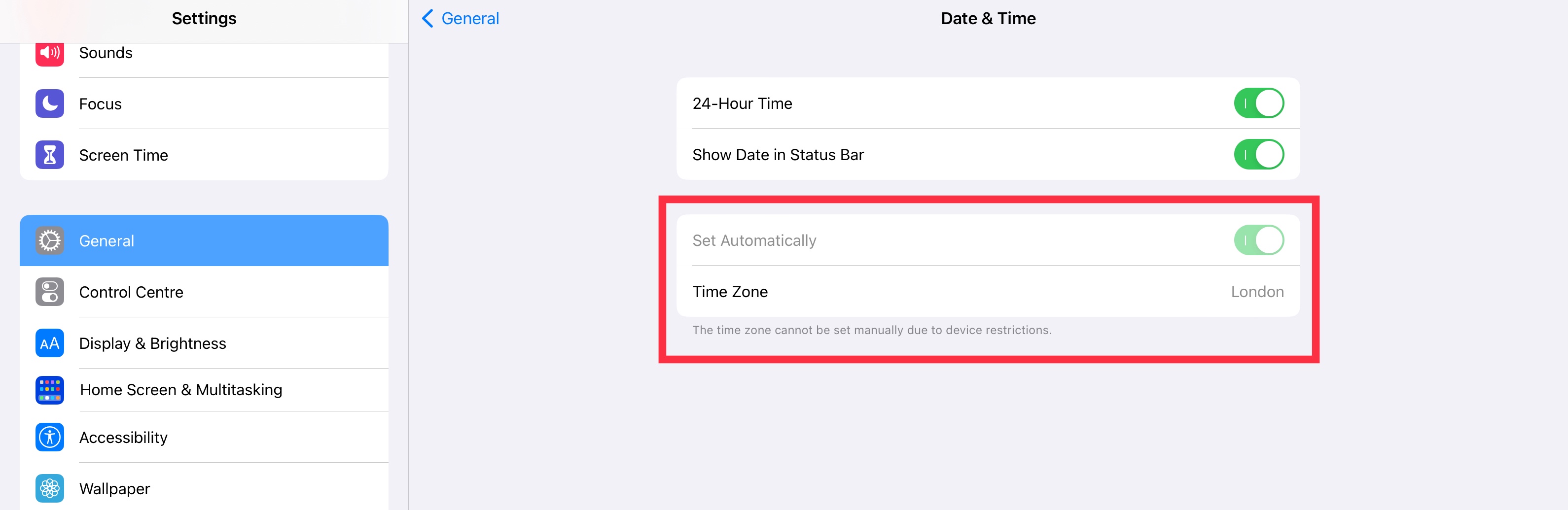


If the Time Zone settings are ghosted (as illustrated above) and cannot be adjusted - you'll need to check (and temporarily change) your ScreenTime permissions:

Settings > ScreenTime > Content & Privacy Restrictions > [Allow Changes] Account Changes - set to Allow


After changing the TimeZone settings, you can return your ScreenTime settings to how they were previous configured.


If your iPad remains unable to automatically set and maintain the correct time for your TimeZone, you can manually set the time. To do so:

Settings > General > Date & Time > Set Automatically - set to OFF


You can now manually set the correct date and time. When manually setting date and time, ensure that you are using an accurate external time source; if not correctly set to within a minute or two of the correct time, many services may not operate correctly - if at all. When manually setting date and time, you must still select the correct TimeZone for your location.


4 replies
Question marked as Top-ranking reply

Jul 17, 2024 2:48 AM in response to waynjer954

With the displayed time being grossly incorrect, for technical reasons beyond simple explanation, your iPad will not be able to automatically obtain and correct the displayed time on your iPad.


Check that Date & Time and TimeZone are correctly set for your iPad - as these settings are known to cause various functional issues if incorrectly configured:

Settings > General > Date & Time


Ensure that the TimeZone matches your current location. For example, if you are in London (UK):


If the Time Zone settings are ghosted (as illustrated above) and cannot be adjusted - you'll need to check (and temporarily change) your ScreenTime permissions:

Settings > ScreenTime > Content & Privacy Restrictions > [Allow Changes] Account Changes - set to Allow


After changing the TimeZone settings, you can return your ScreenTime settings to how they were previous configured.


If your iPad remains unable to automatically set and maintain the correct time for your TimeZone, you can manually set the time. To do so:

Settings > General > Date & Time > Set Automatically - set to OFF


You can now manually set the correct date and time. When manually setting date and time, ensure that you are using an accurate external time source; if not correctly set to within a minute or two of the correct time, many services may not operate correctly - if at all. When manually setting date and time, you must still select the correct TimeZone for your location.

Jul 17, 2024 7:55 AM in response to LotusPilot

My iPad is showing the correct date and time in all other places except this little area in the upper left where it is wrong. All the things you asked me to check are fine no problems there, but still that little upper left time and date does not change …the time and date remain the same every day. On this shot of my iPad main page you can see the date and time are correct on the clock and the next door date, but still incorrect in the upper left hand corner.


I am still unable to figure out how to change this small time and date……wayne

This thread has been closed by the system or the community team. You may vote for any posts you find helpful, or search the Community for additional answers.

How do I fix the wrong date and time on my iPad digital clock?

Welcome to Apple Support Community
A forum where Apple customers help each other with their products. Get started with your Apple Account.