Is there a way to stop the small pop-up windows appearing at the bottom of screen in Mail and Safari on my iPad?

Hi, is there a way to stop the pop-up small windows appearing at the bottom of screen in ipad mail and safari? I really don't want them/ need them and it appears I am not the only one. I know how to remove them but I don't want them to pop up in the first place. Any tips appreciated.


[Re-Titled by Moderator]

iPad Pro, iPadOS 17

Posted on Aug 29, 2024 2:18 AM

Reply
Question marked as Top-ranking reply

Posted on Aug 29, 2024 8:44 AM

You have encountered the iPadOS “Shelf” - this being a feature of the revised iPadOS multitasking environment. 


iPadOS permits you to have multiple “instances” (i.e., App windows) of the same App - each instance being self contained. The shelf, when triggered, shows a thumbnail of each running instance of an App. 


For example, if you have three running instances of Safari, each with its own set of open tabs, you will see three thumbnails corresponding to each running instance of Safari - plus a button to open a new instance of Safari. Simply tapping a thumbnail will switch directly to that running instance of Safari. Each App - such as Mail, Safari, Notes, Calendar, etc. - has its own corresponding shelf.


Individual App windows can be closed directly from the Shelf; just swipe the unwanted thumbnail off the top of the screen.


If you are running iPadOS 17, it is possible to completely disable iPadOS multitasking - and in so doing completely inhibit the appearance of the shelf:


Settings > Multitasking & Gestures > [Multitasking] select OFF
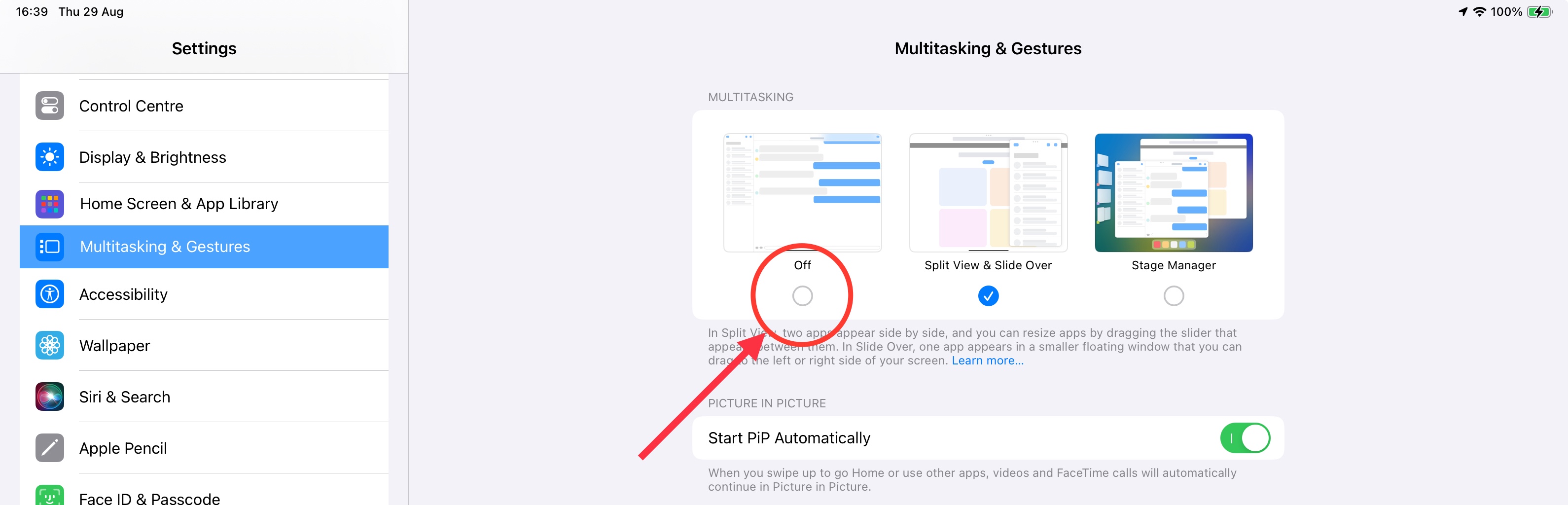


You should note that the Shelf cannot be disabled in isolation.


1 reply
Question marked as Top-ranking reply

Aug 29, 2024 8:44 AM in response to maris162

You have encountered the iPadOS “Shelf” - this being a feature of the revised iPadOS multitasking environment. 


iPadOS permits you to have multiple “instances” (i.e., App windows) of the same App - each instance being self contained. The shelf, when triggered, shows a thumbnail of each running instance of an App. 


For example, if you have three running instances of Safari, each with its own set of open tabs, you will see three thumbnails corresponding to each running instance of Safari - plus a button to open a new instance of Safari. Simply tapping a thumbnail will switch directly to that running instance of Safari. Each App - such as Mail, Safari, Notes, Calendar, etc. - has its own corresponding shelf.


Individual App windows can be closed directly from the Shelf; just swipe the unwanted thumbnail off the top of the screen.


If you are running iPadOS 17, it is possible to completely disable iPadOS multitasking - and in so doing completely inhibit the appearance of the shelf:


Settings > Multitasking & Gestures > [Multitasking] select OFF


You should note that the Shelf cannot be disabled in isolation.


This thread has been closed by the system or the community team. You may vote for any posts you find helpful, or search the Community for additional answers.

Is there a way to stop the small pop-up windows appearing at the bottom of screen in Mail and Safari on my iPad?

Welcome to Apple Support Community
A forum where Apple customers help each other with their products. Get started with your Apple Account.