Airpods 4 ANC tap function does not work

Hello, i recently buyed the new Airpods 4 with Active Noise Cancelletion.

I have the problem that the tap or hold function does not work, like i hold or tap but nothing works.

I checked my settings, i forgot the airpods, i resetted the airpods. I do not know what to do any further, I still have AppleCare for 57 days. Should I contact Apple?


AirPods 4

Posted on Sep 30, 2024 11:58 AM

Reply
Question marked as Top-ranking reply

Posted on Sep 30, 2024 12:52 PM

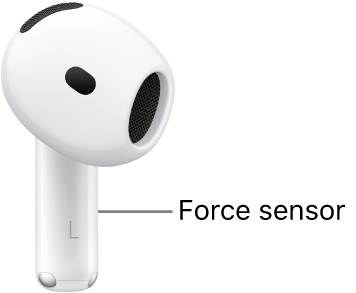
There is no tap function.

you have to squeeze the stem.


Use controls and gestures with your AirPods - Apple Support


AirPods 4 and AirPods 4 (ANC) controls and gestures

With the force sensor on the stem of AirPods 4 (both models), you can do any of the following:

  • Play and pause audio: Press the stem. To resume playback, press it again.
  • Play the next track: Double-press the stem.
  • Play the previous track: Triple-press the stem.
  • Answer a call: When you receive a call, press the stem.
  • Switch between Noise Cancellation, Transparency, and Adaptive Audio noise control modes: On AirPods 4 (ANC) only, you can set either of your AirPods to perform this action when you press and hold the stem. See Change what the force sensor or Touch control does.
  • Activate Siri: You can set either of your AirPods to perform this action when you press and hold the stem. See Use Siri with AirPods.

Use head gestures to respond to Siri

  • Accept a call or reply to notifications and messages: Nod your head up and down.
  • Decline a call or dismiss notifications and messages: Shake your head side to side.

Note: To use head gestures to respond to Siri, Announce Calls and Announce Notifications must be on. See Use Siri to announce calls or notifications.


2 replies
Question marked as Top-ranking reply

Sep 30, 2024 12:52 PM in response to yigit275

There is no tap function.

you have to squeeze the stem.


Use controls and gestures with your AirPods - Apple Support


AirPods 4 and AirPods 4 (ANC) controls and gestures

With the force sensor on the stem of AirPods 4 (both models), you can do any of the following:

  • Play and pause audio: Press the stem. To resume playback, press it again.
  • Play the next track: Double-press the stem.
  • Play the previous track: Triple-press the stem.
  • Answer a call: When you receive a call, press the stem.
  • Switch between Noise Cancellation, Transparency, and Adaptive Audio noise control modes: On AirPods 4 (ANC) only, you can set either of your AirPods to perform this action when you press and hold the stem. See Change what the force sensor or Touch control does.
  • Activate Siri: You can set either of your AirPods to perform this action when you press and hold the stem. See Use Siri with AirPods.

Use head gestures to respond to Siri

  • Accept a call or reply to notifications and messages: Nod your head up and down.
  • Decline a call or dismiss notifications and messages: Shake your head side to side.

Note: To use head gestures to respond to Siri, Announce Calls and Announce Notifications must be on. See Use Siri to announce calls or notifications.


This thread has been closed by the system or the community team. You may vote for any posts you find helpful, or search the Community for additional answers.

Airpods 4 ANC tap function does not work

Welcome to Apple Support Community
A forum where Apple customers help each other with their products. Get started with your Apple Account.