Apple Airpods Pro double/triple tap+HOLD features are gone? (rewind/fast forward songs)

I used to own the original AirPods Pro and shortly after I bought them, I read somewhere that there was a hidden feature for them that not many people were aware of. While most people knew that by tapping the AirPods twice, it skips forward to the next song in the queue, they didn't know that if you tap twice, but then HOLD (long press on the 2nd tap), you skip the song you're currently listening to forward, as in, it starts going faster (like at 2x speed, similar to what holding down on a TikTok video does - if say, you wanted to skip a verse or wanted to go to the chorus faster. I was so surprised when I tried this and saw it actually worked.


The same is true with a triple tap. If you triple tap your AirPods it sends you to the previous song. But if you triple tap and HOLD, it will make the current song play backwards at 2x speed. It will, in other words, rewind the song.

After I recently bought my Airpods Pro 2nd Generation, I have noticed that this feature no longer exists. Double tapping and holding does nothing, it simply changes the mode from Transparency to Noise Cancellation.

Does anyone know what happened to this feature?


[Edited by Moderator]

iPhone 12 Pro Max, iOS 17

Posted on Oct 1, 2024 11:10 AM

Reply
Question marked as Top-ranking reply

Posted on Oct 1, 2024 4:43 PM

It wasn’t ever a feature


Use controls and gestures with your AirPods - Apple Support


AirPods Pro 1 controls

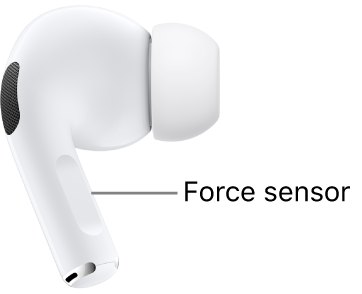
With the force sensor on the stem of both AirPods Pro 1, you can do any of the following:

  • Play and pause audio: Press the stem. To resume playback, press it again.
  • Play the next track: Double-press the stem.
  • Play the previous track: Triple-press the stem.
  • Answer a call: When you receive a call, press the stem.
  • Switch between Noise Cancellation and Transparency modes: You can set either of your AirPods to perform this action when you press and hold the stem. See Change settings for AirPods Pro.
  • Activate Siri: You can set either of your AirPods to perform this action when you press and hold the stem. See Use Siri with AirPods.


2 replies
Question marked as Top-ranking reply

Oct 1, 2024 4:43 PM in response to Allure3

It wasn’t ever a feature


Use controls and gestures with your AirPods - Apple Support


AirPods Pro 1 controls

With the force sensor on the stem of both AirPods Pro 1, you can do any of the following:

  • Play and pause audio: Press the stem. To resume playback, press it again.
  • Play the next track: Double-press the stem.
  • Play the previous track: Triple-press the stem.
  • Answer a call: When you receive a call, press the stem.
  • Switch between Noise Cancellation and Transparency modes: You can set either of your AirPods to perform this action when you press and hold the stem. See Change settings for AirPods Pro.
  • Activate Siri: You can set either of your AirPods to perform this action when you press and hold the stem. See Use Siri with AirPods.


Oct 2, 2024 6:38 AM in response to Johnathan Burger

It quite literally was. There is literally mentions of it everywhere online.


I am literally telling you I used to use it all the time on my original AirPods and your response is basically “oh your brain made it up”? I’m not crazy. It was 100% a feature. Because I was shocked to realise it is gone, as I was instinctively used to tapping and holding.

This thread has been closed by the system or the community team. You may vote for any posts you find helpful, or search the Community for additional answers.

Apple Airpods Pro double/triple tap+HOLD features are gone? (rewind/fast forward songs)

Welcome to Apple Support Community
A forum where Apple customers help each other with their products. Get started with your Apple Account.