I am not receiving push notifications on my iPhone after iOS 18 update

After the iOS 18 update I no longer receive push notifications on my Lock Screen. I have to open the apps to see that I receive a message hours ago and never received the notification. iPhone 13 Pro


[Re-Titled by Moderator]

iPhone 13 Pro, iOS 18

Posted on Oct 11, 2024 10:28 PM

Reply
Question marked as Top-ranking reply

Posted on Jul 21, 2025 9:08 AM

The only thing that worked for me was resetting all settings. Settings app > “General” > “Transfer or reset iphone” > “Reset” > choose “Reset all settings” from the popup menu.

It’s annoying that it requires a blanket fix like that, but it’s way less frustrating than the notification problems. The most intense implications of resetting your settings, in my experience, was that every app acts somewhat like a newly installed app when you open it again after resetting – it’ll keep your “in app” settings (so any settings you’ve managed from the app itself isn’t reset) and data (it doesn’t wipe your app clean), but any settings in the literal iPhone Settings app will be set back to default values. This means you have to allow camera and mic access, access to photo library, access to your location data, etc. I found it a nice way to kind of overhaul my privacy settings everywhere, silver lining.

please note that it will also delete your saved Wifi passwords, unless you have them saved in the passwords app like your network is a website (the passwords app is safe from the reset).

145 replies

Nov 20, 2025 9:51 PM in response to Ledreco13

I have had this problem too (in early model phone). Not sure this will be fix for you or others, but i have discovered by experimenting that the toggle ‘mute’ bell icon that you see when you swipe left on a message is the opposite of what is should be / counter-intuitive. Whereas you would think the bell symbol with line through it means “no notifications” - it is opposition. If you see that when you swipe left it means you should get notifications! If you see bell with no line through it - that is when you won’t get notifications. Completely absurd and dumb design. Amazed no one else is raving so it how this is. Try it. It might fix for you. I had to change the toggle on lots of my regulars contacts by swiping left of their most recent msg and making sure bell was crossed through. Mostly it was not - was just a bell - which is why I wasn’t getting notifications. See AI summary confirming my theory attached.


[Edited by Moderator]

Oct 2, 2025 8:27 AM in response to Ledreco13

There's a list of bug reports: FB19778882FB19813796 FB19852724 FB19767262FB20378888 FB20379383 FB20394663 Me and many other users have issue with push notifications. To reproduce this you should do this steps:


  1. Lock iPhone and make it idle for 10+ minutes;
  2. Send any message from other device via third-party app that uses push notifications (WhatsApp, Telegram and etc.);
  3. After few attempts you can see, that messages don't deliver. They delivers immediately when I unlock iPhone or go to the app.

This bug reproduces on iOS 18.7 and 26.0.1. As I think iPhone goes to deep sleep after 10+ minutes after it locked and don't get push notifications. I've tried everything: many of settings, DFU without backup, but nothing helps to resolve this issue. Pay attention, please, cause this bug is very annoying and present on iOS 18.7 (that is the last for many devices) and latest iOS 26. 

Question marked as Top-ranking reply

Jul 21, 2025 9:08 AM in response to Joshua_Quan

The only thing that worked for me was resetting all settings. Settings app > “General” > “Transfer or reset iphone” > “Reset” > choose “Reset all settings” from the popup menu.

It’s annoying that it requires a blanket fix like that, but it’s way less frustrating than the notification problems. The most intense implications of resetting your settings, in my experience, was that every app acts somewhat like a newly installed app when you open it again after resetting – it’ll keep your “in app” settings (so any settings you’ve managed from the app itself isn’t reset) and data (it doesn’t wipe your app clean), but any settings in the literal iPhone Settings app will be set back to default values. This means you have to allow camera and mic access, access to photo library, access to your location data, etc. I found it a nice way to kind of overhaul my privacy settings everywhere, silver lining.

please note that it will also delete your saved Wifi passwords, unless you have them saved in the passwords app like your network is a website (the passwords app is safe from the reset).

Jul 20, 2025 7:28 PM in response to Ledreco13

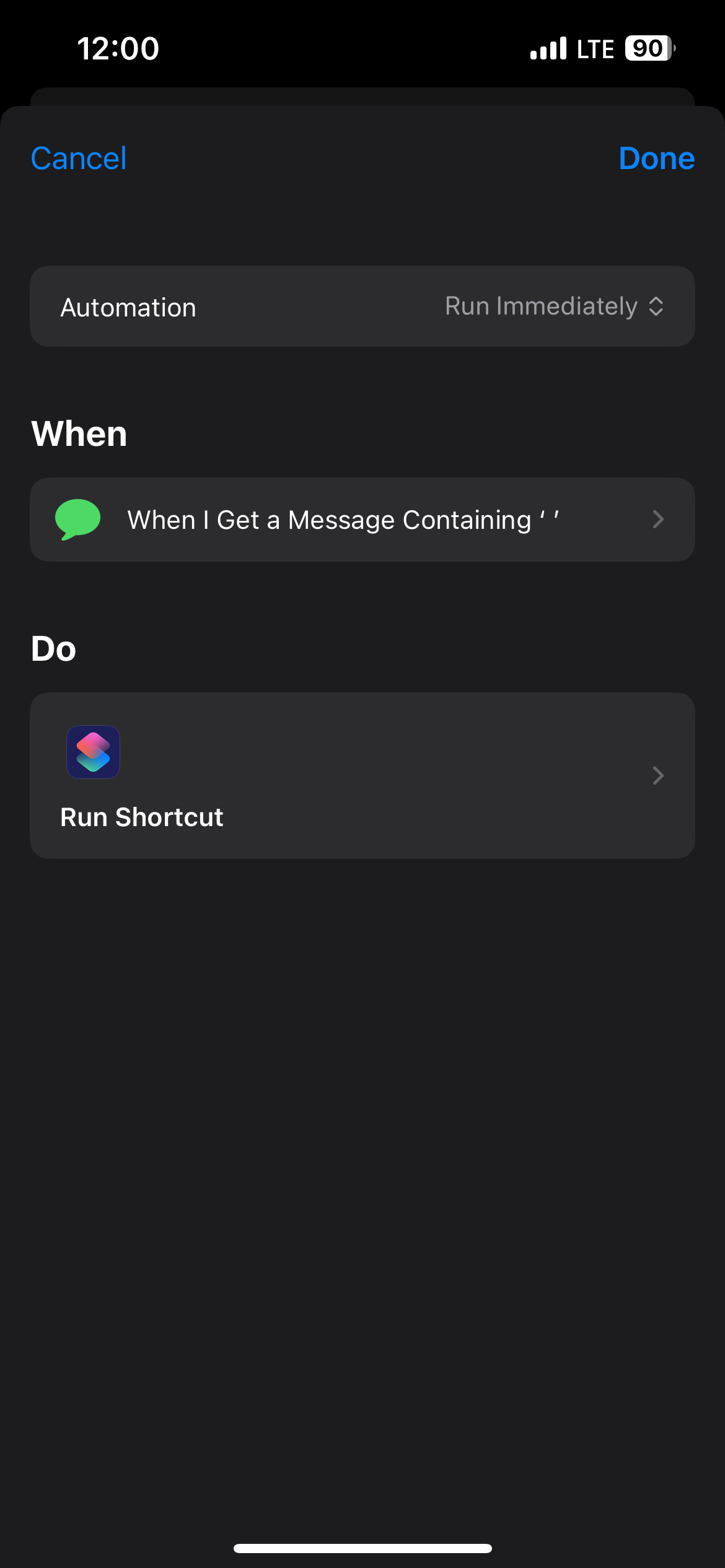
so it seems like the “uninstall and reinstall the faulty app” is a good strategy for most apps, but you cannot uninstall the built-in Messages app. It also seems like it’s not about the iPhone not knowing it got a new message, but some kind of issue with push notifications not getting triggered by a new message, so I created a shortcut/automation that mimics a new message notification:


https://www.icloud.com/shortcuts/3fb758687ed4430688d24baf3abe82d3


instructions for setup are directly in the shortcut. All you gotta do is save it to your shortcuts, then create an automation that triggers every time you receive a message containing a space (or any other text of your choosing, or from specific contacts — this is up to you).


in the Automations tab, tap “+” once you’ve saved the shortcut, scroll to Messages, select “run immediately”, enter a space (or other text) in the “Message Contains” field and leave the “Sender” field blank. Or you can leave the “Message Contains” field blank and instead select specific contacts you want to see notifications from in the “Sender” field. Or you could enter both specific text and specific contacts, but you cannot leave both blanks unfortunately.

Then, in the screen that appears, you’ll see “Receive message as input”. Below that, search for the “Run Shortcut” action, and replace the “Shortcut” field with the “Messages” shortcut i linked above.


now when you receive a message, your phone will check to see what app you’re on or whether your phone is locked. If it’s locked or if you’re outside of Messages, you’ll get a notification (that gets “shown” on your lockscreen and stays as usual) and a pop-up menu at the top of your screen with the sender and content of the message. Hit the • • • in the pop-up menu to open the Messages app or tap elsewhere on your screen to make the menu disappear.


note: this isn’t a perfect solution but it’s very close to what notifications actually do; i’ve been testing it for a few days and it works decently well. i’m not a coder tho so if anyone has tips to improve the shortcut/automation, i’ll be happy to adjust it!


[Edited by Moderator]

May 1, 2025 10:50 AM in response to poilkumnhj

I kept playing with the watch notification settings for both Message and the Ring app.


Ring: Turning off watch notifications makes the alerts appear on a locked, off screen as expected. Turning watch notifications back on makes the alerts not appear on a locked, off screen.


Message: Mirror my iPhone = No alerts on locked, off screen. Custom Allow Notifications = No alerts on locked, off screen. Custom Send to Notification Center = Alerts on locked, off screen. Custom Notifications Off = Alerts on locked, off screen.


Conclusion (at least for me): There's a problem with how watch and lock screen notifications are being handled and turning off watch notifications will make them appear on a locked screen that is off.

May 1, 2025 10:33 AM in response to poilkumnhj

Round 2 of testing... for each set, I sent an iMessage from another phone and triggered a Ring alert.


  1. Re-pair watch and remove any of the apps I was allowed to uninstall. Alerts do not appear as expected.
  2. Power down watch (still paired). Alerts appear as expected.
  3. Power up watch and unlock watch using pass code on watch. Alerts do not appear as expected.
  4. Power down watch. Alerts appear as expected
  5. Power up watch, but did not unlock watch using pass code on watch. Alerts appear as expected.
  6. Unlock watch using pass code. Alerts do not appear as expected.
  7. Take watch off wrist (essentially locking it). Alerts appear as expected.


So, based on this, the issue has something to do with having the watched paired to the phone AND the watch being unlocked. I checked any of the watch notifications I could find, but none of them seem to be set in a way that would cause this issue. Any ideas?

I am not receiving push notifications on my iPhone after iOS 18 update

Welcome to Apple Support Community
A forum where Apple customers help each other with their products. Get started with your Apple Account.
