No photos in Photos after MacOS Sequoia

On Intel iMac, after upgrade to Sequoia from Sonoma, Photos is empty. Previously all photos were on iCloud and Photos operated correctly. iMac Settings shows Photos on iCloud as expected. User also has iPhone and iPad and both continue to operate correctly with Photos on iCloud.

iMac (2017 – 2020)

Posted on Nov 21, 2024 9:35 AM

Reply
Question marked as Top-ranking reply

Posted on Nov 21, 2024 10:48 AM

Thanks for the suggestion. I see your point, and that would be useful if this user had multiple libraries. The user has only one library, on iCloud. It's the default from when she "moved" her photos from her local startup drive to iCloud, several years back. Then after the upgrade of her iMac to Sequoia, when she clicked the Photos icon on the bottom toolbar, Photos started but no photos (or videos, etc.) show. Later after posting this issue to the Community, I realized her Finder should show a library on her iCloud. In Finder I went to iCloud, found and clicked the (only) library and dragged it down to the Photos icon on her toolbar, releasing the click on top of that icon. That drag-and-drop updated the toolbar icon and now it starts correctly using the library on iCloud. I'll take credit for brain fade!!!

7 replies
Question marked as Top-ranking reply

Nov 21, 2024 10:48 AM in response to leroydouglas

Thanks for the suggestion. I see your point, and that would be useful if this user had multiple libraries. The user has only one library, on iCloud. It's the default from when she "moved" her photos from her local startup drive to iCloud, several years back. Then after the upgrade of her iMac to Sequoia, when she clicked the Photos icon on the bottom toolbar, Photos started but no photos (or videos, etc.) show. Later after posting this issue to the Community, I realized her Finder should show a library on her iCloud. In Finder I went to iCloud, found and clicked the (only) library and dragged it down to the Photos icon on her toolbar, releasing the click on top of that icon. That drag-and-drop updated the toolbar icon and now it starts correctly using the library on iCloud. I'll take credit for brain fade!!!

Nov 22, 2024 5:46 AM in response to EngineerBill

leroydouglas, thanks for the suggestion. I see your point, and that would be useful if this user had multiple libraries. The user has only one library, on iCloud. It's the default from when she "moved" her photos from her local startup drive to iCloud, several years back. Then after the upgrade of her iMac to Sequoia, when she clicked the Photos icon on the bottom toolbar, Photos started but no photos (or videos, etc.) show. Later after posting this issue to the Community, I realized her Finder should show a library on her iCloud. In Finder I went to iCloud, found and clicked the (only) library and dragged it down to the Photos icon on her toolbar, releasing the click on top of that icon. That drag-and-drop updated the toolbar icon and now it starts correctly using the library on iCloud. I'll take credit for my brain fade!!!

Nov 21, 2024 11:06 AM in response to EngineerBill

A Photos Library cannot work if it's in iCloud Drive. If that's where you see it, then it needs to be moved to the Pictures Library-- which also shouldn't be on iCloud Drive. Here I tried moving a Library to iCloud Drive:
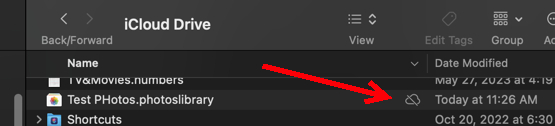
and you can see that it's not really there. If it somehow seems to work, then it may become corrupted.


The iCloud Drive folder is a folder on the Mac which is also copied to iCloud Drive at iCloud.com. But Photos does lots of background stuff that can't be supported in iCloud Drive.


I'm guessing that by "Finder should show a library on her iCloud." you are meaning iCloud Drive. There is a separate system called iCloud Photos which doesn't appear as a folder.

Nov 21, 2024 10:01 AM in response to EngineerBill

EngineerBill wrote:

On Intel iMac, after upgrade to Sequoia from Sonoma, Photos is empty. Previously all photos were on iCloud and Photos operated correctly. iMac Settings shows Photos on iCloud as expected. User also has iPhone and iPad and both continue to operate correctly with Photos on iCloud.


Launch the Photos.app holding the Option key and see if it is a matter of selecting the correct Library...


Nov 23, 2024 5:00 PM in response to d.mcnish

d.mcnish, As I understand it now, the file "Photos Library.photoslibrary" is both app and data. Most people have only one, and Apple expects it to be in the user's "Pictures" directory of the startup drive, by default. "Photos Library.photoslibrary" files are permitted on an external drive; my Mac is set up that way and works properly (the toolbar icon on my Mac points to that on the external drive attached to my Mac). I guess my fix my wife's iMac did update the broken toolbar icon on her machine, as it worked properly before upgrading her iMac to Sequoia.

This thread has been closed by the system or the community team. You may vote for any posts you find helpful, or search the Community for additional answers.

No photos in Photos after MacOS Sequoia

Welcome to Apple Support Community
A forum where Apple customers help each other with their products. Get started with your Apple Account.
