
iOS 18.1.1 Wallet app issues

I just upgraded from 14 pro to 16 pro and installed latest update IOS 18.1.1. I can not add cards to wallet through the wallet app, I just get the spinning icon. My Apple Card is showing up in the app but doesn’t show recent transactions. I tried removing the card via settings and adding it back, but when I log in I just get the spinning icon.

Posted on Dec 4, 2024 10:28 AM

Reply
8 replies

Dec 4, 2024 10:54 AM in response to Spamasutra

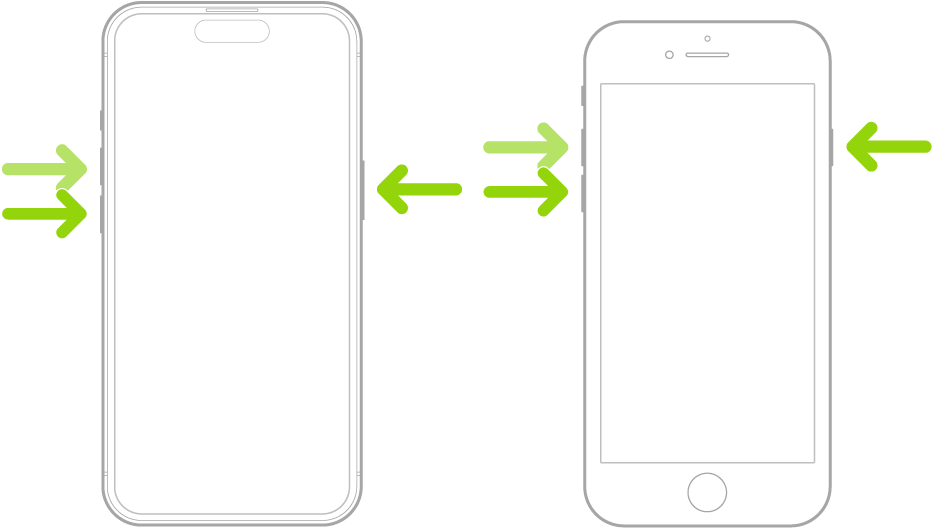
Please do a forced restart of your iPhone. A forced restart does much more than just turning your iPhone off and back on. So, please follow the steps in the Apple Support article I shared the link to below.


Force restart iPhone - Apple Support


Force restart iPhone

  1. Press and quickly release the volume up button.
  2. Press and quickly release the volume down button.
  3. Press and hold the side button.
  4. When the Apple logo appears, release the side button.


This thread has been closed by the system or the community team. You may vote for any posts you find helpful, or search the Community for additional answers.

iOS 18.1.1 Wallet app issues

Welcome to Apple Support Community
A forum where Apple customers help each other with their products. Get started with your Apple Account.