Deleting duplicate photos from my MacBook Air in a large scale

I have a ton of duplicates in Photos. However, the Duplicate option does not appear under Utilities. I have turned everything off, turned it on again, waited for weeks etc. The Duplicate offer came up twice, once with 16 photos and once with 2 photos and never appeared again. And I know I have many duplicates. Thanks for advice.


[Re-Titled by Moderator]


MacBook Air 15″, macOS 15.1

Posted on Dec 7, 2024 12:29 AM

Reply
Question marked as Top-ranking reply

Posted on Dec 12, 2024 9:09 AM

The Duplicates view won't appear until Photos has scanned and found duplicates to show there.


If you're concerned, try these things:

  • Restart the computer (of course, you've done that)
  • Re-start in Safe Mode. This bypasses certain potentially disruptive processes, and it often helps. Safe Mode is different for different computers, so see this: 

           Start up your Mac in safe mode - Apple Support 

Be sure to go back to restart in normal mode after a while.

  • Rebuild your Photos Library--close Photos and re-launch by option-command-clicking the app icon.


The idea is to find out if the problem is with the Library, with your account, or with caches and login items, and stuff like that. One of these steps may fix the problem, but their failure to work also helps figure out what's happening.

Similar questions

6 replies
Question marked as Top-ranking reply

Dec 12, 2024 9:09 AM in response to jasmam

The Duplicates view won't appear until Photos has scanned and found duplicates to show there.


If you're concerned, try these things:

  • Restart the computer (of course, you've done that)
  • Re-start in Safe Mode. This bypasses certain potentially disruptive processes, and it often helps. Safe Mode is different for different computers, so see this: 

           Start up your Mac in safe mode - Apple Support 

Be sure to go back to restart in normal mode after a while.

  • Rebuild your Photos Library--close Photos and re-launch by option-command-clicking the app icon.


The idea is to find out if the problem is with the Library, with your account, or with caches and login items, and stuff like that. One of these steps may fix the problem, but their failure to work also helps figure out what's happening.

Dec 7, 2024 7:47 AM in response to jasmam

A little more information would be helpful. By "Duplicate option does not appear under Utilities," do you mean that
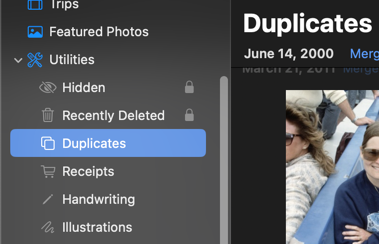
Hidden, Recently Deleted and Receipts do appear, but Duplicates is not there? That usually means that Photos has not found any images that it thinks are duplicates.


What did you do when you saw that Duplicates were found? Did you Merge them or Delete them or leave them alone? Was the "once with 2 Photos" two of the same ones that you saw before, or new finds?


When you say that you have "a ton of duplicates," do you mean identical, or similar images with somewhat different resolutions or filenames or something? How large is your Library?


How much free storage do you have in your MacAir? Mine says 775 GB of 1 TB used, for instance.


Do you use iCloud Photos? Do you have Optimize Mac Storage turned on for Photos? How much free space is there in iCloud?


Where is your Photos Library stored? Is it in your Pictures folder, or is it on an external drive?

Have you tried making a a new duplicate (⌘-D) picture, and waiting to see when and if that shows up?


I made a duplicate when I started to read your post, and I labeled it Dupe in the Title. It shows up in Recently Saved. I'll see when it appears in Duplicates.


Let us know the extra information…



Dec 10, 2024 8:33 AM in response to jasmam

jasmam wrote: … The one with two new photos were new ones that emerged a few weeks later.

It sounds like you have a pretty big Library, so it may take quite a while for Photos to find duplicates.


If you aren't running out of room on your Mac, then you should use "Download Originals" instead of "Optimize."

things go faster. Also, you can't make backups if you're using "Optimize," since you aren't keeping the originals available for copying to an external drive. While I use "Optimize" on my phone, I would not do that on my Mac.

Dec 9, 2024 11:43 PM in response to Richard.Taylor

Thanks for replying. This is what I see:


I have many duplicates due to a mistake Apple made when moving my data after I bought a new computer. When I found duplicates I merged them as directed. The one with two new photos were new ones that emerged a few weeks later. My storage in iCloud is getting tight which is why I want to get rid of these duplicates. I have Optimize Mac Storage. I have tons of space on my Mac. I do not use an external drive. I can make duplicates without problems. Thanks for your help.

This thread has been closed by the system or the community team. You may vote for any posts you find helpful, or search the Community for additional answers.

Deleting duplicate photos from my MacBook Air in a large scale

Welcome to Apple Support Community
A forum where Apple customers help each other with their products. Get started with your Apple Account.