Camera and service history
With iPhone 12 models and later using iOS 15.2 and later you can go to Settings > General > About to see the parts and service history of your iPhone and you can see if the camera has been replaced. If the repair was done using genuine Apple parts and processes, you will see "Genuine Apple Part" next to the Camera.

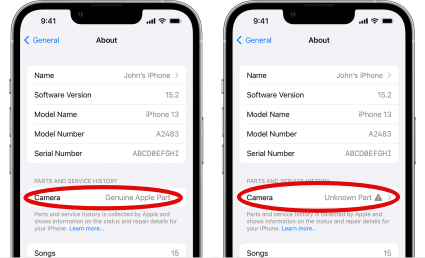
- You will see an Unknown Part
 message if the camera installation is incomplete or if the camera:
 - Was replaced with a nongenuine camera
- Was already used or installed in another iPhone
- Isn't functioning as expected
This message doesn't affect your ability to use your iPhone or access your camera.
Learn more about iPhone parts and service history.

Battery and Display and service history
With iPhone 11 models and later, excluding iPhone SE (2nd and 3rd generation), using iOS 15.2 and later, you can go to Settings > General > About for the parts and service history of your iPhone. You can also find out if the display has been replaced. If the repair was done using genuine Apple parts and processes, "Genuine Apple Part" will appear next to Display.
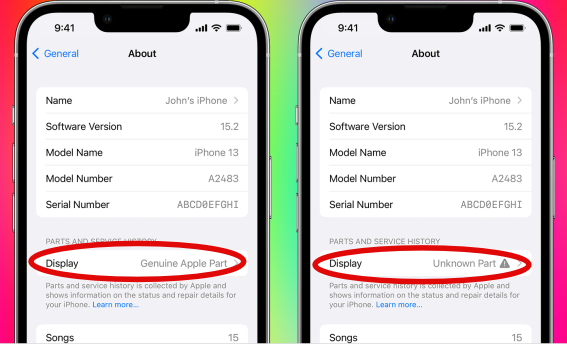
- An Unknown Part message will appear if the display installation is incomplete or if the display:
- Was replaced with a nongenuine display
- Was already used or installed in another iPhone
- Isn't functioning as expected
An additional message might appear that says "Apple has updated the device information for this iPhone." This means that Apple has updated the device information maintained for this iPhone for service needs, safety analysis, and to improve future products.
If your iPhone's parts have been previously replaced, repaired, or serviced by an unauthorized service provider, it's worth noting that Apple may decline to provide service for your device. The decision to refuse service will depend on the specific components that were affected by the unauthorized service.
Get a Genius Bar Reservation and Apple Support Options - Apple
Contact Genius Bar.
Manage Reservations - My Reservations - Apple

