How to list files-DURATIONS (of .mp3s) in terminal ?

Hello :)


I’m trying to get the duration of .mp3-files listed in TERMINAL.


I found the following command documented online...


ls -l


List in a long format. Includes file mode, owner and group name, date and time file was modified, pathname, and more

Source : https://www.makeuseof.com/tag/mac-terminal-commands-cheat-sheet/


«more» in my case should be the DURATION of each .mp3-file.


How can I get the DURATIONS listed/displayed with the rest of the metadata ?


e.g.: FILENAME … FILESIZE … FILE-DURATION

    1. example-filename_1.mp3 … 1.2MB … 11:04:36
    2. example-filename_2.mp3 … 1.8MB … 16:24:01
    3. example-filename_3.mp3 … 2.3MB … 20:31:44
    4. example-filename_4.mp3 … 1.9MB … 17:52:07
    5. etc…


Any hints would be much appreciated.


:)


G


MacOS : Monterey 12.7.6

TERMINAL : 2.12.7

MacBook Pro 15″, macOS 12.7

Posted on Dec 18, 2024 3:24 AM

Reply
Question marked as Top-ranking reply

Posted on Dec 18, 2024 8:57 AM

There are no UNIX Terminal commands that can do all of this in one go. You will need to script it and then run the script with the folder containing the MP3 files. This script is recursive so it will plumb a folder hierarchy.


Sample:
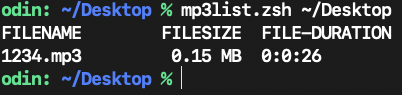


Copy the following code into (ideally) a programmer's editor (e.g. BBEdit, macVIM, etc.) and save as plain text (e.g. mp3list.zsh) to your Desktop, though it just needs to be in your PATH (e.g. /usr/local/bin). Launch the Terminal application and enter the following:

cd ~/Desktop
chmod +x ./mp3list.zsh
./mp3list.zsh folderpath


In proper UNIX tradition, you can redirect the output of this script to a text file:

./mp3list.zsh folderpath > ~/Desktop/mp3list.txt


Code:

#!/bin/zsh

: <<"COMMENT"
List each MP3 file's name, filesize, and duration as hh:mm:ss instead of a
decimal duration. This script takes a single folder as a command line argument
and recursively hunts for all MP3 files in it.

Usage: mp3list.zsh ~/folderpath
Output:
FILENAME    FILESIZE  FILE-DURATION
1234.mp3     0.15 MB  0h:0m:26s

Tested: macOS Sequoia v15.2, Monterey 12.7.6
VikingOSX, 2024-12-18, Apple Support Communities, No warranties whatsoever.
COMMENT

# no script argument or no folder passed
[[ $# = 1 || -d "${1}" ]] || exit 1

# if there are no .mp3 files present in the provided folder hierarchy then exit'
files=( "${1}"/**/*.mp3(.N) )
(( $#files )) || exit 1

# since .mp3 files are present in provided folder, we can print the header
printf 'FILENAME\tFILESIZE  FILE-DURATION\n'
for f in "${1}"/**/*.mp3(.N);
do
    ds=$(/usr/bin/afinfo "${f}" | awk '/duration:/ { printf "%4.2f", $3}')
    fs=$(/usr/bin/stat -f '%z' "${f}")

    # just the filename and extension
    fn="${f:t}"
    # perform the MB calculation for file size
    fmb=$(bc -l <<<"scale=3;${fs}/(1024 * 1024)")
    # and print out results for this mp3 file iteration including duration
    printf '%s\t%5.2f MB  %d:%d:%d\n' "${fn}" ${fmb} $(($ds/3600)) $(($ds%3600/60)) $(($ds%60))
done
unset files
exit 0


Similar questions

1 reply
Question marked as Top-ranking reply

Dec 18, 2024 8:57 AM in response to gestyle

There are no UNIX Terminal commands that can do all of this in one go. You will need to script it and then run the script with the folder containing the MP3 files. This script is recursive so it will plumb a folder hierarchy.


Sample:


Copy the following code into (ideally) a programmer's editor (e.g. BBEdit, macVIM, etc.) and save as plain text (e.g. mp3list.zsh) to your Desktop, though it just needs to be in your PATH (e.g. /usr/local/bin). Launch the Terminal application and enter the following:

cd ~/Desktop
chmod +x ./mp3list.zsh
./mp3list.zsh folderpath


In proper UNIX tradition, you can redirect the output of this script to a text file:

./mp3list.zsh folderpath > ~/Desktop/mp3list.txt


Code:

#!/bin/zsh

: <<"COMMENT"
List each MP3 file's name, filesize, and duration as hh:mm:ss instead of a
decimal duration. This script takes a single folder as a command line argument
and recursively hunts for all MP3 files in it.

Usage: mp3list.zsh ~/folderpath
Output:
FILENAME    FILESIZE  FILE-DURATION
1234.mp3     0.15 MB  0h:0m:26s

Tested: macOS Sequoia v15.2, Monterey 12.7.6
VikingOSX, 2024-12-18, Apple Support Communities, No warranties whatsoever.
COMMENT

# no script argument or no folder passed
[[ $# = 1 || -d "${1}" ]] || exit 1

# if there are no .mp3 files present in the provided folder hierarchy then exit'
files=( "${1}"/**/*.mp3(.N) )
(( $#files )) || exit 1

# since .mp3 files are present in provided folder, we can print the header
printf 'FILENAME\tFILESIZE  FILE-DURATION\n'
for f in "${1}"/**/*.mp3(.N);
do
    ds=$(/usr/bin/afinfo "${f}" | awk '/duration:/ { printf "%4.2f", $3}')
    fs=$(/usr/bin/stat -f '%z' "${f}")

    # just the filename and extension
    fn="${f:t}"
    # perform the MB calculation for file size
    fmb=$(bc -l <<<"scale=3;${fs}/(1024 * 1024)")
    # and print out results for this mp3 file iteration including duration
    printf '%s\t%5.2f MB  %d:%d:%d\n' "${fn}" ${fmb} $(($ds/3600)) $(($ds%3600/60)) $(($ds%60))
done
unset files
exit 0


This thread has been closed by the system or the community team. You may vote for any posts you find helpful, or search the Community for additional answers.

How to list files-DURATIONS (of .mp3s) in terminal ?

Welcome to Apple Support Community
A forum where Apple customers help each other with their products. Get started with your Apple Account.