Will e-SIM record be deleted after resetting Network Settings on iPhone 14?

I use IMEI number 1 as physical SIM and IMEI number 2 as e-SIM on my Apple iPhone 14 model device. If I reset the "Network Settings" in the Reset process in the Settings menu, will the e-SIM record be deleted?


[Re-Titled by Moderator]

iPhone 14, iOS 18

Posted on Jan 3, 2025 8:53 AM

Reply
Question marked as Top-ranking reply

Posted on Jan 21, 2025 2:03 AM

Resetting Network Settings typically only affects things like:

  • Saved Wi-Fi passwords
  • Bluetooth connections
  • Cellular network preferences (like APN settings)


eSIM Profiles are usually stored separately and remain intact after a network settings reset. Rest assured eSIMs are not removed


To be extra cautious before resetting your network settings, it's advisable to note down your current eSIM's APN settings. While typically unaffected, there's a slight chance a reset could remove them.


This precaution ensures you have the necessary information to easily reconfigure your eSIM if needed after the network reset.



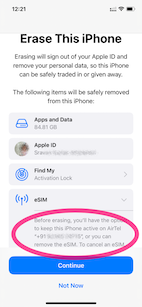
Even when you do complete erase the iPhone will offer you to keep the eSIM see the pic below


Erase --> Erase iPhone - Apple Support (IN)

  1. Keep eSIM Data was the option I chose (See the pic)
  2. .


1 reply
Question marked as Top-ranking reply

Jan 21, 2025 2:03 AM in response to me4362

Resetting Network Settings typically only affects things like:

  • Saved Wi-Fi passwords
  • Bluetooth connections
  • Cellular network preferences (like APN settings)


eSIM Profiles are usually stored separately and remain intact after a network settings reset. Rest assured eSIMs are not removed


To be extra cautious before resetting your network settings, it's advisable to note down your current eSIM's APN settings. While typically unaffected, there's a slight chance a reset could remove them.


This precaution ensures you have the necessary information to easily reconfigure your eSIM if needed after the network reset.


Even when you do complete erase the iPhone will offer you to keep the eSIM see the pic below


Erase --> Erase iPhone - Apple Support (IN)

  1. Keep eSIM Data was the option I chose (See the pic)
  2. .


This thread has been closed by the system or the community team. You may vote for any posts you find helpful, or search the Community for additional answers.

Will e-SIM record be deleted after resetting Network Settings on iPhone 14?

Welcome to Apple Support Community
A forum where Apple customers help each other with their products. Get started with your Apple Account.