
How can I change my storage of iPhone?
I have to change my storage is iPhone because my games and apps are not working properly
iPhone 6s, iOS 15
I have to change my storage is iPhone because my games and apps are not working properly
iPhone 6s, iOS 15
No, you cannot.
Neither you can increase the space on iPhone by buying iCloud storage. However, you can save space by optimising the storage space. Keep originals on iCloud and space saving photos on iPhone
Manage your Storage --> Manage your photo and video storage - Apple Support
Your photos are always available on both iPhone and iCloud. You delete it on iPhone it is gone from iCloud and vice-versa. To save space on your iPhone use Optimised iPhone storage. Remember, if you delete in one it is deleted everywhere.
Get started with iCloud Photos:
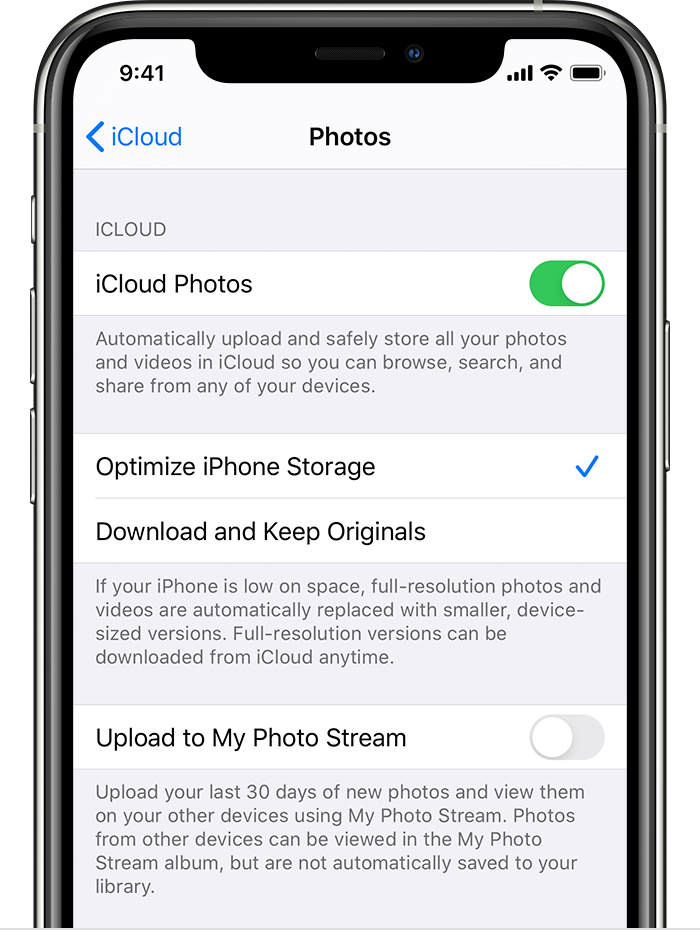
With Optimize Storage, smaller, space-saving photos and videos are kept on your device while all of your original, full-resolution versions are stored in iCloud. And as long as you have enough space in iCloud, you can store as many photos and videos as you want.
No, you cannot.
Neither you can increase the space on iPhone by buying iCloud storage. However, you can save space by optimising the storage space. Keep originals on iCloud and space saving photos on iPhone
Manage your Storage --> Manage your photo and video storage - Apple Support
Your photos are always available on both iPhone and iCloud. You delete it on iPhone it is gone from iCloud and vice-versa. To save space on your iPhone use Optimised iPhone storage. Remember, if you delete in one it is deleted everywhere.
Get started with iCloud Photos:
With Optimize Storage, smaller, space-saving photos and videos are kept on your device while all of your original, full-resolution versions are stored in iCloud. And as long as you have enough space in iCloud, you can store as many photos and videos as you want.
You cannot upgrade local (device) storage on an iPhone. Whatever the phone had when it rolled off the assembly line at the factory is what it will have forever.
You can purchase (rent) additional iCloud storage, on Apple's servers, but that's for backups and synchronization. It's not a substitute for device storage, and you can't use it to store games and apps.
How can I change my storage of iPhone?

