Two Model #s showing on my iPhone SE (not sure if 2nd or 3rd Generation)


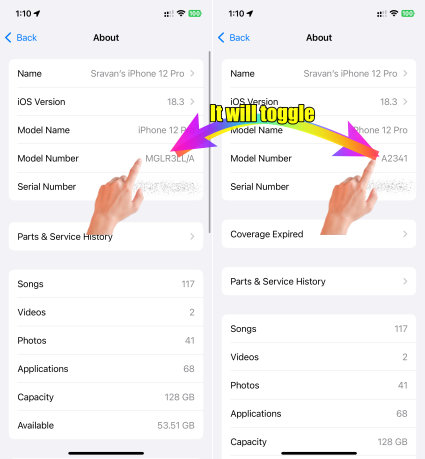
Why does MMX53LL/A show as my Model # but when I click on it, a different model # appears? I can toggle them back and forth.


The other model #

is A2595 ?


See attached pictures…


[Re-Titled By Moderator]

iPhone SE (2nd generation)

Posted on Jan 27, 2025 11:05 PM

Reply
5 replies

Jan 27, 2025 11:46 PM in response to MortyJester

Ecery Apple IpHone will have this. At the bottom see my iPhone pic


MMX53LL/A and A2595 are identifiers for Apple products, typically for iPhones or iPads. Here's what they mean:

MMX53LL/A


  • MMX53LL/A is an Apple part number.
  • It identifies a specific model, configuration, and region of an Apple device, often including details such as:
    • Device type (e.g., iPhone, iPad)
    • Storage capacity
    • Color
    • Market/region (e.g., "LL/A" refers to the U.S. market).

A2595

  • A2595 is the Apple model number.
  • It is used to identify the general type of the device (e.g., iPhone 14, iPad Air, etc.).
  • This number doesn’t specify configuration (like color or storage) but rather the device generation and cellular/wireless compatibility.


iPhone 12 Pro
This thread has been closed by the system or the community team. You may vote for any posts you find helpful, or search the Community for additional answers.

Two Model #s showing on my iPhone SE (not sure if 2nd or 3rd Generation)

Welcome to Apple Support Community
A forum where Apple customers help each other with their products. Get started with your Apple Account.

