
Need more storage how do I get it !?
Need more storage how do I pay for extra ??
iPhone SE, iOS 17
Need more storage how do I pay for extra ??
iPhone SE, iOS 17
You cannot increase storage of an iPhone. However, you can optimise iPhone Storage by using iCloud Storage. Save space on your device
Settings > [your name] > iCloud Tap Photos > Choose Optimize [device] Storage Set up and use iCloud Photos - Apple Support
You can buy iCloud Storage. --> Buy more iCloud storage - Apple Support
You can manage your storage --> How to check the storage on your iPhone, iPad, and iPod touch
Manage your Storage --> Manage your photo and video storage - Apple Support
Your photos are always available on both iPhone and iCloud. If you delete it on your iPhone, it will be gone from iCloud and vice versa. To save space on your iPhone, use Optimised iPhone storage. Remember, if you delete in one it is deleted everywhere.
Get started with iCloud Photos:
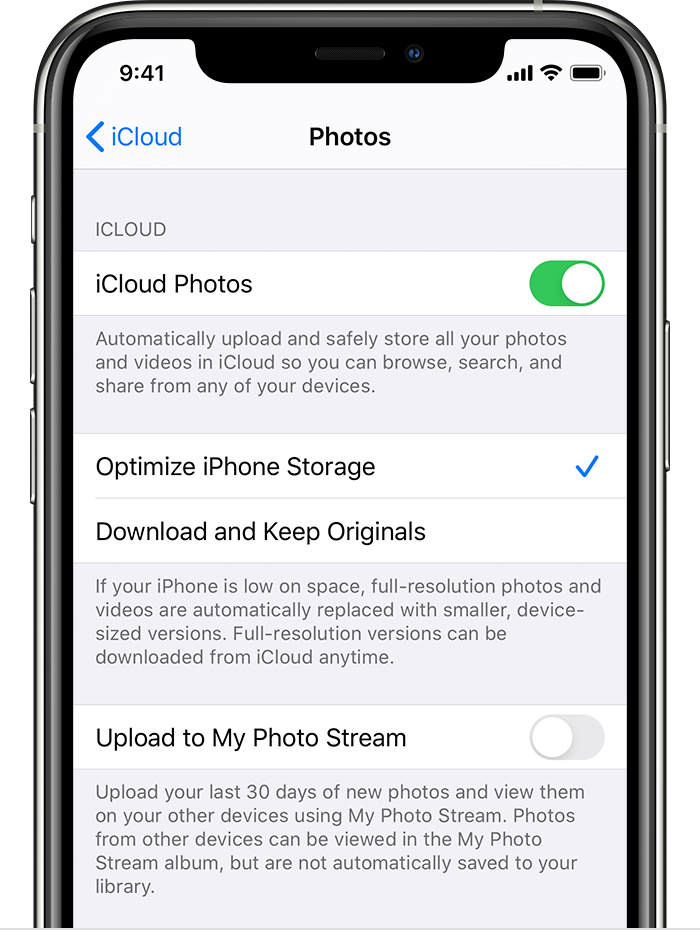
With Optimize Storage, smaller, space-saving photos and videos are kept on your device while all of your original, full-resolution versions are stored in iCloud. And as long as you have enough space in iCloud, you can store as many photos and videos as you want.
How to check the storage on your iPhone, iPad, and iPod touch
You cannot increase storage of an iPhone. However, you can optimise iPhone Storage by using iCloud Storage. Save space on your device
Settings > [your name] > iCloud Tap Photos > Choose Optimize [device] Storage Set up and use iCloud Photos - Apple Support
You can buy iCloud Storage. --> Buy more iCloud storage - Apple Support
You can manage your storage --> How to check the storage on your iPhone, iPad, and iPod touch
Manage your Storage --> Manage your photo and video storage - Apple Support
Your photos are always available on both iPhone and iCloud. If you delete it on your iPhone, it will be gone from iCloud and vice versa. To save space on your iPhone, use Optimised iPhone storage. Remember, if you delete in one it is deleted everywhere.
Get started with iCloud Photos:
With Optimize Storage, smaller, space-saving photos and videos are kept on your device while all of your original, full-resolution versions are stored in iCloud. And as long as you have enough space in iCloud, you can store as many photos and videos as you want.
How to check the storage on your iPhone, iPad, and iPod touch
You cannot get more storage on any iPhone. Each Apple device comes with a set amount of storage that cannot be changed. You have two options:
• Buy a new iPhone that offers more storage, or
• Optimize the storage on your current iPhone. You can do this and possibly free up space, by deleting apps, deleting old photos you no longer need, old emails & messages. You can read more about it here: How to check the storage on your iPhone and iPad - Apple Support
Need more storage how do I get it !?

